
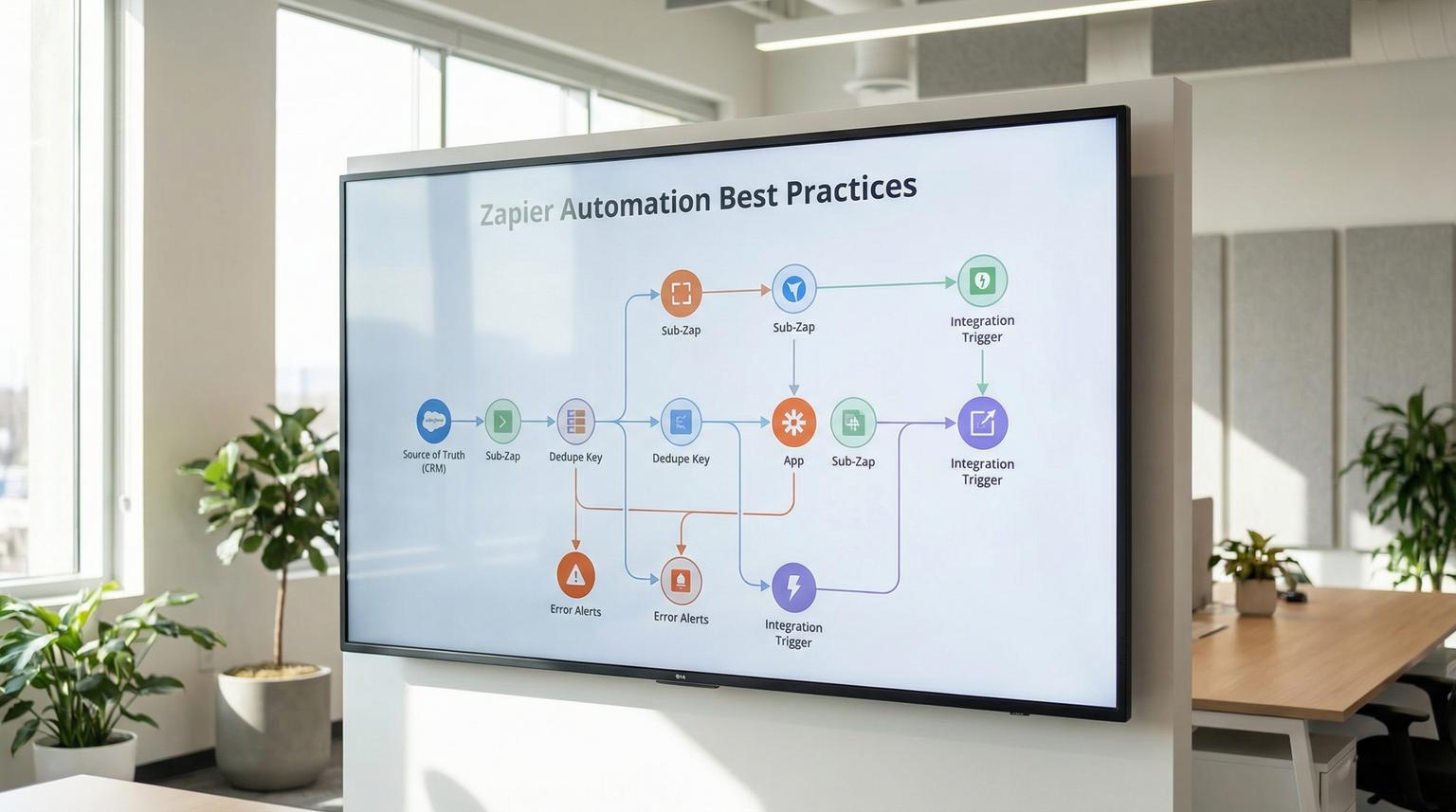
Most teams start with one or two Zaps to eliminate busywork. Then the business grows, the tool stack evolves and suddenly automations become fragile, noisy and hard to trust. This guide covers Zapier automation best practices we use at ThinkBot Agency to design workflows that keep working as your CRM, email platform and project tools change.
If you are an ops manager, founder or marketing and CRM lead who wants fewer broken Zaps, cleaner data and faster response times, this article will help you build automations that stay low maintenance and genuinely save time.
Quick summary:
- Design around a clear system of record so data stays consistent across apps.
- Prefer modular, reusable building blocks over one giant multi-step Zap.
- Add dedupe and idempotency early to prevent double creates and duplicate emails.
- Make failures actionable with structured alerts, logging and ownership.
- Document and govern workflows so teams can safely change and scale them.
Quick start
- Pick your source of truth (usually your CRM) and define which fields are authoritative.
- Split long workflows into smaller Zaps and reusable Sub-Zaps where logic repeats.
- Add a dedupe key and a "find before create" pattern for every create action.
- Instrument error handling, alert routing and a dead-letter style backlog for failed items.
- Write Zap notes, step names and a lightweight workflow registry for ownership and change control.
To design reliable and scalable Zapier workflows, start with a single source of truth, break processes into small composable Zaps, add deduplication and idempotency to prevent repeated side effects and implement monitoring that routes errors to an owner with enough context to fix them quickly. Finally, document naming, mappings and dependencies so changes in apps or processes do not silently break your automations. For a broader view on how no-code automation platforms support this across CRM and email, you can also review our guide on streamlining operations with no-code automation.
Start with architecture: source of truth and modular workflows
Reliability is an architecture choice before it is a Zap setting. When teams complain that "Zapier keeps breaking" the root cause is often ambiguous ownership of data and overly complex flows.
Choose a single system of record
Pick one app to be the canonical record for the workflow. For most growth teams this is a CRM like HubSpot, Salesforce or Pipedrive. For ops teams it might be an Airtable style database or an internal app. The key is that every other tool reads from and writes back to that system in a predictable way.
When selecting the system of record, verify it can support the basic lifecycle via Zapier: trigger on create, trigger on update, find records, create records and update records. Zapier itself recommends planning around a central source of truth and building smaller interoperable workflows that coordinate through it, rather than one giant automation, see these tips.
Prefer micro-workflows over one mega Zap
In practice we see better outcomes when a process is implemented as a set of smaller Zaps with clear responsibilities. This reduces blast radius when you change one step and makes troubleshooting much faster.
- Example pattern: "Lead created" -> normalize data -> create or update CRM -> emit an internal event (Tag, Table row or webhook) -> downstream Zaps handle notifications, assignments and follow-ups.
- Why it scales: you can add new lead sources by reusing the normalization Zap and keeping downstream logic unchanged.
Use reusable components for repeated logic
If you have repeated blocks like "format phone" "enrich company" "create onboarding tasks" or "post to Slack" isolate them. On Team and Enterprise accounts, Sub-Zaps help standardize repeated logic across the account. Zapier documents how to create reusable steps with Sub-Zaps and how to collaborate and maintain workflows across teams, see this guidance.

Build for data integrity: mapping, consistency and duplicates
Most time loss in automation is not from building Zaps, it is from cleaning up after them. The biggest culprits are inconsistent field mapping and duplicate records across your CRM, email platform and project management tool.
Standardize field mapping and normalization
Define a canonical schema for shared objects like Lead, Contact, Company and Ticket. Then normalize inputs before you write to your system of record:
- Trim whitespace and standardize casing for emails.
- E.164 normalize phone numbers when possible.
- Split full name into first and last, or store both with clear precedence rules.
- Use controlled vocabularies for lifecycle stage, lead source and pipeline stage.
Use idempotency keys and "find before create"
Many triggers and webhooks are effectively at-least-once delivery. That means duplicates can happen after retries, timeouts or user re-submissions. A reliable workflow assumes duplicates will occur and prevents repeated side effects.
- Always find first: before creating a Contact, search by email. Before creating a Deal, search by a stable external ID.
- Store a dedupe key: keep a field like external_event_id, form_submission_id or message_id in the CRM record.
- Make creates safe: if the record exists, update it. If it does not, create it and write back the key.
Mini template: a dedupe record you can reuse
Use this as a lightweight spec for how your Zaps and webhooks should track idempotency. We often store this in a table or database that both Zapier and n8n can access.
{
"event_id": "evt_2026_02_06_001234",
"source": "web_form",
"occurred_at": "2026-02-06T14:22:10Z",
"dedupe_key": "web_form:submission:8f3a1c",
"status": "processed",
"primary_record_type": "contact",
"primary_record_id": "crm_12345",
"last_error": ""
}
Implementation note: if you cannot store a separate table, you can still store dedupe_key on the CRM record itself. The dedicated table is better for cross-system workflows and replay handling.
Workflow design checklist for robust multi-step Zaps
Use this checklist when you are building or refactoring a multi-step Zap that touches more than one system. It is the fastest way we know to reduce rework and prevent silent failures.
- Name the Zap with a clear verb and object, include environment or team prefix if needed.
- Define the source of truth and write it down in Zap notes.
- Add a validation step early, check required fields before any create or update.
- Use "find before create" for every create action and store a dedupe key.
- Rename steps so a teammate can understand the flow without opening each step.
- Group risky external calls, add retries only for transient failures.
- Write back the resulting IDs to the source of truth (CRM IDs, ticket IDs, project IDs).
- Log key run metadata (event_id, record_id, status, error) to a table or sheet.
- Add an alert route for failures with enough context to act, include record links.
- Document ownership, last review date and dependencies in a workflow registry.
Error handling and monitoring that reduces firefighting
Broken automations cost time twice. First when the workflow fails and second when someone has to reconstruct what happened. The fix is to make failures observable and actionable.
Classify failures: retryable vs fatal
Retries help when the downstream service is flaky or rate limited. Retries hurt when the data is wrong or the configuration is broken. A platform-neutral best practice is to only retry transient errors and stop early on validation issues. This matches proven error handling patterns used in enterprise automation platforms, see error handling guidance for the underlying principles.
Build a dead-letter backlog for failed items
For business-critical flows, do not rely on someone noticing an email alert. Instead, create a "failed items" backlog in a table, spreadsheet or ticketing system with enough fields to replay the run safely:
- event_id or dedupe_key
- source app and trigger timestamp
- target record links
- error message and step name
- owner and status (new, investigating, replayed, ignored)
This is where ThinkBot often blends Zapier with n8n. Zapier handles the fast app-to-app glue and n8n can orchestrate replays, complex branching or API-first error processing when needed. If you want to go deeper on n8n patterns that complement these Zapier automation best practices, see our article on n8n automation workflows for SMB operations.
Set up governance alerts for changes
On team accounts, monitor changes that commonly break workflows, like new app connections, Zaps turned off or ownership changes. Zapier provides admin and monitoring capabilities that can be automated through Zapier Manager style events and account analytics. Also configure Zap error notifications at the right cadence so you get signal, not noise.
Documentation and team governance for low-maintenance automation
Teams outgrow "the Zap lives in Sarahs account" quickly. Governance is not bureaucracy, it is what prevents knowledge loss and broken credentials when people change roles.
Use shared connections or service accounts for critical apps
If a Zap depends on a personal Google account or a personal CRM login, it will eventually break during offboarding. Zapier supports sharing app connections within Team and Enterprise accounts. Zapier also recommends using dedicated shared app accounts for commonly used integrations and only sharing connections with trusted users, see app connections guidance.
Write Zap notes and maintain a workflow registry
At minimum, document:
- Purpose and business owner
- Trigger source and expected volume
- Key mappings and dedupe rules
- Dependencies, including shared tables, shared connections and Sub-Zaps
- How to test and how to roll back
In ThinkBot projects we often implement a simple registry in a table with columns like: workflow name, owner, systems touched, last reviewed, business critical (yes/no) and alert channel. This aligns with Zapier recommendations for documenting and maintaining workflows at scale, see best practices.
Versioning and change control that does not slow you down
Use version names as a lightweight changelog and adopt naming conventions for Zaps and folders so teammates can search and understand intent quickly. When a change is risky, ship it behind a feature flag field in the source of truth, for example a CRM property like automation_enabled = true. That gives you a fast rollback without deleting steps.
Real-world patterns ThinkBot builds with Zapier, n8n and AI triggers
Below are a few common customer requests we implement and how we design them to be resilient. The details vary by stack but the patterns hold.
Lead management: multi-source intake -> clean CRM -> instant follow-up
Goal: integrate multiple lead sources, reduce manual data entry and respond faster.
- Zap 1: intake from each lead source -> normalize fields -> upsert into CRM (find by email) -> write dedupe_key.
- Zap 2: CRM record created or updated -> assign owner based on rules -> create task in project management tool.
- Zap 3: AI-assisted enrichment or routing -> only runs when required fields are present and consent rules allow it.
Where AI helps: classify inbound lead intent, route to the right pipeline or generate a first response draft. Guardrail: always store the AI output as a suggestion field and keep the CRM as the source of truth. For more end-to-end CRM automation patterns that complement these Zapier automation best practices, see our article on CRM automation with AI and no-code tools.
Client onboarding: signed proposal -> project setup -> billing handoff
Goal: reduce onboarding time and avoid missed setup steps.
- Trigger: deal stage changes to "Closed won" in CRM.
- Actions: create project, create standardized tasks, invite stakeholders, post internal notification.
- Reliability: use Sub-Zaps for repeated provisioning steps and log every created ID back to the CRM deal record.
Customer support: triage -> SLA routing -> knowledge-assisted replies
Goal: improve response times without sacrificing quality.
- Trigger: new ticket or new email in support inbox.
- Filters: detect duplicates, spam patterns and missing required info.
- Actions: categorize, set priority, route to the right queue and optionally draft a reply using AI.
Where n8n often fits: advanced branching, calling internal APIs, more complex retry logic and structured logging. Zapier remains excellent for fast integrations across common SaaS tools.
If you want a second set of eyes on your current Zaps, we can audit reliability, data consistency and monitoring then propose a refactor plan. Book a consultation here: schedule time with ThinkBot.
Implementation playbook: roles, monitoring and rollback
When you are ready to operationalize automation across teams, use this playbook. It keeps builds fast while reducing risk.
Owners and responsibilities
- Business owner: defines success criteria, approves field mappings and signs off on edge cases.
- Automation builder: implements Zaps, Sub-Zaps and integrations, writes notes and tests.
- System owner: owns CRM and core app permissions, shared connections and data model.
- Ops on-call: receives alerts, manages the failed items backlog and coordinates fixes.
Monitoring setup
- Route Zap errors to a shared channel or ticket queue, not a single person.
- Log run outcomes to a central table for business-critical flows.
- Review analytics monthly for error rate changes, high task usage and Zaps that were turned off.
- Schedule quarterly reviews to archive unused workflows and confirm owners.

Rollback strategy
- Use a feature flag field in the source of truth to disable downstream actions without deleting the Zap.
- Keep a known-good version name so you can revert quickly.
- For risky changes, run in parallel for a short window and compare outputs in the log table.
- When duplicates are possible, ensure rollback does not trigger more side effects. Use dedupe_key checks.
For examples of the kinds of systems we build across CRM, email and internal APIs, you can also review our work in the ThinkBot portfolio. You can also compare where Zapier fits versus other tools in our automation platform comparison for CRM and email workflows.
FAQ
Common questions we hear when teams want to make their Zapier workflows more reliable and scalable.
How do I prevent duplicate records when a Zap retries or runs twice?
Use a "find before create" step for every create action, store a dedupe_key or external_event_id on the record and log processed event IDs in a table when the workflow is business critical. Design the workflow so re-running the same event results in an update, not a second create.
Should I build one long Zap or many smaller Zaps?
In most cases, many smaller Zaps are easier to maintain and safer to change. Keep each Zap focused on one responsibility, coordinate through your source of truth and reuse repeated logic with Sub-Zaps or shared webhook style helper flows.
What should I document so my team can maintain Zaps after handoff?
Document the purpose, owner, source of truth, key field mappings, dedupe rules, dependencies and how to test and roll back. Add Zap notes and step names so troubleshooting does not require tribal knowledge.
When does it make sense to use n8n alongside Zapier?
Use Zapier for fast SaaS integrations and team-friendly maintenance. Add n8n when you need complex branching, heavy API work, advanced retries, custom data transformations or centralized logging across many workflows.
Can ThinkBot Agency audit and refactor existing Zapier workflows?
Yes. We typically start with a workflow inventory, identify reliability risks like missing dedupe, brittle field mappings and poor alerting then refactor into modular workflows with monitoring and documentation so your team can scale safely.
