
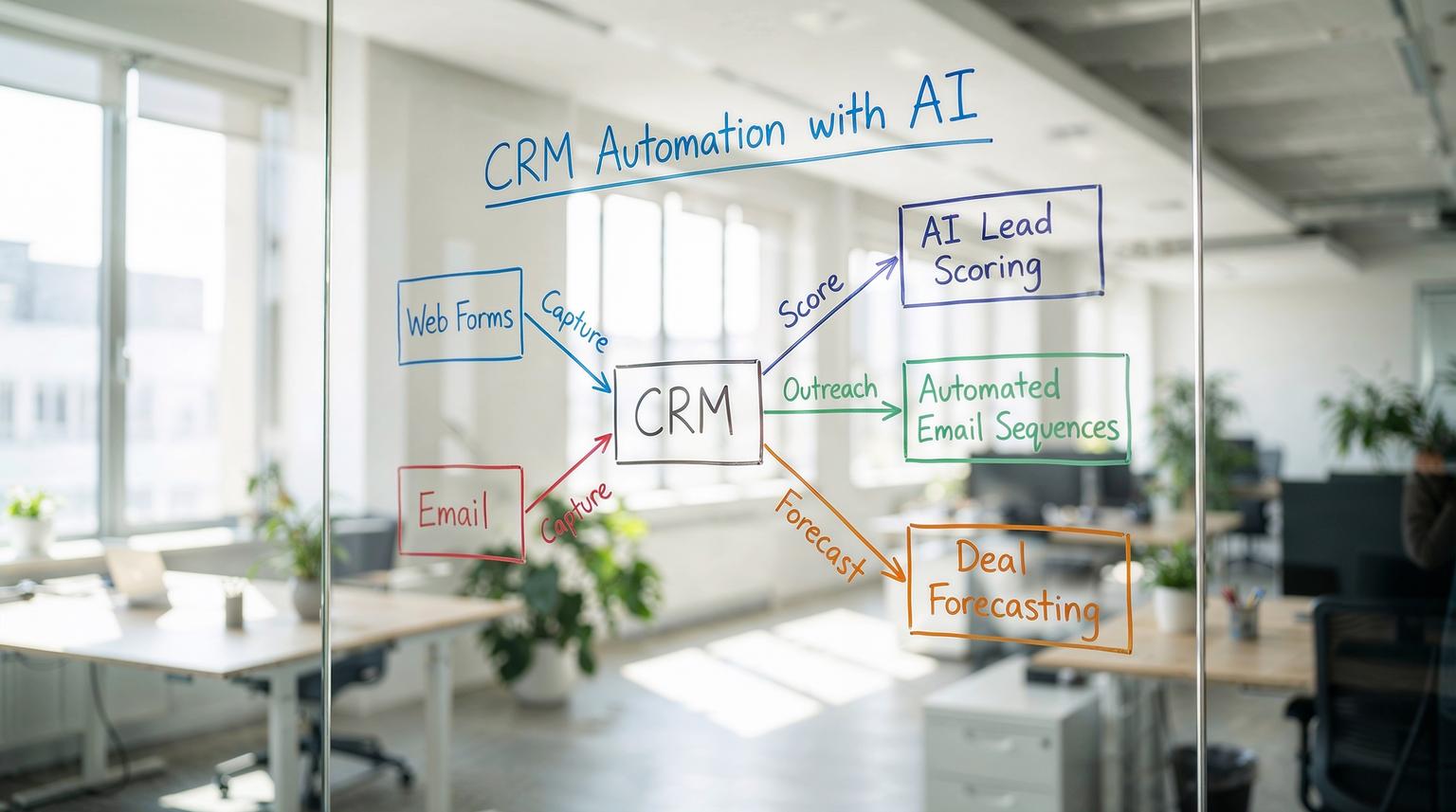
If your team is still copying data between forms, CRMs, and email tools, you are leaving revenue on the table. Modern CRM automation with AI lets you connect every touchpoint from the first form fill to renewal so that leads are scored, followed up, and nurtured without manual chasing. This guide is for founders, revenue leaders, and ops teams who want reliable, end-to-end sales and customer workflows.
CRM automation with AI means using your CRM as the central brain of your revenue operations, then connecting it to automation platforms like n8n, Make, or Zapier and AI models to handle lead capture, scoring, outreach, and follow-up. Done right, it cuts response times, keeps pipeline data clean, and surfaces the next best action for sales and success teams in real time.
From messy pipeline to smart revenue engine
Most teams ThinkBot Agency works with describe the same problems:
- Leads sit untouched for hours or days because nobody sees them in time.
- Follow-up depends on individual discipline, so prospects quietly drop off.
- Pipeline stages are inconsistent, which makes forecasting and prioritization guesswork.
- Account notes are scattered across email threads, docs, and chat.
At the same time, you probably have a modern CRM, multiple marketing tools, and a support platform. The issue is not lack of software; it is the gaps between them.
AI-enabled CRM workflows close those gaps. As described in guides on how to integrate AI into your CRM, AI can analyze CRM data, score leads, draft emails, and recommend next actions, while automation platforms orchestrate when and how these capabilities run. To go deeper on platform selection and patterns, you can also read our comparison of Zapier vs. n8n for scalable CRM and AI workflows.
What does an end-to-end AI-powered CRM workflow look like?
An effective end-to-end workflow connects four stages of the customer lifecycle:
- Lead capture and enrichment
- Qualification and routing
- Deal management and forecasting
- Post-sale success and expansion
Here is how those stages can work when you combine CRM automation with AI, n8n/Make/Zapier, and your existing tools.
1. Lead capture and enrichment
Trigger: A prospect submits a web form, replies to a campaign, or messages your sales inbox.
Automation flow (example with n8n or Make):
- Watch for new form submissions, email replies, or chat events.
- Create or update the contact and company in your CRM (HubSpot, Pipedrive, Salesforce, etc.).
- Call an enrichment API to pull firmographic data like industry, size, and location.
- Store enrichment results in structured CRM fields for later scoring and routing.
This is similar to the modular “skills” used in an AI sales agent that monitors inboxes, enriches data, logs contacts, and follows up automatically as shown in a guide on building a Sales Outreach AI Agent. For a broader view of how automation for CRM systems fits together, see our guide on n8n-powered CRM workflows.
2. AI qualification and routing
Once the lead is in your CRM, AI can assess quality and intent. Instead of a static lead scoring formula, you can send relevant fields and recent interactions to an LLM to classify the lead on dimensions like fit, urgency, and likely deal size.
Typical scoring inputs include:
- Firmographics (industry, headcount, region).
- Engagement (pages viewed, emails opened, replies, events attended).
- Stated needs from form fields or email content.
In an n8n workflow, this might look like:
- Trigger when a new contact is created or updated.
- Fetch engagement metrics and past interactions via CRM API.
- Send a structured prompt to an AI model to assign a score (0 to 100) and a short explanation.
- Write the score and explanation back to the CRM.
- Branch routing: high-score leads create immediate tasks and alerts; medium-score leads go into nurture; low-score leads are monitored but not prioritized.
As highlighted in guidance on AI lead scoring and predictive forecasting, the key is to validate AI scores against actual closed-won data and iterate until the model aligns with your reality.
3. AI-personalized outreach and follow-up
With scoring and routing in place, you can automate the heavy lifting of outreach while keeping humans in control of tone and strategy.
Example workflow (built in n8n, Make, or Zapier):
- Trigger: Lead becomes “Sales Qualified” or crosses a score threshold.
- Automation fetches lead details and recent behavior.
- Send this context to an AI model to draft a personalized first email and 2 to 3 follow-up variants.
- Log the drafts in the CRM and your email platform; optionally create a task for a rep to review and approve before sending.
- Schedule follow-ups automatically if there is no response within a defined window.
This pattern mirrors the email drafting and summarization workflows described in AI CRM guides, where AI generates first drafts and humans review them for personalization and accuracy before sending. A similar approach is used by AI assistants that summarize records and draft emails inside tools like Dynamics 365 Sales Copilot, which can generate meeting prep and follow-up content directly from CRM data.
4. Deal management, forecasting, and next-best actions
Once opportunities are created, AI can help your team stay ahead of risk and focus on the most promising deals.
Typical automations include:
- Summarizing long email threads into concise opportunity notes.
- Flagging deals with stalled activity and suggesting a next step.
- Generating account summaries before key meetings.
- Running predictive models to estimate win probability and expected value.
There are production examples of this pattern where generative AI creates account summaries from CRM, support, and product data and then pushes them into the CRM UI and Slack before meetings. In one such implementation, described in an AWS case study, sellers saved around 35 minutes per summary and saw measurable uplift in opportunity value.
Core building blocks of CRM automation with AI
ThinkBot typically uses a simple but powerful framework when designing AI-enabled CRM workflows.
Audit -> Map -> Integrate -> Test -> Optimize
- Audit: Document how leads currently move from capture to close. Identify bottlenecks such as slow first response or inconsistent data entry.
- Map: Define your ideal data model and process. Clarify lead statuses, opportunity stages, owner rules, and SLAs.
- Integrate: Connect your CRM, email, calendar, enrichment tools, and AI models using n8n, Make, or Zapier. Implement the triggers and actions you mapped.
- Test: Run with a subset of reps or a specific segment. Validate AI scoring, email quality, and routing logic against real outcomes.
- Optimize: Tune prompts, thresholds, and automations based on performance data. Add more use cases once the foundation is stable.

Key AI capabilities to leverage
Across this lifecycle, several AI skills keep appearing:
- Classification and scoring: Lead and account scoring, churn risk detection, intent classification.
- Summarization: Turning long email threads, call transcripts, and ticket histories into concise notes and meeting prep.
- Content generation: Drafting outbound emails, follow-ups, proposals, and renewal reminders.
- Recommendation: Suggesting next-best actions based on similarity to past successful deals.
- Data extraction: Pulling structured fields from unstructured inputs like emails or PDFs.
These align with the capabilities described in AI CRM guides such as lead scoring, email automation, and deal nudges that recommend follow-ups based on historical win patterns. If you want a broader strategy view on using AI across your operations, explore our article on AI integration in business automation with n8n.
How to fix slow lead response times with AI workflows
Slow first response is one of the easiest and highest-ROI problems to solve with automation and AI.
Blueprint: Instant lead reply and routing
Here is a practical blueprint ThinkBot often implements, inspired by AI sales agent architectures:
- Trigger when a new lead is created from a form, ad, or inbound email.
- Enrich the lead with company data and update CRM fields.
- Send the full context to an AI model to draft a short, on-brand reply that acknowledges the request and asks 2 to 3 qualifying questions.
- Log the drafted reply in CRM and send it immediately via your email tool, or route it to a rep for quick approval.
- Create a CRM task and Slack/Teams notification for the assigned owner, including a summary and recommended next step.
- If the lead does not respond within your SLA, trigger a polite follow-up with slightly different messaging.
This pattern consistently reduces first response time to minutes or seconds, while still allowing human oversight. It matches the modular “skills” approach where the agent can send replies, enrich companies, log contacts, and follow up on missing info automatically.
How can AI improve follow-up consistency?
Inconsistent follow-up usually comes from three gaps: no clear schedule, no centralized view of tasks, and no easy way to personalize messages at scale. AI-enabled CRM automation addresses all three.
Typical improvements include:
- Standardized cadences based on deal stage, score, or segment.
- Automatic task creation and reminders in the CRM whenever a follow-up is due.
- AI-drafted follow-up emails that reference previous interactions and objections.
- Summaries of unanswered emails so reps can quickly see who needs attention.
For example, AI assistants embedded in CRMs can list unanswered emails and generate draft replies, similar to how Dynamics 365 Sales Copilot summarizes records and suggests follow-ups from email threads and SharePoint content. By combining this with n8n or Make automations, you can ensure that every due follow-up appears as a task with a ready-to-edit email draft.
Improving pipeline visibility with AI-driven insights
Good pipeline visibility depends on accurate data and timely insights. AI can help on both fronts.
Standardizing data and summaries
First, enforce clean data. Use automations to:
- Normalize fields like industry, region, and company size.
- Require key fields at each stage transition.
- Auto-generate opportunity summaries after key events, such as discovery calls or proposal sends.
AI summarization is powerful here. Similar to how AI assistants summarize CRM records and recent changes, you can configure workflows where every new meeting or call recording triggers an AI summary that is stored on the opportunity record and shared with the account team.
Predictive forecasting and risk alerts
Once your data is consistent, you can layer on predictive models:
- Estimate win probability based on historical patterns.
- Identify at-risk deals with low activity or negative sentiment.
- Highlight deals that look similar to past high-value wins.
In the same way that AI-powered account summary solutions combine CRM data, product usage, support tickets, and external news to prepare sellers for meetings, you can build a retrieval and summarization pipeline that feeds your CRM with actionable insights. This often uses a retrieval-augmented generation pattern where documents and metrics are indexed, then queried by AI to create focused summaries and recommendations.
Blueprints ThinkBot can implement for you
Here are three ready-to-deploy blueprints we frequently adapt for clients using n8n, Make, Zapier, and popular CRMs.
Blueprint 1: Lead scoring and outreach autopilot
Goals: Prioritize sales effort, speed up outreach, and improve conversion from MQL to SQL.
Workflow:
- Trigger on new or updated leads in CRM.
- Enrich firmographics and engagement data.
- Run AI-based lead scoring and classification.
- Create prioritized tasks for reps and queue AI-drafted outreach sequences.
- Log all actions and scores for reporting and continuous model tuning.
Blueprint 2: Deal health and next-best action engine
Goals: Shorten sales cycles and reduce slipped deals.
Workflow:
- Monitor opportunity changes, email threads, and meeting notes.
- Use AI to summarize recent activity and sentiment.
- Compare deal patterns to historical wins and losses.
- Generate a “health score” and recommended next step such as schedule a demo, involve a technical specialist, or send a recap.
- Push insights into the CRM record and team channels like Slack or Teams.
Blueprint 3: Post-sale success and expansion navigator
Goals: Increase retention, identify expansion opportunities, and keep CSMs focused on the right accounts.
Workflow:
- Combine CRM data, support tickets, and product usage metrics.
- Use AI to detect churn risk signals and upsell triggers.
- Generate account health summaries ahead of QBRs or renewals.
- Create tasks and email drafts for CSMs with personalized talking points.
- Track outcomes to refine risk and opportunity models over time.

Common mistakes with AI CRM automation (and how to avoid them)
From implementing these systems across different stacks, we see a few recurring pitfalls.
1. Treating AI as a black box decision-maker
AI should assist, not replace, your team. For critical steps such as pricing, contract terms, or high-stakes outreach, keep a human in the loop. Use automations to route AI outputs to reps for review rather than sending everything automatically.
2. Poor data quality and incomplete fields
AI is only as good as the data it sees. If your CRM has inconsistent fields or missing history, predictions and summaries will be unreliable. Start by standardizing key fields and enabling audit history so you can generate accurate record summaries and change logs.
3. Over-automation of messaging
Fully automated email sequences can quickly feel robotic. Use AI to draft, but ask reps to personalize key messages, especially for high-value accounts. In workflows inspired by AI outreach agents, we often set thresholds where messages to strategic accounts must be reviewed, while lower-value or unresponsive leads can receive auto-sent follow-ups.
4. No measurement or feedback loop
Track metrics like first response time, conversion by lead score band, meeting booked rate from automated outreach, and time saved per rep. Some large-scale implementations have shown that even small improvements in opportunity value and time saved per summary compound significantly across a sales team. Use this data to refine prompts, routing rules, and scoring thresholds. For more measurement and optimization ideas, check out our article on optimizing workflows with AI and n8n integrations.
Should you build these workflows in-house or with a partner?
Technically, most of what we described can be built in-house if you have strong RevOps and automation skills. In practice, many teams stall on design decisions, edge cases, and vendor choices. A partner that lives in tools like n8n and Make every day can shorten the path from idea to a stable, audited system.
If you want to see what this could look like for your stack, you can book a short strategy call with ThinkBot to map your current lead-to-close journey and identify 2 to 3 high-impact automations to pilot. Use this link to book a consultation with our team.
FAQ
How does CRM automation with AI actually work in practice?
CRM automation with AI connects your CRM to automation platforms and AI models so that events like new leads, stage changes, or upcoming meetings trigger AI tasks. These tasks can score leads, summarize activity, draft emails, and recommend next actions, then write results back into the CRM and task systems for your team to act on.
Which tools do I need to start with AI-powered CRM workflows?
You typically need a modern CRM such as HubSpot, Pipedrive, Salesforce, or Dynamics 365, an automation platform like n8n, Make, or Zapier, and access to one or more AI models. Optional but useful additions include data enrichment services, call recording tools, and chat or email platforms that integrate cleanly with your CRM.
Can ThinkBot integrate AI with my existing CRM and email stack?
Yes. ThinkBot specializes in connecting CRMs with email, chat, calendars, enrichment APIs, and AI providers using tools like n8n, Make, and Zapier. We design custom workflows around your current stack so you do not need to switch systems to benefit from AI-driven automation.
How do we keep AI-generated emails on-brand and accurate?
We use carefully designed prompts, structured templates, and human-in-the-loop review steps. For high-value or sensitive communication, workflows route AI drafts to reps for editing and approval before sending. We also log outputs for QA so your team can refine prompts and rules over time.
What results can I expect from implementing CRM automation with AI?
Most organizations see faster first response times, more consistent follow-up, better pipeline visibility, and higher rep capacity. Over time, this typically translates into higher conversion rates from lead to opportunity, shorter sales cycles, and clearer forecasting, especially when combined with ongoing optimization and measurement.
