
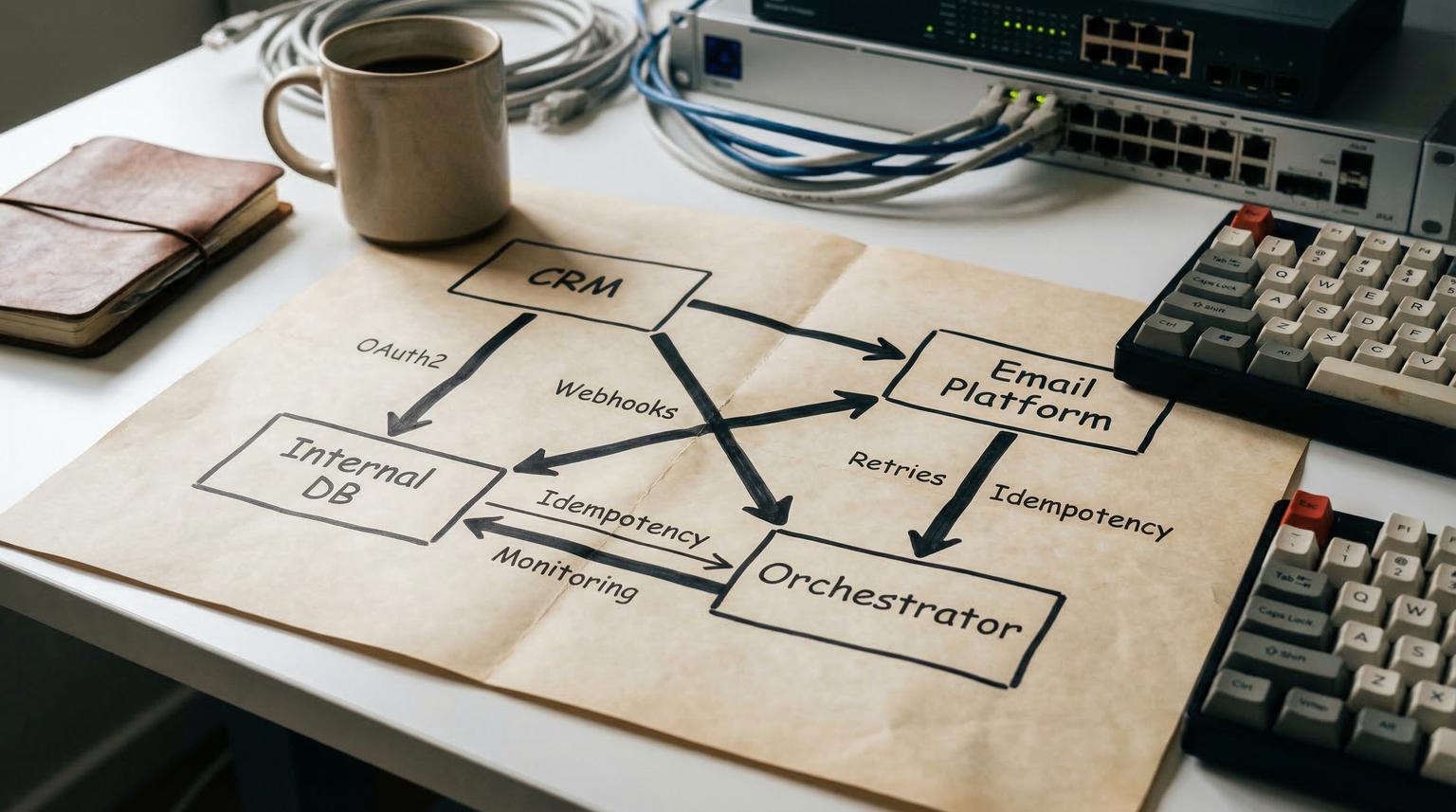
Most teams start with a few quick connectors between a CRM and an email platform, then wake up one day with duplicate contacts, missing lifecycle emails and handoffs that require spreadsheets. A custom API integration for automation solves this by making your systems speak a consistent language through secure endpoints and a workflow layer that can handle real-world failure conditions. This guide is for ops leaders, RevOps, marketing teams and tech-savvy founders who want reliability, traceability and clean data across CRM, email and internal tools.
At a glance:
- Replace brittle point-to-point connectors with a versioned integration layer and clear event contracts.
- Design around auth, rate limits, retries, idempotency and monitoring from day one.
- Use an orchestrator like n8n to coordinate multi-step workflows without losing auditability (see our deeper guide on automating CRM workflows with n8n for practical patterns).
- Ship faster by scoping the right events and data model before you start mapping fields.
Quick start
- List the 5 to 10 business events you need to automate (example: lead created, deal won, invoice paid).
- Define one canonical data model for the shared fields (contact, company, deal, subscription, ticket).
- Pick an integration approach: direct API calls from n8n or middleware first for reuse and governance.
- Implement authentication (OAuth2 or API keys) and store secrets in a vault or encrypted credential store.
- Build one workflow end-to-end with logging, retries and alerting before scaling to more events.
Connect your CRM, email platform and internal tools by treating integrations as products: define event triggers, normalize data, call APIs through authenticated endpoints and run the flow in an orchestrator such as n8n with rate limit handling, safe retries and monitoring. This turns fragile one-off connections into a maintainable workflow that keeps records consistent and makes failures visible and recoverable.
Why one-off connectors fail in production
Most connector setups break for predictable reasons:
- Schema drift: someone adds a required field in the CRM or renames a property in the email platform.
- Hidden branching: marketing adds a new list, sales adds a new pipeline stage and the automation never learns the new rules.
- Rate limits and bursts: a backfill, import or campaign spike triggers 429 errors and silent data loss.
- Non-idempotent actions: retries create duplicate customers, duplicate invoices or duplicate tickets.
- No operational ownership: there is no runbook, no alert routing and no safe replay strategy.
At ThinkBot Agency, we treat integrations as operational systems. The goal is not just to make it run once, it is to make it predictable on Monday morning and on your biggest campaign day.
A practical build plan: scope, model, authenticate, map, harden
If you want a workflow you can trust, build in this order. It prevents the common trap of mapping fields too early and only later discovering you have no reliable trigger or no replay strategy.

1) Scope the events, not the tools
Start with business events that matter to revenue and customer experience:
- Lead created -> enrich -> assign owner -> enroll in lifecycle emails
- Meeting booked -> create or update contact -> create deal -> notify sales
- Deal moved to Closed Won -> create customer record -> provision internal access
- Payment failed -> update CRM health -> create ticket -> send transactional email
Write each event as a sentence with a clear trigger and expected outcomes. This becomes your integration contract.
2) Define canonical records and field ownership
Decide which system is the source of truth for each attribute. A simple rule helps: let the system that captures the data own it. Example: marketing forms own opt-in and source fields, CRM owns sales stage and owner, internal DB owns product entitlements.
3) Authentication and secret handling
Most integrations use OAuth2 for user-scoped access or API keys for service access. Either way, implement:
- Least privilege scopes, separate tokens for prod and staging.
- Secret rotation plan and a single place to store secrets.
- Audit logging of which workflow accessed which endpoint and when.
This is also where you decide if you need API gateway policies (throttling, allow lists) or if orchestrator-level controls are sufficient. For a repeatable, production-ready methodology (OAuth, canonical mapping, retries, idempotency, monitoring), use our pillar: API Integration Engineering Playbook.
4) Map fields with transformations and validation
Field mapping is not only name matching. Most teams need normalization such as:
- Email casing and whitespace trimming
- Phone normalization
- Country and timezone normalization
- UTM and attribution parsing
- Enum mapping (pipeline stage names, status codes)
Add validation rules before writes. If a required identifier is missing, fail fast and alert rather than writing partial data that later becomes expensive to fix.
Integration approach: direct APIs vs middleware (and when to use each)
You can build reliable workflows either way, but the best choice depends on how many systems you will connect and how much governance you need. The iPaaS framing is useful here: point-to-point integrations get expensive to operate as the number of apps grows, while a centralized layer improves visibility and change management. If you are evaluating orchestration options and tradeoffs, see our n8n vs Zapier vs Make comparison for CRM and API workflows.
Comparison: direct integration vs middleware vs API management
| Option | Primary job | Typical fit | Key tradeoff |
|---|---|---|---|
| Direct APIs from orchestrator (n8n, Make, Zapier) | Orchestrate workflow steps and transformations | Small to mid stacks, fast iteration, clear ownership | Reuse can be harder if many workflows duplicate logic |
| Middleware / iPaaS-style layer | Centralize connectors, transformations and governance | Growing SaaS sprawl, multiple teams, shared policies | More upfront design, platform patterns must be enforced |
| API management | Publish, secure, throttle and observe APIs | Internal platform teams, productized internal APIs | Does not orchestrate multi-step business workflows alone |
| Hybrid (common in 2026) | Managed endpoints plus orchestrated workflows | Mission-critical processes and compliance needs | Requires clear boundaries between API and workflow logic |
In practice, ThinkBot often recommends a hybrid: keep business workflow state in the orchestrator, centralize reusable transformations and validations in versioned endpoints when multiple workflows depend on them.
Reliability checklist: rate limits, retries, idempotency, logging and alerting
Use this checklist when you move from a proof of concept to a workflow that touches revenue, customer communications or fulfillment. These items are where most automations fail after launch.
Production hardening checklist
- Confirm each API rate limit by endpoint and by credential.
- Identify burst points: backfills, batch updates, multi-branch workflows and retries.
- Classify each write operation as idempotent or non-idempotent and document the replay behavior.
- Implement idempotency keys or deduplication on create actions where duplicates are harmful.
- Use exponential backoff with jitter for transient failures to avoid retry storms.
- Stop retries on validation errors and missing required identifiers, then alert with context.
- Log a correlation ID across steps (CRM record ID, email subscriber ID, internal entity ID).
- Persist workflow run outcomes for auditability (success, failed, retried, manual replay needed).
- Add alert routing to a shared channel or group inbox, not an individual.
- Create a safe manual replay procedure and test it before production launch.
Retries are not automatically safe. You should only retry requests that are retryable and idempotent, or you must add an idempotency mechanism so repeating the request does not create duplicates. The guidance from retry strategy docs applies well to business APIs: backoff and jitter reduce cascading failures, while idempotency prevents unintended side effects.
n8n patterns for throttling and pacing
Rate limits show up as HTTP 429 errors. In n8n you can harden workflows using built-in controls described in rate limit handling:
- Enable node-level retries using the "Retry On Fail" setting and set a wait interval that matches the API limit.
- For bulk operations, use "Loop Over Items" plus a "Wait" node to pace requests predictably.
[Loop Over Items] -> [HTTP Request / API Node] -> [Wait 1000 ms]
^ |
|---------------------------------------|
Example workflow: lead-to-customer handoff with lifecycle email personalization
Here is a concrete workflow we implement often for revenue teams. It keeps lead status, lifecycle messaging and internal fulfillment in sync. For more end-to-end CRM + email + helpdesk syncing patterns with idempotent upserts and audit trails, see API integration solutions to unify CRM, email, and support data.

Trigger and routing
- Trigger: CRM deal moved to "Closed Won" (webhook or polling)
- Route by product line or region to the right internal process
Data consistency steps
- Fetch canonical contact and company data from CRM.
- Upsert subscriber in the email platform using email as the natural key.
- Write the internal customer record using a stable external ID (CRM contact ID or account ID).
- Write back internal identifiers into CRM (customer_id, entitlement_tier) so future workflows can join safely.
Personalization payload example (canonical customer event)
Keeping a stable event schema makes your workflows easier to version and test. This is a simple example that can feed email personalization and ticket automation.
POST /v1/events/customer.converted
{
"event_id": "evt_2026_03_19_000123",
"occurred_at": "2026-03-19T10:15:22Z",
"source": "crm",
"customer": {
"crm_contact_id": "12345",
"email": "[email protected]",
"first_name": "Alex",
"last_name": "Kim",
"company": "Example Co",
"lifecycle_stage": "customer",
"plan": "pro",
"owner_email": "[email protected]"
},
"context": {
"deal_id": "D-9001",
"utm_source": "webinar",
"utm_campaign": "onboarding"
}
}
Operational safeguards
- Use upserts over creates when possible.
- Apply idempotency keys for create-only endpoints (example: event_id).
- Write structured logs that include CRM IDs and email subscriber IDs.
- On failure, stop downstream actions and alert with enough context to replay safely.
This is where an orchestrator shines: it can coordinate multi-step actions, persist intermediate data and keep a single audit trail of what happened.
Common pitfalls that cause failed automations (and how to avoid them)
These show up repeatedly when teams connect CRM, email and internal systems. Avoiding them early saves weeks of cleanup later.
Failure modes and mitigations
- Failure: Immediate retries after 429 or 5xx create a retry storm. Mitigation: exponential backoff with jitter and a max backoff cap.
- Failure: Retrying non-idempotent create calls generates duplicates. Mitigation: only retry idempotent operations or implement idempotency keys and dedupe logic.
- Failure: Blind retries hide mapping bugs and invalid payloads. Mitigation: fail fast on 4xx validation errors, log the rejected payload and alert the owner.
- Failure: Partial success creates cross-tool inconsistency (CRM updated but internal DB failed). Mitigation: design compensating actions or reconciliation jobs and write back status markers.
- Failure: Auth changes break production runs silently. Mitigation: token rotation runbooks, proactive expiry alerts and a staging environment that mirrors prod scopes.
- Failure: Lack of correlation IDs makes support slow. Mitigation: propagate a run_id across logs and store it on the CRM record for quick traceability.
When these guardrails are in place, your team stops treating failures as mysterious. They become observable events with clear owners and safe recovery steps.
How ThinkBot Agency ships maintainable integrations faster
Our delivery approach is designed for business outcomes and production reliability. We typically implement:
- Event-driven workflows (webhooks where possible), plus scheduled reconciliation for eventual consistency.
- Versioned endpoints and schemas so changes do not break downstream workflows.
- Secure auth patterns, least privilege scopes and audit-ready logs.
- Operational tooling: alerts, error queues, replay mechanisms and runbooks.
If you want a reliable integration that connects your CRM, email platform and internal tools without constant babysitting, book a consult with ThinkBot Agency here: book a consultation.
If you prefer to evaluate proven delivery history first, you can also review our Upwork agency profile: ThinkBot on Upwork.
FAQ
Answers to common questions we hear when teams plan an integration that must survive real traffic, real data and real change.
What does custom API integration for automation actually mean?
It means designing and implementing reliable API-based connections between systems using defined events, stable data models and production-grade safeguards like authentication, rate limit handling, retries, logging and alerting. Instead of a brittle one-off connector, you get a workflow you can version, test and operate.
How do you keep data consistent across CRM and email platforms?
We pick a canonical identifier strategy, define field ownership and use upserts instead of creates where possible. We also write back external IDs to the CRM, add reconciliation jobs for drift and design safe replay using idempotency keys so retries do not create duplicates.
When should we choose middleware instead of direct API calls from n8n?
Choose middleware when multiple teams and many workflows need the same transformations and policies, or when governance and auditability are major requirements. Direct API calls from n8n are often best when you need speed, clear workflow ownership and fewer systems. Many companies succeed with a hybrid approach.
What are the most common causes of broken automations after launch?
The top causes are rate limits, auth changes, schema changes, missing idempotency on create operations and lack of monitoring. Fixing these usually requires adding pacing, backoff with jitter, token management processes, schema validation and alerting with correlation IDs.
Can ThinkBot Agency integrate our internal database and custom app with our CRM?
Yes. We build API connections to internal tools, databases and custom services, then orchestrate the end-to-end workflow in platforms like n8n. We also document endpoints, create test cases and implement logging and alerting so your team can operate the integration confidently.
