
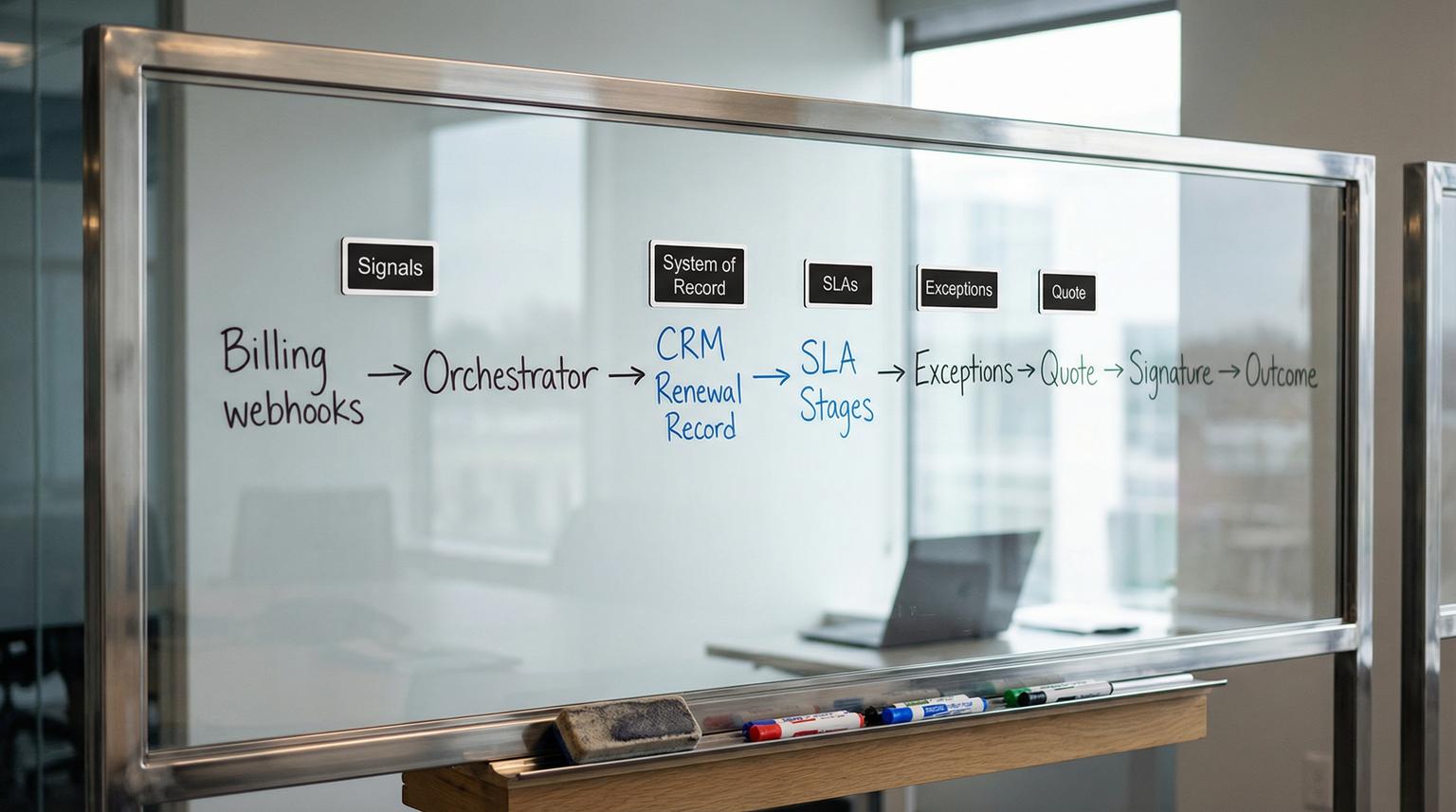
Renewals rarely fail because a team does not care. They fail because data is scattered across billing, product usage, and support and nobody owns a timed process end to end. This is where custom workflow automation pays off: you create a single renewal record in your CRM that gets fed by reliable signals then drives tasks, alerts, outreach and quote creation on a schedule.
This article is for ops leaders, CS teams and CRM owners who want an execution-ready renewal pipeline that prevents silent slip, reduces churn risk and eliminates manual chasing across tools.
Quick summary:
- Use one CRM renewal record as the system of record and feed it from billing and support signals.
- Drive renewals with stage timers, SLAs and escalations instead of ad hoc reminders.
- Build explicit exception paths for paused accounts, disputed invoices and procurement delays.
- Generate quotes from validated renewal line items so the quote to sign step is repeatable.
Quick start
- Create a dedicated Renewal object (or Renewal Deal type) in your CRM and add the required fields listed below.
- Connect billing webhooks (invoice upcoming, paid, finalization failed) to create or update the Renewal record.
- Ingest support and success signals (open critical tickets, low health score, no next activity) as risk flags on the Renewal record.
- Configure SLA stages with timers, task templates and timed escalations tied to ownership.
- Implement exception paths that pause customer outreach but keep internal remediation tasks active.
- Add monitoring for webhook lag, stuck stages and renewals with no next activity scheduled.
A renewal workflow that actually works starts with a single CRM renewal record fed by billing and support signals. Then you move that record through SLA-based stages that create tasks, alerts and outreach automatically while exception flags pause the wrong actions and route the right ones. The end state is quote generation from confirmed line items and a clear close path to renewed, churned or deferred.
Why renewals slip when data and ownership are split
The failure pattern we see most often is not a lack of automation. It is automation without a system boundary. Billing knows an invoice is upcoming but CS does not see it. Support has a reopened P1 ticket but sales is still sending renewal emails. Someone updates a spreadsheet and nobody updates the CRM so forecasting is wrong.
To fix this, choose one system of record for renewal execution. In most companies that should be the CRM because it already owns pipeline stages, tasks, ownership and reporting. Billing, support and product systems should emit signals into the CRM renewal record but they should not become the place where renewal work is tracked.
One practical operations insight: if you do not define who owns the renewal record when ownership changes (CSM to AE, AE to renewals team, or region to region) your workflow will create tasks that land on the wrong person for weeks. Put owner resolution rules into the automation so it is deterministic.
The renewal system of record design in your CRM
The goal is a single renewal record per account per renewal date, not a loose set of tasks. Depending on your CRM, that record can be a Renewal Deal, Renewal Opportunity, a custom object called Renewal, or a child record under Account.
Required fields to make SLAs, risk flags and quotes work
Below is a concrete field set that keeps the workflow executable and auditable. Use the closest equivalents in your CRM and lock down which fields humans can edit vs which are stamped by automation.
- Renewal ID (unique, automation-generated)
- Account ID and Primary contact and Billing contact
- Renewal date (canonical date that drives enrollment and SLAs)
- Term start and Term end
- Renewal stage (see SLA stages below)
- Renewal owner (single accountable person)
- Secondary stakeholders (multi-select or linked contacts)
- Renewal health score (numeric) and Renewal risk (Low, Medium, High)
- Risk reasons (multi-select: Payment risk, Support escalation, Low usage, No champion, Procurement delay)
- Exception status (None, Paused account, Disputed invoice, Procurement, Legal review, Data issue)
- Exception owner (billing ops, finance, support lead)
- Exception SLA date (when the exception must be resolved or escalated)
- Last signal received (timestamp) and Last billing event (string enum)
- Quote required (yes/no) and Quote ID (from CPQ or quoting tool)
- Renewal amount, ARR and Currency
- Next activity date and Last activity date (use your CRM defaults where available because they power guardrails, see default deal activity properties)
- Outcome (Renewed, Churned, Deferred) and Outcome reason
Events your automation should write to the renewal record
- Renewal created (source: billing webhook, order activation, or scheduled job)
- Stage changed (automation or user) with timestamp
- Risk updated (from signals)
- Exception set and exception cleared
- Quote created and quote sent
- Signed (if you track e-sign) and invoice paid (if auto-pay)
Decision rule: if billing is authoritative for payment status and term dates then do not let humans edit those fields in the CRM. Instead, expose a notes field for context and keep authoritative fields automation-only. This prevents SLA drift and unreliable reporting.
Trigger sources and how to map them into renewal stages and tasks
Use three signal categories and keep the boundary clean: billing tells you timing and payment risk, product usage tells you adoption risk, support tells you relationship risk. An orchestrator like n8n can listen to these sources and update the renewal record consistently.
| Signal source | Trigger | When it fires | CRM update | Tasks or alerts created |
|---|---|---|---|---|
| Billing (Stripe) | invoice.upcoming |
Days before renewal invoice is due | Create or update Renewal record, set stage to Discovery, set renewal date, set risk to Medium if no next activity | Value review task, confirm contacts task, internal alert to owner |
| Billing (Stripe) | invoice.paid |
Payment succeeds | Set outcome Renewed, close open tasks, move stage to Closed | Notify CS and finance, trigger onboarding for new term if needed |
| Billing (Stripe) | invoice.finalization_failed |
Invoice cannot be finalized | Set exception Disputed invoice or Data issue based on error text, set risk High | Create billing ops task with error details and escalation timer |
| Support (Zendesk) | P1 ticket opened or reopened count threshold | Any time | Add risk reason Support escalation, set risk to High, pause customer renewal sequence | Create retention plan task, notify manager |
| CRM activity | Next activity date is empty | During any open stage | Set risk to Medium, add risk reason No follow up scheduled | Create task to schedule next step, escalate if not resolved in X days |

Billing webhook reliability matters more than most teams expect. Stripe notes that webhook endpoint issues can delay invoice finalization and retries can stretch for days. See Stripe subscription webhooks for the concrete event types and retry behavior. In practice, you should track Last signal received so your CRM can alert you when webhook processing is lagging and renewals are at risk of slipping silently.
On support signals, avoid creating race conditions by trying to update a Zendesk ticket inside the same cycle that created the trigger. Zendesk explicitly warns about trigger and webhook patterns that update the same ticket unpredictably. Treat support as a one-way signal emitter into your orchestrator and CRM. Reference: Zendesk trigger and webhook limitations.
SLA stages that turn renewals into a governed pipeline
A renewal pipeline works when stages have timeboxes, exit criteria and automated escalations. Below is a concrete stage model that maps cleanly to most CRMs. It borrows the proven cadence pattern (120/90/60/30) that HubSpot describes for renewal automation then adds the missing parts: exceptions, quote readiness gates and monitoring. Source reference: renewal workflow cadence.
Stage 1 Discovery (T-120 to T-90)
- Entry triggers: invoice upcoming, contract end date approaching, order product end date job
- Required tasks (auto-created): value review, confirm renewal owner, verify billing contact and champion
- Exit criteria: next meeting booked or next activity date set, health score captured
- Escalation: if no next activity date within 7 days, notify owner then manager at day 10
Stage 2 Validation (T-90 to T-60)
- Required tasks: confirm products and quantities, validate term end date, identify procurement path
- Exit criteria: renewal line items confirmed and decision process documented
- Escalation: if support escalation risk is High then require retention plan task before advancing
Stage 3 Quote prep (T-60 to T-30)
- Required tasks: pricing approval if needed, legal review if required, generate quote
- Exit criteria: Quote ID exists and quote sent date stamped
- Escalation: if quote not created within 10 business days of stage entry, page renewals leader
Stage 4 Negotiation and signature (T-30 to renewal date)
- Required tasks: follow up cadence, confirm signature plan, coordinate invoice if manual pay
- Exit criteria: signed agreement or invoice paid
- Escalation: if last activity date exceeds 7 days, raise risk to High and notify exec sponsor
Stage 5 Closed (post-renewal)
- Outcomes: Renewed, Churned, Deferred
- Automation: close tasks, stamp outcome reason, create handoff tasks for onboarding or offboarding
Common mistake: teams implement only date-based emails and forget the guardrails. If the owner never schedules a next step the workflow still sends messages and leadership assumes progress. Using Next activity date and Last activity date as stage health checks is a simple way to prevent that blind spot.
Exception paths that stop bad automation and accelerate the right work
Exceptions are where renewal workflows usually break. The fix is not more branches. The fix is a small set of explicit exception states that pause customer outreach, keep internal tasks running and define who can clear the exception.
Exception 1 Paused account
- Typical triggers: subscription paused, missing payment method, trial ending with no card
- Automation behavior: pause customer renewal sequence, create billing remediation task, set exception SLA date (for example 5 business days)
- Clear condition: payment method added or billing status returns to active
Exception 2 Disputed invoice
- Typical triggers: invoice finalization failed, dispute created, invoice marked uncollectible
- Automation behavior: assign exception owner to finance, create internal task with error context and link to billing record, set risk High
- Clear condition: dispute resolved and invoice finalized or replacement invoice issued
Exception 3 Procurement delay
- Typical triggers: customer requests vendor forms, security review, purchase order timing
- Automation behavior: keep internal follow ups active but slow down outbound cadence, set exception SLA date aligned to renewal date and internal decision points
- Clear condition: PO received or procurement approves
Tradeoff to decide early: do you allow exceptions to change the renewal date? Many teams do and it destroys forecasting. A better pattern is to keep the original renewal date for reporting then track a separate expected close date or exception SLA date for operational timing.
Quote readiness and line item generation without spreadsheets
To ship quotes without manual chasing you need line items to be correct before the quote is generated. There are two common sources of truth for line items:
- Billing subscription items (best for straightforward auto-renew SaaS)
- Order and product end dates (best when customers have multiple end dates or mixed terms)
A proven implementation pattern in Salesforce is to create renewal opportunities from Order Products grouped by EndDate then add opportunity line items from the same records. This avoids duplicate renewals and makes quote creation deterministic. The concept is portable even if you are not on Salesforce: group by a canonical renewal date key then create one renewal container record per date. Source reference: renewal opportunities from order products.
Minimal spec for renewal line items
Whether you store them as CRM line items or in a quoting tool, you need these fields available before generating the quote:
- Product ID
- Pricebook or plan ID
- Quantity
- Unit price and discount fields
- Start date and end date for the renewed term
Example payload from orchestrator to CRM (conceptual)
{
"renewal_id": "RN-10482",
"account_id": "A-8831",
"renewal_date": "2026-09-30",
"stage": "Quote prep",
"line_items": [
{"product_id": "PRO", "qty": 25, "unit_price": 99, "term_months": 12},
{"product_id": "SUPPORT", "qty": 1, "unit_price": 1200, "term_months": 12}
],
"quote_required": true
}
Implementation reality: if you try to update line items in a loop you can create performance and duplication issues. Prefer a two-pass approach (build the list then upsert in bulk) when your CRM API supports it. If your CRM requires a parent ID first, create the renewal record then batch-create child line items.
Operations model for ownership, monitoring and rollback
Automations that touch revenue need an operating model. Here is a lightweight one that works in small teams and scales. For a broader, step-by-step methodology to map and standardize workflows before you automate them, use our pillar guide: business process automation playbook for mapping, standardizing, and automating back-office workflows.

Ownership and SLAs
- Renewal owner: accountable for stage progress and customer communication.
- Billing ops owner: accountable for billing exceptions and webhook health.
- Support lead: accountable for support risk signals and retention plan execution.
- RevOps: owns the field governance and stage definitions.
Monitoring checks (run daily)
- Renewals in open stages with Next activity date empty.
- Renewals with Last activity date older than the stage threshold.
- Renewals with Last signal received older than expected for active billing accounts (webhook lag detection).
- Renewals in an exception state past the Exception SLA date.
- Renewals at T-30 with no Quote ID.
Rollback plan
- Use feature flags: disable outbound email steps first while keeping internal tasking active.
- Keep an audit log of automation writes (field, old value, new value, timestamp, source).
- Version your workflow: publish changes in a staging environment then roll to production during a low-volume window.
When this approach is not the best fit: if your renewals are highly bespoke services agreements with non-standard deliverables and every renewal is negotiated from scratch, a strict stage timer model can create busywork. You can still use the single renewal record and exception logic but you should simplify stages and focus on risk flags and stakeholder tracking rather than rigid dates.
Implementation checklist for a renewal to quote to sign workflow
- Create the CRM renewal record type and required fields including exception status, risk reasons and signal timestamps.
- Define authoritative sources per field (billing for payment status, CRM for owner and stages, support for ticket risk signals).
- Connect billing webhooks for invoice upcoming, paid and finalization failed then map them to stage and exception behavior.
- Implement support signal ingestion as one-way updates into CRM to avoid same-system update loops.
- Build stage timers using next activity date and last activity date guardrails and add manager escalations.
- Add quote readiness gates: block quote generation until line items are confirmed and contacts are validated.
- Set outbound sequences to stop automatically when exception status is not None.
- Publish monitoring dashboards and daily alerts for stuck stages, missing next steps and webhook lag.
If you want this built end to end in n8n with clean system boundaries and a CRM that stays trustworthy as the system of record, book a working session with ThinkBot Agency: book a consultation. If you’re evaluating platforms first, see our n8n vs Zapier vs Make comparison for branching, retries, and governance tradeoffs.
For examples of the kinds of multi-system automations we ship across CRM, billing, support and AI tooling, you can also review our portfolio: recent automation work.
FAQ
Common implementation questions we hear when teams operationalize renewals across billing, support and CRM. If you want to zoom out from renewals and prioritize your next automations by impact, run a quick scoring exercise using our guide to prove business process automation benefits with an ROI audit.
What should be the single system of record for renewals?
In most cases it should be your CRM because it already supports owners, pipeline stages, tasks and reporting. Billing and support should feed signals into the CRM renewal record rather than running the renewal process in parallel.
Which billing events are most useful to trigger renewal automation?
Use a pre-renewal event like invoice upcoming to open or refresh the renewal record, a confirmation event like invoice paid to close it and a failure event like invoice finalization failed to set an exception and route remediation tasks.
How do you prevent automated outreach from sending at the wrong time?
Add explicit exception flags like paused account, disputed invoice and procurement delay. Your workflow should branch so customer emails and sequences stop when an exception is active while internal tasks and escalations continue.
What CRM fields are essential for SLA timers and stall detection?
You need renewal date, stage and owner plus activity-based fields like next activity date and last activity date. These let you detect renewals with no future follow up scheduled and stalled negotiations that need escalation.
How do you monitor webhook reliability so renewals do not silently slip?
Stamp a last signal received timestamp on the renewal record whenever your orchestrator processes a billing webhook. Alert when that timestamp is older than expected for active accounts and track processing errors so billing events do not lag without visibility.
