
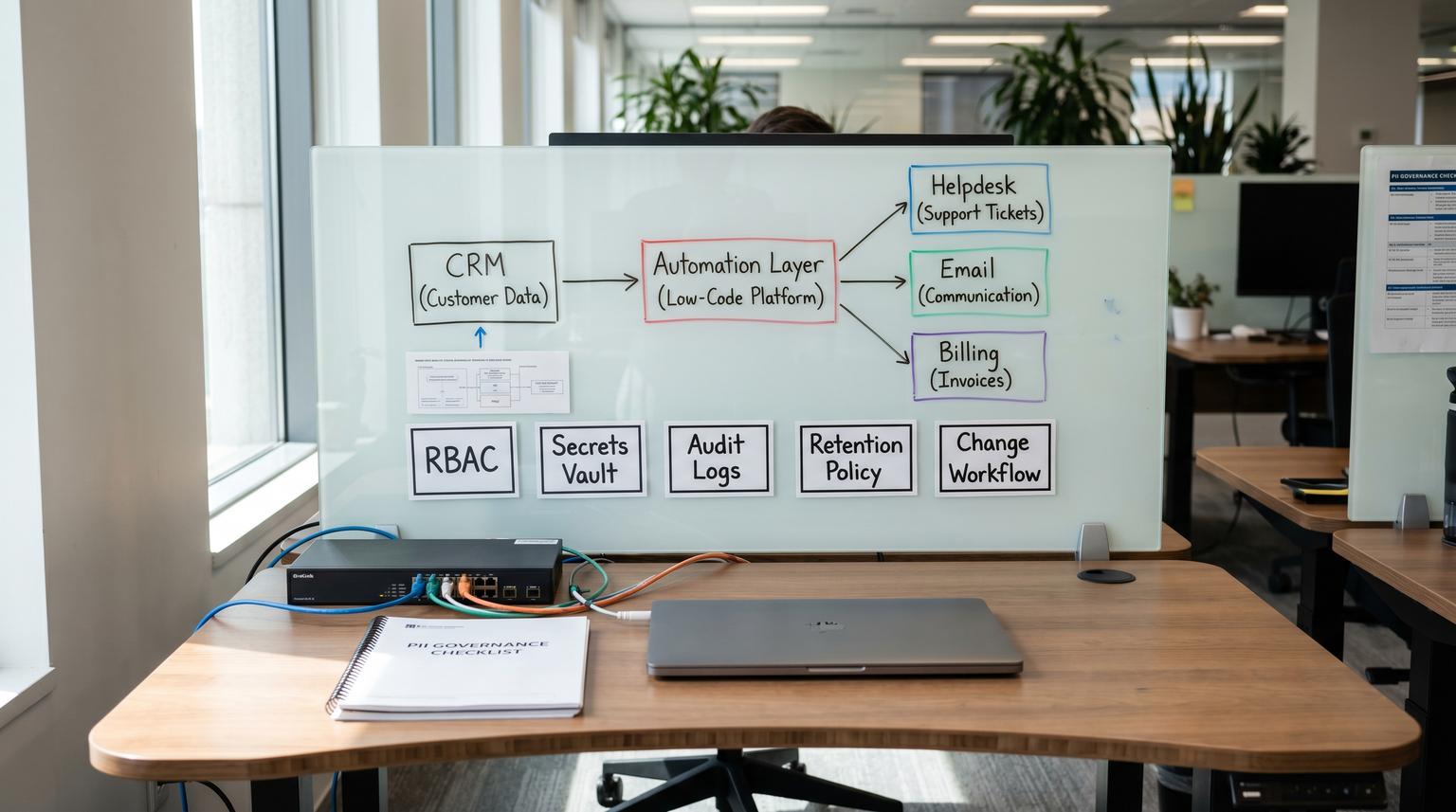
When automations move customer data between SaaS apps, the risk is rarely the integration itself. The risk is governance: who can change it, where secrets live, what gets logged, and whether you can prove what happened after an incident. This comparison is for ops leaders and tech-savvy teams choosing low-code automation tools for workflows that touch PII like leads, support tickets and billing details. We focus on the system boundary where data leaves one tool and enters another and the controls that prevent shadow automations once multiple departments depend on them.
At a glance:
- Pick the tool that matches your ownership model: IT-owned and self-hosted vs business-owned SaaS with guardrails.
- Standardize a minimum bar before you scale: RBAC, centralized secrets, audit log export/streaming, retention policy and a change workflow.
- Use PII minimization (IDs over full records) to reduce what lands in run history and logs.
- If you cannot audit who changed what and when, assume you will not be able to investigate incidents quickly.
Quick start
- List your PII flows by system boundary: source system, destination system, fields moved and where logs of that transfer will live.
- Decide your minimum bar (RBAC, secrets, logs, retention and deploys) then score tools against it.
- Run a pilot on one high-value workflow (CRM to email, helpdesk to CRM or approvals) and validate: least privilege, audit trail and failure recovery.
- Choose an ownership model: business teams own SaaS automations with guardrails or IT owns a self-hosted automation platform.
- Before rollout, standardize naming, environments (dev/stage/prod), credential rotation and incident playbooks.
If your workflows move PII and you need strong governance, self-hosted n8n usually wins when you can operate it like a platform (centralized secrets, RBAC, log streaming and deployment controls). Zapier and Make can be the right choice when you need fast delivery with simpler operations, but you must be explicit about retention, audit logging availability by plan and how you will export evidence for investigations. The best choice is the one you can control, audit and safely change once many teams rely on it.
The real boundary that breaks teams at scale
Most teams start with a single automation that saves time. Then marketing adds lead routing. Support adds ticket enrichment. Finance adds approvals. Suddenly your automation layer becomes a shared piece of infrastructure that handles PII but is owned by nobody.
That is where shadow automations show up:
- Credentials are created ad hoc and shared between workflows.
- Changes are made directly in production with no review and no rollback.
- Run history becomes an ungoverned store of customer content.
- When something breaks, you cannot answer basic questions like who changed it, what data was sent and whether it was retried safely.
The decision is less about connectors and more about control surface: data residency, access boundaries, auditability, secrets rotation and operational recovery.
The PII automation minimum bar to set before you choose a tool
Before comparing platforms, define what you will require for any automation that touches PII. This prevents you from picking a tool and then discovering later that you cannot meet security expectations without a rebuild.
Minimum bar checklist
- Identity and access: role-based access control (RBAC), least privilege and a clear owner for each workflow and credential.
- Secrets management: centralized secrets, rotation process and separation of duties (builders can use secrets but do not need to know raw values).
- Auditability: you can answer who changed what and when, plus export or stream logs to your own system for longer retention.
- Retention policy: defined retention for run history, logs and backups and a plan for minimizing PII stored in the automation layer.
- Reliability controls: retries, idempotency strategy (avoid double-creating records) and alerting on failures.
- Change management: dev/stage/prod, versioning, peer review for sensitive workflows and a rollback plan.

A practical rule we use in ops: if an automation can create, update or delete customer records then treat it like production code even if it was built with a visual editor. That means controlled credentials, controlled changes and an evidence trail.
Scoring matrix for PII-sensitive automations
Use this matrix to compare n8n (self-hosted) vs Zapier vs Make when workflows touch PII. Scores are directional and assume typical team setups: n8n operated by an IT or platform owner, Zapier used by business teams on managed plans and Make used by ops or revops teams with some governance. For a broader baseline comparison beyond PII governance, see our no-code automation tools comparison of n8n vs Zapier vs Make.
| Category | n8n (self-hosted) | Zapier | Make |
|---|---|---|---|
| Data handling (residency and minimization) | 5/5 Full control over hosting location and network boundaries. You can design data paths to avoid storing payloads beyond what you need. | 3/5 Managed SaaS. Strong controls on their side but less control over where intermediate data exists. Retention windows matter. | 3/5 Managed SaaS. Good operational tooling but residency and data-plane control depend on plan and architecture. |
| Governance and auditability | 5/5 You can implement strict RBAC plus stream events to your SIEM. n8n supports log streaming and durable local event logs that survive restarts. | 3/5 Good admin controls on higher tiers but audit evidence is constrained by retention and what is exposed for export. | 4/5 On Enterprise you get audit logs with 12 month retention and detailed categories, but verify coverage gaps (config vs data actions). |
| Reliability controls (retries, recovery and incident response) | 4/5 Strong when you operate it well: queue mode, retries and the ability to centralize monitoring and alerting. You own uptime, scaling and disk retention. | 4/5 Mature SaaS reliability. Easy retries and monitoring but less flexibility for deep incident forensics unless you export events externally. | 4/5 Good scenario tooling and visibility. Enterprise audit logs help explain changes that caused incidents. |
| Maintainability (versioning, environments and change control) | 5/5 Best fit when you need SDLC-like change management. Externalized secrets and controlled deployments reduce drift across environments. | 3/5 Fast iteration but easy for teams to change production flows directly. Standardization and admin policy must do more work. | 4/5 Better governance story at Enterprise with org and team scopes, but ensure your deployment practice matches your risk level. |
How to use the matrix: decide which category is non-negotiable for your organization. For example, if audit export and residency are mandatory, n8n self-hosted typically becomes the default and SaaS tools become exceptions for low-risk workflows.

Tool-by-tool decision rules that map to real workflows
Below are practical if/then rules we use when teams ask us what to standardize for PII-sensitive automations.
CRM to email and lead routing (PII: names, emails, phone, firmographic)
- If marketing needs to ship quickly and data exposure is low (only contact fields, no sensitive notes) then Zapier or Make can work, but set a retention expectation and minimize payloads in step outputs.
- If you need strong change control because sales ops depends on it and mistakes create customer-facing errors then prefer n8n self-hosted with RBAC, environment separation and log streaming to your central logging. If you want a concrete end-to-end example, use the lead-to-invoice n8n workflow automation blueprint as a reference implementation.
Helpdesk to CRM enrichment (PII: ticket content, attachments, conversation history)
- If tickets include sensitive free-text (password resets, billing disputes, medical or HR details) then default to n8n self-hosted so you can tightly control data residency, access and log export.
- If you use Make Enterprise then audit logs can help you trace who changed a scenario and when, but still design to avoid storing ticket bodies in run history unless required.
Finance approvals and billing operations (PII: addresses, invoices, tax IDs, payment context)
- If the automation can initiate refunds, update billing status or approve payments then treat it as a controlled system: n8n self-hosted is usually the safest baseline because you can enforce deployment rules and restrict credential binding through an external vault. For a stage-by-stage tradeoff framework, see low-code automation vs traditional development for purchase approvals.
- If you must use SaaS automation for speed then create a hard boundary: approvals happen in the system of record and the automation only moves IDs and status transitions.
User provisioning and offboarding (PII: identity records and access rights)
- If offboarding failures are a material security risk then choose the tool you can operate like infrastructure: n8n self-hosted with strict RBAC, audit log streaming and a runbook for retries and escalation.
- If the workflow is limited to notifications and ticket creation then Zapier or Make can be appropriate because the blast radius is lower.
A common failure pattern we see: teams build a working onboarding flow then add exceptions over time (contractors, temporary access, rehires). Without versioning and a clear owner, the workflow becomes brittle and silently wrong. That is where a platform-style approach with controlled changes pays off.
Secrets, logs and retention are the three breakpoints
If PII touches your automations, the hardest problems are not usually triggers and actions. They are operational controls that must hold up under audits and incidents.
Secrets management and rotation
For self-hosted n8n, externalizing secrets is a practical step toward separation of duties: workflow builders can use a secret without seeing it and an admin team can rotate it centrally. n8n documents external secrets and the related RBAC configuration (for example enabling access for project roles in Settings then External Secrets) which is exactly the kind of standardization that prevents credential sprawl.
Vendor-neutral guidance like the OWASP Secrets Management Cheat Sheet is a good baseline: do not treat secrets as app config, plan for rotation and avoid putting secrets in environment variables where they can leak via logs or dumps.
Audit logs you can export and keep
Make Enterprise provides audit logs with 12 month retention and detailed event categories (Make audit logs). One nuance that matters for PII workflows: audit logs can be strong for configuration and access events but may not fully cover every data-plane change depending on how you store data. That is a reason to keep systems of record (CRM, helpdesk, billing) as the primary audit source for actual customer record changes.
On self-hosted n8n, log streaming matters because it lets you push workflow and platform events into your SIEM or central log system. The design detail that changes incident response: events are written to a local event log file before being forwarded so they can survive restarts and be re-emitted if a downstream log destination is temporarily unavailable. That durability is valuable when you need evidence after an outage.
Retention and PII minimization in run history
Zapier publishes specific retention windows for content and run metadata (Zapier data retention and deletion). The practical takeaway is not memorizing the numbers. It is deciding what you consider PII in logs and then designing automations so that the platform stores as little of it as possible. For example, store a CRM record ID and fetch details only inside the destination system where auditing is stronger.
Operating model and change management choices
Pick a tool that matches how your organization actually works. Otherwise you will create a governance gap and the tool will get blamed for an ownership problem.
When n8n self-hosted is the better fit
- You have a platform owner (IT, RevOps engineering or a technical ops team) who can run uptime, upgrades and backups.
- You need data residency control or network-level constraints (private networking, IP allowlists or internal-only systems).
- You need enforceable separation of duties for secrets, workflow editing and production deployments.
- You want to stream events into your logging stack for longer retention and investigation.
When Zapier or Make is the better fit
- You need fast delivery across many SaaS tools with minimal operational overhead.
- The workflows are mostly low risk (notifications, task creation and syncing non-sensitive fields).
- You can accept platform retention behavior and you have an explicit policy for what is allowed to appear in run history.
- You can centrally administer the workspace (SSO, role control and periodic reviews).
A tradeoff rule that avoids expensive rewrites: if the automation needs SDLC-like controls (versioning, staged releases and auditable deployments) pick the platform that can support that operating model without heroics. For many teams that means n8n self-hosted for PII-heavy flows and SaaS automations for edge cases.
When this approach is not the best fit: if you are a small team with no one to own infrastructure and your PII workflows are light, self-hosting can add risk rather than reduce it. In that case, a managed SaaS tool with strict admin policies and a conservative retention stance can be a better near-term choice.
Standardize before you scale automations across departments
Once more than one department depends on automations, your biggest risk becomes uncontrolled change. Here is what we recommend standardizing so you can move faster without losing control. If you want the bigger “how to roll this out” guide, use our pillar reference: business process automation playbook to map, standardize, and automate back-office workflows.
Pre-scale standardization checklist
- Workflow inventory: owner, purpose, systems touched, PII fields and business impact if it fails.
- Naming conventions: consistent workflow names, environment suffixes and shared folder or project structure.
- Credential policy: least-privilege service accounts, central secrets store where possible and a rotation schedule.
- Logging and evidence: what you log, where it is stored, who can access it and retention aligned to your policy.
- Error handling: retries, dead-letter pattern (failed items captured for reprocessing) and alerts to a monitored channel.
- Change workflow: who can edit production, how changes are reviewed, how you roll back and how you document exceptions.
A real-world ops insight: most incidents we investigate are not caused by the first version of an automation. They are caused by the fifth quick fix made directly in production to handle an edge case. If you only implement one control, implement a simple release process for PII workflows: build in dev, test with masked data, deploy with a named change and keep the previous version ready to roll back.
Need help choosing and operationalizing the right option? ThinkBot Agency builds and hardens automation systems across n8n, Zapier and Make with an emphasis on governance for PII and cross-team reliability. You can book a consultation and we will map your workflows to a tool choice and a minimum-control rollout plan.
FAQ
How do I keep PII out of automation logs and run history?
Design for minimization: pass record IDs instead of full payloads, avoid putting sensitive fields into step outputs and store detailed data only in systems of record. When you must process sensitive text (like ticket bodies) limit what is persisted and export audit evidence to your controlled logging system.
Is self-hosted n8n automatically more compliant for PII?
No. Self-hosting gives you more control over residency, secrets and logs but it also makes you responsible for patching, backups, access reviews and retention enforcement. It is a good fit when you can operate it like a platform with clear ownership.
What plan-related gotchas matter most for governance in Zapier and Make?
Two big ones are retention and audit logs. Zapier has defined retention windows for content and run metadata and some plans allow shorter in-account retention. Make audit logs are available on Enterprise with 12 month retention and role-based access so governance capabilities can depend heavily on plan tier.
What should we standardize first to prevent shadow automations?
Start with inventory and ownership, then lock down credentials and access. After that, standardize logging and retention plus a simple change workflow (dev to prod with review and rollback). These steps reduce the chance that a critical PII flow becomes unauditable or unsafe to modify.
