
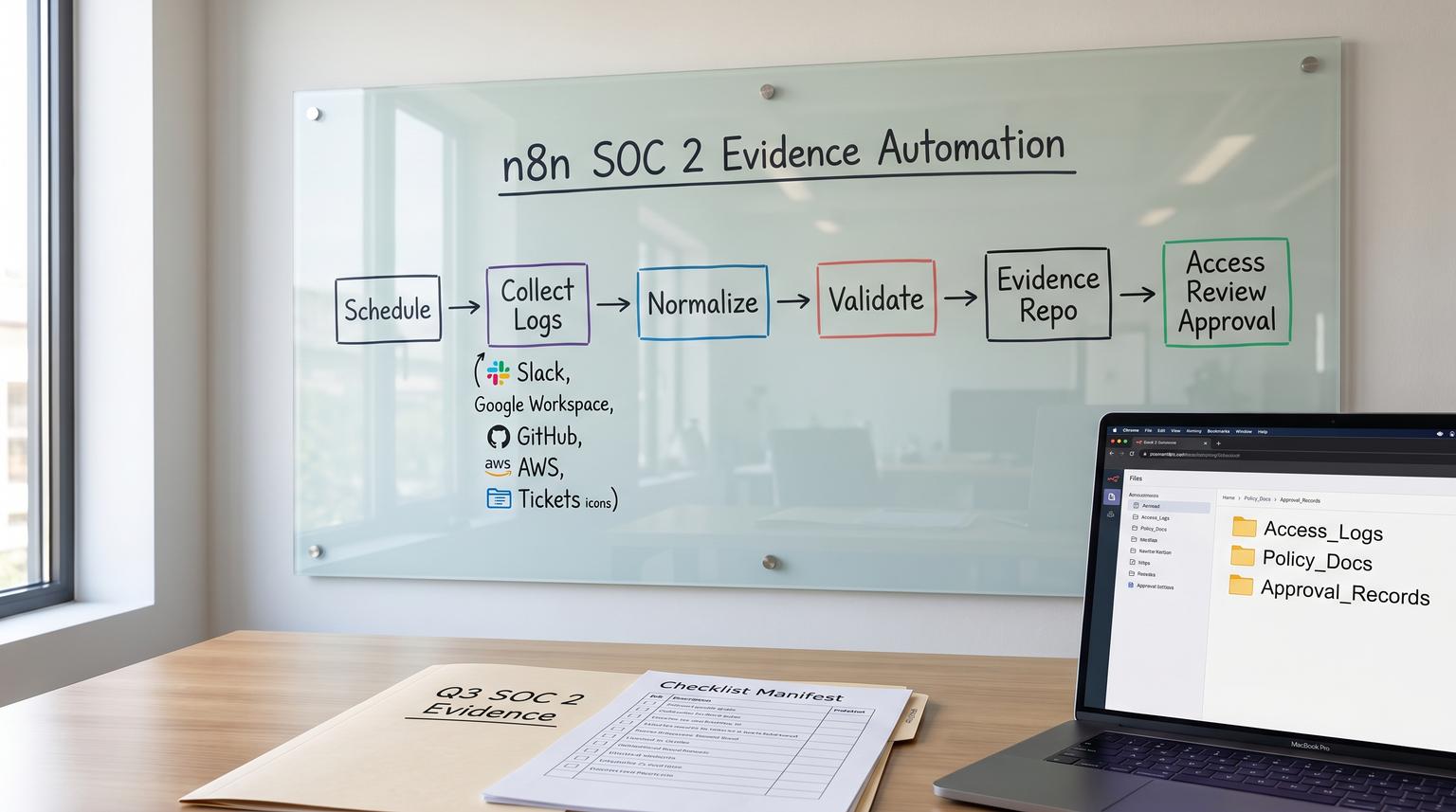
SOC 2 Type II audits are rarely lost because a company lacks controls. They are lost because evidence is incomplete, time-scoped incorrectly, or scattered across tools with no consistent trail of who reviewed what. This is one of those high-leverage n8n use cases where a single workflow can turn a recurring fire drill into an operating routine.
Below is a practical build that pulls audit logs and configuration proofs from your SaaS stack, generates quarterly access review population lists, routes approvals to the right owner and stores everything in a single evidence repository with deterministic naming, retention and traceability.
At a glance:
- Automate scheduled evidence pulls from Slack, Google Workspace, GitHub, AWS and your ticketing tool with time-bounded exports.
- Generate quarterly access review population lists, collect a lightweight approval and track remediation proof if changes are required.
- Store artifacts in one evidence repository with consistent paths, manifests and retention rules that auditors can follow.
- Reduce missed quarters by validating completeness on every run and alerting when a collector fails or returns partial data.
Quick start
- Define your evidence calendar: daily or weekly log snapshots plus quarterly access reviews (set explicit timezones).
- Create one n8n workflow with a Schedule Trigger and a per-system collector stage (Slack, Google Workspace, GitHub, AWS and tickets).
- Normalize outputs into a consistent schema and generate a period manifest (what was collected, from where and for which dates).
- Write binaries and exports into a single evidence repository path with deterministic naming and retention tags.
- For quarterly access reviews, route the population list to an approver and record their sign-off plus any remediation tickets and before/after proof.
You can use n8n to run a scheduled SOC 2 evidence pipeline that pulls time-scoped logs and screenshots from key SaaS systems, validates that all required artifacts were captured then stores them in a single repository with consistent naming and a manifest. For quarterly access reviews, the workflow can generate the user population list, request an approval from the control owner and append a change-log trail so auditors can trace who confirmed the review and when.
Why SOC 2 evidence breaks in real operations
In practice, evidence collection fails in predictable ways:
- Missing time boundaries: exports do not clearly show the start and end of the period being tested which makes sampling harder.
- Artifact sprawl: screenshots in one folder, CSVs in email threads and approvals in Slack messages without a linkable trail.
- Quarterly procedural gaps: teams automate technical monitoring but forget that quarterly User Access Reviews often require a population list, a sign-off and remediation proof. This is a common exception driver in Type II audits (see quarterly evidence patterns).
- Last-minute reconstruction: teams try to recreate what happened three months ago but logs expired or roles changed.
The operational fix is to treat evidence as an engineered output produced on a cadence with completeness checks and traceability (similar to how teams treat CI outputs and change records as a system output, not a one-off project).
System design for a repeatable evidence pipeline
Before you touch nodes, define the system boundaries and the contract for what your workflow produces every run:
- Inputs: time window (start/end), control mapping, system list, credentials and approver routing rules.
- Outputs: raw artifacts (JSON exports, CSVs, screenshots or PDFs), a period manifest and a change-log of approvals and remediation references.
- Storage: one evidence repository that is not dependent on n8n execution retention. Even if you configure external binary storage for n8n, you should still copy evidence into your dedicated structure with explicit retention rules (see n8n external binary storage notes).

Evidence scope and cadence checklist (use this before building)
- Daily or weekly: admin and access audit logs from key systems (Slack, Google Workspace, GitHub and AWS).
- Weekly or monthly: configuration snapshots that prove security settings (MFA enforced, SSO settings, key org policy settings).
- Quarterly: User Access Reviews for each in-scope system: population list export, review sign-off and remediation evidence if any changes were required.
- Always: manifest per run that includes period boundaries, collector version, requester identity and success/failure states.
A decision rule we use with clients: if an evidence item cannot be reproduced later (short log retention, admin UI changes or role state changes), it should be collected more frequently than the audit asks. You can downsample for the auditor later but you cannot backfill missing quarters reliably.
Single-source evidence repository structure and naming rules
The goal is simple: an auditor or internal reviewer should be able to answer three questions quickly.
- What control does this evidence support?
- What system and period does it cover?
- Who reviewed it and when?
Use a deterministic path that encodes control, system, period and the evidence type. Keep binary artifacts and manifests together. Below is a structure that works well in S3, Google Drive or an internal file store.

Recommended folder and key convention
evidence/
{control_id}/
{system}/
{cadence}/
{period_start}_{period_end}/
manifest.json
raw/
{collector}_{dataset}_{period_start}_{period_end}.{ext}
approvals/
access-review_{system}_{quarter}_approved-by_{approver}_{approved_at}.json
remediation/
ticket-{ticket_key}/
before_{timestamp}.{ext}
after_{timestamp}.{ext}
notes.json
Examples
evidence/CC6.1/slack/weekly/2026-01-06_2026-01-12/
raw/slack_auditlogs_admin-actions_2026-01-06_2026-01-12.jsonl
manifest.json
evidence/CC6.2/github/quarterly/2026-Q1_2026-01-01_2026-03-31/
raw/github_org-members_2026-03-31.csv
approvals/access-review_github_2026-Q1_approved-by_j.smith_2026-04-03T14-22-10Z.json
remediation/ticket-SEC-184/before_2026-04-03T15-10-00Z.png
Manifest template (store one per run)
This is the glue that makes audits faster. It gives auditors a population list of evidence items and lets your team verify completeness without hunting through folders.
{
"run_id": "n8n-2026-04-03T14:00:00Z-uar",
"workflow": "soc2-evidence-pipeline",
"timezone": "America/New_York",
"period": {
"start": "2026-01-01T00:00:00-05:00",
"end": "2026-03-31T23:59:59-04:00",
"label": "2026-Q1"
},
"control_id": "CC6.2",
"systems": [
{
"name": "github",
"collector_version": "1.3.0",
"artifacts": [
{
"type": "population_list",
"path": "raw/github_org-members_2026-03-31.csv",
"sha256": "...",
"record_count": 128
}
],
"status": "ok"
}
],
"approvals": [
{
"system": "github",
"approver": "[email protected]",
"approved_at": "2026-04-03T14:22:10Z",
"decision": "approved",
"remediation_ticket_keys": ["SEC-184"]
}
]
}
The most common mistake we see is relying on n8n execution data as the evidence store. Even with external binary mode enabled, execution pruning and workflow changes make that a fragile long-term repository. Always copy evidence into a dedicated evidence path with your retention policy.
Concrete n8n workflow outline for scheduled evidence pulls
Below is a battle-tested stage layout that you can implement in one workflow or split into two workflows (daily or weekly logs and quarterly access reviews). The core idea is the same: schedule, collect, normalize, validate then write.
Stage 1 Schedule and period builder
- Schedule Trigger: set explicit workflow timezone and use separate schedules per cadence. The Schedule Trigger only runs if the workflow is saved and activated (see Schedule Trigger).
- Function node: compute
period_startandperiod_end. For weekly runs, align to your defined week boundary. For quarterly runs, derive the last completed quarter. - Set node: define
control_idmapping andsystems_in_scope. If you need a reusable production architecture (triggers, orchestration, mapping, enrichment, actions, feedback, plus retries/logging/versioning), use this pillar framework: governed n8n workflow framework.
Stage 2 Per-system collectors (parallel branches)
Each collector should return two things: a raw dataset and a small metadata object describing what was fetched (source, query parameters, record count, errors). In n8n, this often looks like HTTP Request nodes plus pagination loops.
- Slack audit logs: call the Slack Audit Logs API for the time window. Note that this API requires an Enterprise plan and the
auditlogs:readscope with an org-level install (see Slack Audit Logs API). Store admin and access events, not message content. - Google Workspace: export Admin audit log events and sign-in or token events relevant to your controls. (Implementation varies by your chosen API and log source.)
- GitHub: export org membership, team membership and audit log events relevant to access and admin changes.
- AWS: export CloudTrail events relevant to IAM changes and console sign-ins for the period window.
- Ticketing tool: export change-management tickets created in the period, including status, approvals and links to PRs or deploys if you use them.
Real-world implementation insight: do not try to pull everything with one mega query. Most SaaS audit log endpoints have pagination, rate limits and occasional delayed ingestion. You will get more reliable results by pulling time-bounded slices (for example 24h or 7d) and writing each slice as its own file, then aggregating at the manifest level.
Stage 3 Normalization and deterministic file naming
- Function node: map each raw event into a normalized shape:
timestamp,actor,action,entity,context,source_system. This aligns well with how Slack frames audit events and makes cross-tool review easier. - Function node: build the destination path using your repository convention and include the period boundaries in the filename.
- Optional: write JSONL for logs, CSV for population lists and PNG or PDF for UI screenshots.
Stage 4 Completeness validation and alerts
This is where most DIY automations fall short. Build explicit checks that fail the run when evidence is incomplete. For more reliability patterns (idempotency, retries, alerts, and change tracking), see n8n best practices for enterprise workflow automation.
- Verify each in-scope system produced at least one artifact for the period.
- Verify record counts are above a minimum threshold or at least non-null.
- Verify the output includes the correct
period_startandperiod_endin metadata. - Write an error report file when a collector fails so the gap is visible in the repository.
If you skip these checks, your workflow can look green in n8n while silently missing a system for weeks due to an expired token or a permission change.
Stage 5 Repository write
- Binary handling: if the collector produces a screenshot or PDF, store it as binary and copy it to the evidence repository path. If you are using S3-compatible storage for n8n binaries, remember the internal key pattern is execution-scoped and should not be your final evidence address.
- Write manifest.json: include artifact paths, hashes and counts. This becomes your population manifest for sampling.
Access review approval loop that auditors can trace
Quarterly access reviews are procedural evidence. Auditors typically want three things: a timestamped population list, proof it was reviewed and proof of remediation if changes were required. Your workflow can produce all three.
Step 1 Generate the population list
- For each system, export all active users and their roles as of the review start date.
- Store as CSV and also store a small JSON summary: total users, privileged users count and export timestamp.
Step 2 Route to the approver
Pick a channel that matches how your company actually works: email, Slack or a ticket. The tradeoff is speed versus traceability. Slack is fast but you must persist the approval response into your evidence repository, not leave it as a chat message.
- Create a review task with links to the population list and a simple approve or request-changes choice.
- Require the approver to select one of: approved, approved with changes required, rejected (needs investigation).
- Capture approver identity and timestamp.
Step 3 If changes are required, enforce remediation proof
- Create remediation tickets for each required change (or validate that a ticket already exists).
- Collect before and after proof. This can be a screenshot of role removal, a log entry that shows access revoked or a system export showing the user is no longer privileged.
- Write
notes.jsonunder the remediation folder that links the ticket key and the evidence paths.
Step 4 Append to change-log trail
Write an approvals JSON file into approvals/ using deterministic naming that includes system, quarter, approver and timestamp. Add the approval record into the manifest.
Operational rollout, ownership and monitoring
This approach works best when it has clear ownership and a small number of measurable checks.
Suggested ownership model
- Control owner (Ops or Security): owns quarterly access review approvals and remediation follow-through.
- System owner (IT or Engineering): ensures API access and admin permissions remain valid for collectors.
- Automation owner (internal or ThinkBot Agency): owns n8n reliability, error handling and repository write logic.
Monitoring and rollback approach
- Alert on missing artifacts, failed collectors and repeated low record counts.
- Track workflow changes: when nodes or credentials change, log a workflow version string into each manifest.
- If a collector starts failing, temporarily switch that system to manual evidence collection but keep the same repository paths so the audit trail stays consistent.
When this approach is not the best fit: if your company has no stable evidence repository and no owner who will respond to quarterly approvals, automation can create a false sense of compliance. In that situation, start by assigning ownership and a minimum review cadence then automate once the process is real.
Security, retention and practical guardrails
- Least privilege: collectors should use read-only scopes whenever possible. For example Slack audit log access is read-only but it has strict org-level requirements.
- Retention: align evidence retention to your audit window plus buffer (commonly 12 months plus a few months). Apply bucket lifecycle rules or Drive retention policies, not just n8n execution cleanup.
- PII minimization: store what you need for SOC 2 evidence. Avoid message content and avoid exporting unnecessary fields. Use normalized event schemas to reduce sprawl.
- Immutable logs: if possible write manifests and approval records to storage with versioning enabled so edits are traceable.
Implementation support from ThinkBot Agency
If you want this built in a way your auditor can actually follow, we can help you design the evidence contract, implement the n8n collectors with pagination and rate-limit handling and set up the repository structure, manifests and approval loop end to end. If you want to see additional n8n automation use cases beyond compliance, we also break down patterns for ops, support, and reporting. Book a working session here: book a consultation.
FAQ
Common questions we get when teams operationalize recurring evidence collection and quarterly access reviews.
Do I need separate workflows for weekly logs and quarterly access reviews?
Not strictly. You can keep one workflow with branches and different schedules, but many teams split them for clarity and permissions. Weekly log collectors run frequently and should be lightweight while quarterly access reviews include approvals and remediation tracking.
What should be in a quarterly access review evidence pack?
Include a timestamped population list export taken before the review begins, proof of the review action (approval record that captures who approved and when) and remediation proof when access changes were required, including before and after evidence tied to a ticket.
How do we prove evidence completeness to an auditor?
Write a manifest.json per period that lists every artifact path, its source system, collection parameters and a success or failure status. This gives a population list for sampling and makes missing systems visible immediately.
Can n8n store screenshots and PDFs safely for compliance?
Yes, but do not rely on execution storage alone. Configure external binary storage if needed then copy binaries into your dedicated evidence repository structure with explicit retention rules, versioning where possible and least-privilege access.
What is a common failure pattern with Slack audit logs?
Teams assume Slack audit logs are available in every plan. The Audit Logs API is an Enterprise feature and requires an org-level installation with the correct scope. Validate plan and permissions early and add collector failure alerts so missing data does not go unnoticed.
