
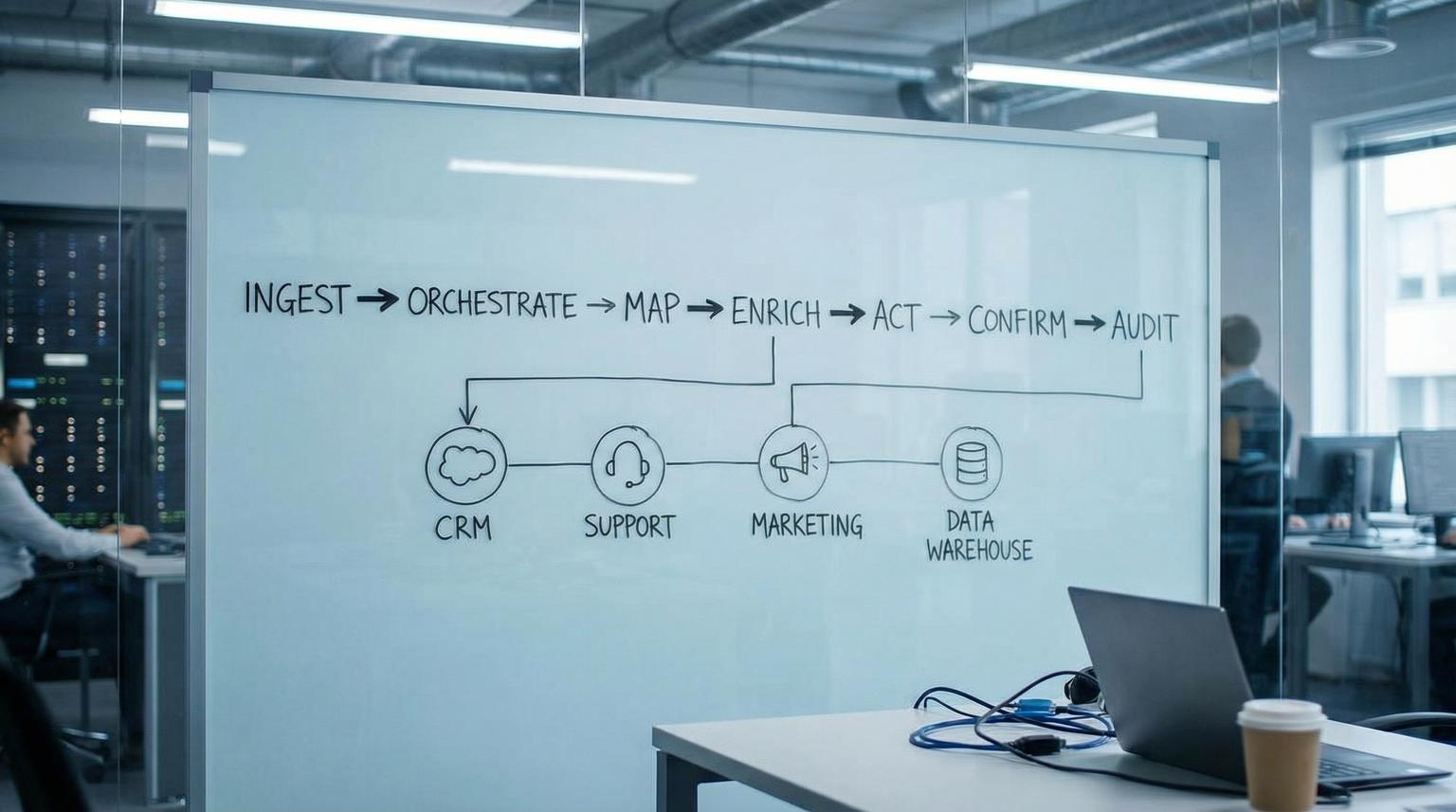
Most n8n deployments start with a few helpful automations, then quickly turn into a maze of one-off workflows, undocumented credentials, fragile mappings, and unclear ownership. The goal of an n8n workflow framework is to prevent that drift by giving every team a shared blueprint for how automations are designed, deployed, and maintained in production.
This pillar lays out a practical operating system you can apply across CRM and RevOps, customer support, marketing ops and back-office operations. You will get a standard architecture (ingest -> orchestrate -> map -> enrich -> act -> confirm -> audit), guidance for reusable sub-workflows, and the production discipline required for logging, alerting, versioning, and scaling.
Key takeaways:
- Use one repeatable workflow architecture so every automation is readable, testable and governable.
- Make idempotency and ordering rules part of the ingestion phase, not an afterthought.
- Modularize with sub-workflows to reduce duplication and stabilize interfaces across teams.
- Standardize environment configuration, credentials, logging and error handling for production reliability.
- Choose webhooks for low latency events, scheduled syncs for reconciliation and batch reporting, then design both to tolerate duplicates and retries.
Quick start
- Create a canonical event envelope: correlation_id, source, event_id, entity_type, entity_id, payload, received_at.
- Adopt a standard workflow layout: Trigger -> Normalize -> Dedup/State check -> Map -> Enrich -> Act -> Confirm -> Audit.
- Extract shared blocks into sub-workflows (Normalize Contact, Map to Canonical, Write Audit Log) and require input/output contracts.
- Set up an n8n error workflow for centralized triage, alerting and dead-letter storage.
- Choose your ingestion pattern per use case: webhook for real-time, schedule trigger for periodic syncs and reconciliation.
- Turn on structured logging (JSON) at the platform level, and log correlation_id at key phases.
- Implement promotion discipline: dev -> stage -> prod with workflow JSON versioning and manual credential/variable provisioning.
An n8n workflow operating system is a set of standards that makes automations reusable across teams: a consistent workflow architecture, shared sub-workflows, and production controls for credentials, environments, error handling, logging, versioning and scaling. With this approach, every automation becomes a governed component you can test, deploy and maintain like software, whether it powers lead routing, ticket triage, campaign ops, or back-office reporting.
Table of contents
- Why ad-hoc automations fail in production
- The workflow operating system: a standard architecture
- Workflow naming, structure and node conventions
- Reusable sub-workflows and interface contracts
- Webhook events vs scheduled syncs: choosing the right trigger model
- Reliability patterns: idempotency, ordering, retries and dead-letters
- Observability: logging, correlation IDs and actionable alerts
- Versioning and promotion across environments
- Scaling n8n safely: concurrency, queue mode and workload shaping
- Cross-team patterns you can reuse immediately
- How ThinkBot implements a governed automation program
- FAQ
Why ad-hoc automations fail in production
Ad-hoc workflows usually fail for predictable reasons:
- Hidden coupling: field mappings are embedded inside nodes, so a CRM schema change breaks downstream steps.
- Unclear boundaries: one workflow mixes ingestion, enrichment, writes, notifications and analytics, which makes it hard to debug or reuse.
- No contracts: workflows accept any input, so quality issues show up as partial writes and silent data drift.
- Environment confusion: production credentials or URLs get hardcoded in dev experiments.
- Weak failure handling: retries create duplicates, webhook storms overwhelm instances, and nobody knows which execution to trust.
If you are already using n8n for growth workflows, you have likely seen these pain points show up as duplicate records, mismatched lifecycle stages and "why did this email fire" incidents. We have seen teams resolve this by moving from isolated workflows to a shared operating model, similar to how product teams standardize CI/CD. For related patterns on building end-to-end automation with measurement and guardrails, see end-to-end workflows.
The workflow operating system: a standard architecture
Think of each automation as a pipeline with the same phases. When every workflow follows the same structure, new team members can read it quickly, you can extract reusable components and you can instrument it consistently.
The standard phases (use in almost every workflow)
- 1) Trigger (ingest): webhook, schedule, manual, queue message.
- 2) Normalize: reshape inbound data into a canonical envelope and validate required fields.
- 3) Dedup + state check: enforce idempotency, detect replays, and apply ordering rules before side effects.
- 4) Map: transform canonical fields into destination schema (CRM, helpdesk, billing, warehouse).
- 5) Enrich: add data from APIs, databases, or AI services, then re-validate.
- 6) Act: create/update records, send messages, write files, call APIs.
- 7) Confirm: read-after-write checks, reconcile counts, or verify status when the target API is eventually consistent.
- 8) Audit + feedback: write an audit log record, emit metrics, and optionally trigger a follow-up workflow (human review, re-drive, escalation).
This structure maps cleanly to reusable building blocks. For example, the same Normalize and Dedup steps can power lead capture, ticket creation and invoice reconciliation. If you want examples of how AI fits into enrichment and routing steps, see AI optimization patterns.

A checklist for production-ready workflow architecture
Use this checklist when you design or refactor a workflow to match the operating system. It is intentionally specific to n8n execution behavior and typical integration failure modes.
- Workflow starts by creating correlation_id and setting it on every item.
- Normalize step outputs a canonical envelope (source, event_id, entity_type, entity_id, payload).
- Dedup/state check occurs before any external writes.
- Mapping to each destination system is isolated in its own sub-workflow or clearly separated block.
- Enrichment calls have timeouts, rate limit handling and explicit fallbacks.
- Act steps are idempotent (safe to retry) or protected by a transaction-like guard (check then write).
- Every workflow has a clear "success" end node that writes audit data (run summary, entity ids, timestamps).
- All known contract violations fail fast using a deliberate error, not a silent branch.
- Owner, purpose, and dependencies are documented in the workflow description.
- Schedules and webhook endpoints are treated as production interfaces with change control.
Workflow naming, structure and node conventions
A workflow operating system works only if teams can find and understand components. The simplest effective approach is a naming taxonomy that encodes intent and scope.
Naming conventions that scale across teams
- WF - Domain - Purpose for orchestrators, for example: "WF - RevOps - Lead Intake".
- Sub - Phase - Purpose for shared blocks, for example: "Sub - Normalize - Contact".
- Lib - Utility - Purpose for reusable utilities, for example: "Lib - Audit - Write Record".
Within a workflow, name nodes like functions. Prefer verb-first labels such as "Validate envelope", "Derive idempotency key", "Map to HubSpot", "Write audit log". This is the difference between a diagram and a maintainable system. For CRM-centric layout ideas that fit this structure, see CRM automation.
Sub-workflow boundaries (where to cut)
Cut sub-workflows along stable boundaries:
- Normalize and validation (stable across many workflows).
- Field mapping to a destination app (changes when the app schema changes).
- Single external side effect actions (create ticket, update deal, send invoice).
- Audit and observability steps (stable and shared).
Reusable sub-workflows and interface contracts
Sub-workflows are n8n's modularity tool for building "microservice-like" blocks you can call from many orchestrators. A parent workflow calls a component with Execute Sub-workflow and the child starts with Execute Sub-workflow Trigger, passing items in and returning items back out, as described in the docs.
How to design stable inputs and outputs
When you select a sub-workflow in the Execute Sub-workflow node, n8n can surface the declared inputs so callers map values into a clear contract. For shared building blocks, prefer defining inputs using a JSON example to reduce drift, and choose execution mode intentionally ("all items" for bulk transforms, "each item" for per-entity writes), per the node guide.
Mini template: canonical sub-workflow contract
Use this as a starting point for Normalize, Map and Act sub-workflows. Keep it simple, explicit and stable.
Sub-workflow: Sub - Normalize - Lead
Inputs:
{
"correlation_id": "string",
"source": "string",
"event_id": "string",
"entity_type": "lead",
"entity_id": "string",
"payload": {
"email": "string",
"name": "string",
"company": "string"
}
}
Outputs:
{
"correlation_id": "string",
"event_id": "string",
"entity_type": "lead",
"entity_id": "string",
"canonical": {
"email": "string",
"name": "string",
"company": "string"
},
"warnings": ["string"],
"valid": true
}
Once you standardize this pattern, your orchestrators become thin routing layers. This is also how you keep AI enrichment safe, by wrapping it in a sub-workflow that validates inputs and outputs. For implementation examples that combine AI and deterministic logic, see AI integration.
Webhook events vs scheduled syncs: choosing the right trigger model
This is one of the most important design choices because it determines latency, load profile and failure modes. Event-driven webhooks provide low latency but require hardened inbound security and robust handling of retries and duplicates. Time-driven polling or scheduled syncs simplify inbound security but create lag and can increase API load. The tradeoffs are summarized clearly in this guide.
When to use webhooks
- Lead capture, form submits, payment events, ticket creation, and other "act immediately" events.
- When the source system provides event IDs or change versions you can use for deduping.
- When downstream actions are small and can be made idempotent.
When to use scheduled syncs
- Systems without reliable webhooks.
- Reconciliation runs (nightly or hourly) to catch missed events.
- Batch reporting extracts into a warehouse or dashboard.
- Back-office processes like evidence collection, invoicing checks, or SLA rollups.
In n8n, Schedule Trigger supports interval schedules and cron, including multiple trigger rules in a single workflow. Note that variables used in cron expressions are evaluated only when the workflow is published, so changing a variable later will not change the schedule until you republish, per the documentation. This matters for change control.
Reliability patterns: idempotency, ordering, retries and dead-letters
Production automation is mostly about being correct under failure: duplicates, retries, out-of-order updates, timeouts, and upstream rate limits. Two rules belong in your operating system:
- Assume duplicates: design every ingestion path to tolerate replay.
- Assume reordering: define an ordering rule per entity and only apply newer updates.
Idempotency, deduplication key strategies and per-record ordering are highlighted as core reliability pillars in this overview. In practice, you implement them as early workflow steps and back them with durable storage (a DB table, data warehouse table, or key-value store), not in-memory variables.

Common failure modes and guardrails
Use these pairs as defaults in your design reviews. They map directly to how n8n workflows behave under retries, webhook redelivery and scheduled re-runs.
- Duplicate events -> Derive an idempotency key (provider event_id, object_id + version, or a deterministic payload hash) then check a durable dedup store before writes.
- Out-of-order updates -> Store last_seen_version or updated_at per entity, apply only newer updates and define tie-break rules.
- Retry storms -> Implement exponential backoff, cap attempts and throttle concurrency on the workflow or platform.
- Partial side effects -> Fail fast before writes on contract violations, and design actions to be safe to retry (check-then-write).
- Poison items -> After N attempts, move the item into a dead-letter store, keep the rest of the run moving.
Centralized error workflows and controlled failures
n8n supports a dedicated error workflow that runs when an execution fails. Your error handler should normalize payload shapes from trigger failures vs downstream failures, and it should handle the fact that execution.id and execution.url can be missing if the trigger node fails before the execution is saved, as documented in n8n error handling. Use the Stop And Error node to enforce data contracts and route controlled failures into the same triage pipeline.
Dead-letter queue thinking (even if you do not use SQS)
Dead-letter queues are a standard integration pattern: when messages fail processing repeatedly, isolate them for inspection and later re-drive. AWS documents this DLQ pattern and the concept of a max receive count in the SQS guide. In n8n, you can implement the equivalent as a table, queue, or a dedicated workflow that stores failed items with attempt_count, last_error and the idempotency key, then replays them after fixes.
Observability: logging, correlation IDs and actionable alerts
Without observability, automations rot. With observability, you can run automations as a program: you know what is failing, what is slowing down, and where to invest next.
Platform logging baseline (JSON logs)
For production, enable structured logs so you can parse fields and build alerts by workflow name, execution id and correlation_id. n8n supports JSON log format and multiple outputs via environment variables like N8N_LOG_FORMAT, N8N_LOG_OUTPUT and N8N_LOG_LEVEL, per the logging variables documentation. Also consider logging active cron jobs to detect scheduler problems using N8N_LOG_CRON_ACTIVE_INTERVAL.
Alert payload standards and error taxonomy
Actionable alerts require consistent identifiers and context. A practical approach is to standardize an error_type_id or category and include workflow name, node name, retry count and the execution link when available. This concept is widely used in automation operations and is covered in an operations-focused way in this guide. In n8n terms, it means your error workflow emits one normalized error record per failure, and routes it to the right channel (Ops, RevOps, Support) based on workflow tags or domain.
What to log inside the workflow
- correlation_id, source, event_id, entity_id
- phase markers: normalize_started, dedup_checked, act_started, act_completed
- write results: destination ids, status codes, error messages
- run summary: items_in, items_out, items_failed, retries
For AI-assisted workflows, also log the model decision metadata you need for later review (prompt version, routing decision, confidence threshold), but never log sensitive customer content unless you have a policy. For examples of AI workflows where governance matters, see AI productivity workflows.
Versioning and promotion across environments
To move from "automation scripts" to "automation systems", you need a lifecycle: develop, test, promote, and roll back. n8n workflows are stored as JSON, which makes them versionable and reviewable as a change artifact. Export and import methods include UI download, URL import, and CLI options, as described in the docs. Be careful when sharing workflow JSON because it can include credential names and HTTP nodes imported from cURL may include auth headers.
Environment separation: dev, stage, prod
n8n environments are a pairing of an instance and a Git branch, intended to keep development changes from breaking production. A key operational constraint is that credential values and variable values are not synced with Git, so you must provision them separately in each instance, per the environment model.
Promotion discipline you can adopt this quarter
- All production workflows live in source control (JSON), with tagged releases for rollbacks.
- Every change is reviewed as a JSON diff plus a short change note: intent, expected impact, rollback step.
- Stage runs use production-like credentials but scoped permissions and test destinations where possible.
- Smoke tests include: trigger path, at least one action, and forced error handling into the error workflow.
This is the same discipline that keeps customer onboarding automations stable as you scale. If onboarding is a major use case for you, see customer onboarding automation.
Scaling n8n safely: concurrency, queue mode and workload shaping
Scaling is not only about adding CPU. It is also about preventing overload on your own instance and on upstream APIs.
Concurrency control in regular mode
n8n provides a production concurrency limit for executions started from triggers and webhooks. You enable it by setting N8N_CONCURRENCY_PRODUCTION_LIMIT to a positive integer. When the limit is reached, n8n queues executions and processes them FIFO as capacity frees up, per the docs. This is one of the simplest ways to prevent spikes from taking down your instance.
Queue mode for higher throughput
Queue mode separates the main process (UI, API, webhooks) from worker processes that execute jobs. You tune worker throughput with the --concurrency flag and should avoid configurations that exhaust your database connection pool, per queue mode guidance. Use this architecture when you have bursty event loads, high-volume syncs, or many long-running workflows.
Workload shaping in workflows
- Stagger schedules to avoid top-of-hour spikes.
- Batch writes when the destination supports it.
- For API syncs, use pagination correctly and log cursors and counts.
- Handle 429 and 5xx with backoff and caps.
Example: pagination spec for scheduled sync workflows
n8n's HTTP Request node supports several pagination modes. Align your configuration to the API style, such as "Response Contains Next URL" or page-number increments using $pageCount, as shown in the pagination guide. Put pagination in the orchestration layer so downstream steps always receive a consistent item stream.
Workflow: Scheduled API Sync (Paged)
- Trigger: Schedule
- Node: HTTP Request
- Pagination: enabled
- Mode: Response Contains Next URL
- Next URL expression: {{ $response.body.next }}
- Page size (query): limit={{ $vars.page_size }}
- Audit fields per run:
- pages_fetched, items_fetched, first_cursor, last_cursor
Cross-team patterns you can reuse immediately
A useful operating system includes a pattern library. The goal is not to copy-paste entire workflows, it is to reuse the same phases and sub-workflows with different triggers and actions.
CRM and RevOps patterns
- Lead intake and routing: webhook ingest -> normalize -> dedup -> enrichment -> assign owner -> create tasks and sequences. For deeper CRM patterns, see smart CRM workflows.
- Nightly reconciliation: scheduled sync -> paginated API pull -> diff against warehouse/CRM -> apply corrections -> audit report.
- Pipeline snapshots: schedule -> extract deals -> write to analytics table -> alert on anomalies.
Customer support patterns
- Ticket enrichment: new ticket event -> normalize -> lookup customer and order -> update ticket fields -> tag and route -> audit.
- SLA monitoring: schedule -> pull open tickets -> evaluate SLA -> escalate to Slack/email and write log.
- AI triage with human handoff: enrich with LLM -> validate confidence -> route to agent queue and log transcript. If this is a focus, see handoff workflows.
Marketing ops patterns
- Audience refresh: schedule -> pull segment members -> map fields -> sync to ads/email platform -> confirm counts.
- Campaign pacing checks: schedule -> pull spend and conversions -> compute deltas -> alert and annotate a sheet.
- Attribution hygiene: webhook or schedule -> normalize UTMs -> update CRM contact/deal fields.
Back-office and compliance patterns
A surprisingly reusable pattern is "package and send": build a packet of evidence or artifacts based on a control table, then distribute it. n8n provides a concrete example of assembling an audit evidence package using Google Sheets as a control table and Google Drive for file retrieval before emailing the ZIP, described in this workflow. The same pattern applies to finance close packets, customer escalation dossiers, and marketing campaign archives.
Comparison table: packaging automations across teams
| Variant | Control table (source of truth) | Evidence store | Output | Primary metric |
|---|---|---|---|---|
| Compliance evidence pack | Controls/log rows (control_id, status) | Drive/S3 | ZIP + email | % controls with evidence |
| Finance close packet | Checklist rows (account, owner, due) | Drive/ERP exports | ZIP + link | Close cycle time |
| Customer escalation dossier | Ticket list (ids, priority) | Helpdesk attachments | ZIP + Slack/email | Time to first response |
| Marketing campaign archive | Campaign rows (id, dates) | Ads exports + creative files | ZIP + report | Archive completeness |
How ThinkBot implements a governed automation program
When ThinkBot Agency helps teams operationalize n8n, we treat it like an automation program, not a collection of workflows. That means:
- Shared architecture: every workflow follows ingest -> normalize -> dedup -> map -> enrich -> act -> confirm -> audit.
- Reusable library: sub-workflows for mapping, enrichment, audit logging, error normalization, and notifications.
- Governed lifecycle: dev/stage/prod promotion, versioning and rollback, schedule and webhook change control.
- Operational metrics: error rate by workflow, queue time, item throughput, duplicate suppression counts.
We also design for practical integration realities: rate limits, pagination, schema drift and safe credential management across instances. For teams choosing the right automation stack around n8n, Zapier and Make, see platform comparison.
Primary CTA: If you want a reusable operating system implemented in your n8n instance, including sub-workflow libraries, environment promotion, error handling, and observability, you can book a consultation.
Secondary CTA: Prefer to evaluate delivery history first? View ThinkBot's Upwork profile for recent automation and integration work.
FAQ
What is an n8n workflow operating system?
It is a set of standards for how your organization designs, deploys and maintains n8n automations. It includes a consistent workflow architecture, reusable sub-workflows, and production controls for credentials, environments, error handling, observability, and scaling.
How do we make n8n workflows reusable across departments?
Standardize on a canonical event envelope, extract stable steps into sub-workflows with explicit input/output contracts, and keep orchestrator workflows thin. Reuse shared blocks like normalization, field mapping, audit logging, and error handling.
Should we use webhooks or scheduled workflows for integrations?
Use webhooks for low latency event processing and scheduled workflows for batch syncs, reconciliation, and systems without reliable webhook support. In both cases, design for duplicates and retries using idempotency keys and durable state checks.
What is the minimum error handling setup for production n8n?
Configure an n8n error workflow, normalize error payloads, send actionable alerts with workflow and node context, and store failed items in a dead-letter store after a capped number of retries so you can re-drive safely later.
How do we promote workflows from dev to production safely?
Version workflow JSON in source control, test in a staging instance, and promote via review and pull to production. Provision credentials and variable values per environment since they are not synced through Git, then run smoke tests and keep a rollback tag ready.
