
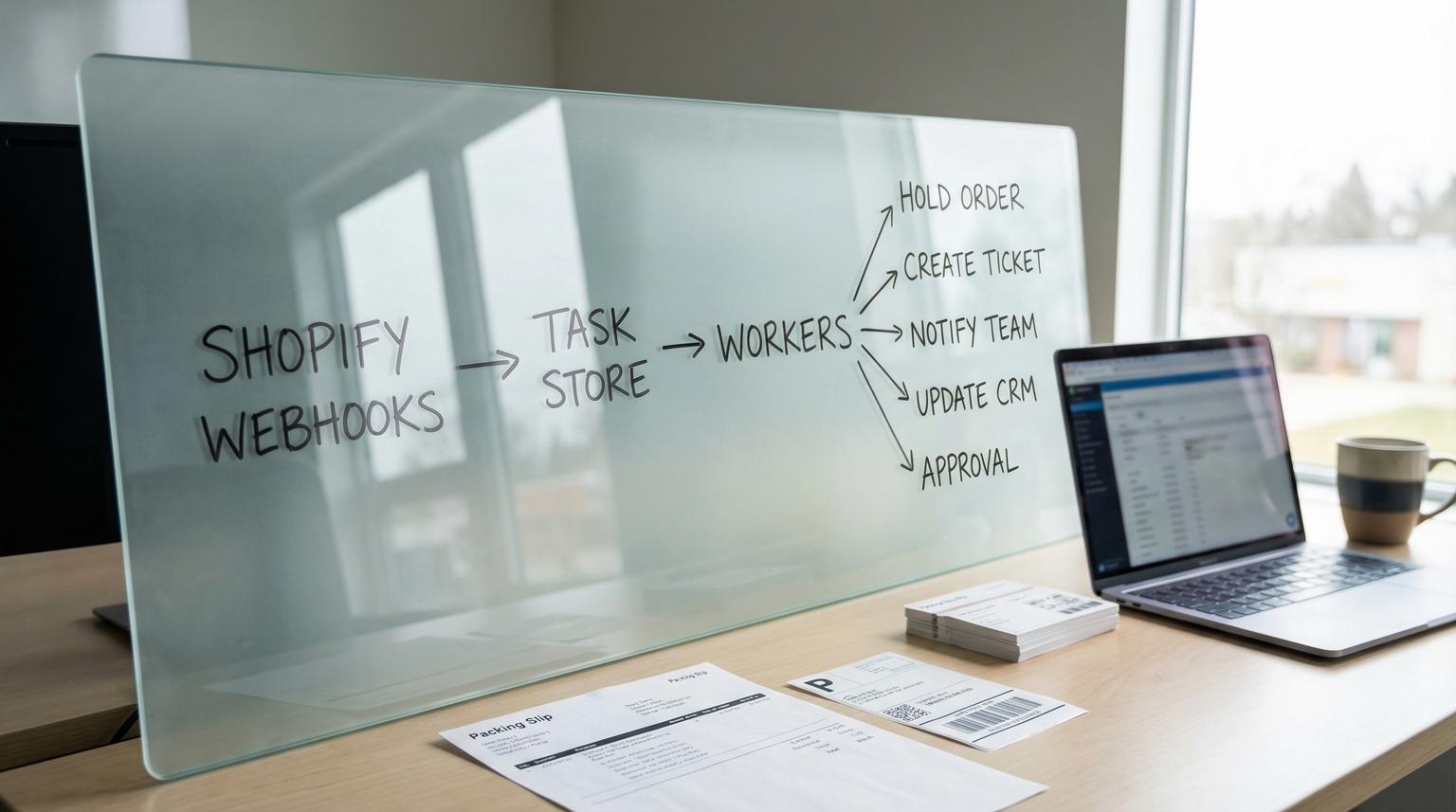
Shopify order exceptions are where revenue quietly leaks: a failed payment that never gets chased, a stockout discovered too late, an address issue that causes a return, or a fraud flag that gets missed until a chargeback lands. This post shows how to build no code automation solutions that treat exceptions as a reliable event-driven workflow with clear routing, consistent holds and human approvals so issues get resolved before they become cancellations or support chaos.
Quick summary:
- Detect exceptions from Shopify events and key signals (payment, inventory, risk and address validation) then normalize them into tasks.
- Decide when to auto-resolve vs. place an order or fulfillment hold and request human approval.
- Route the right context to Slack or Teams, email, your helpdesk and your CRM with consistent tags and ownership.
- Run it reliably at scale using idempotency, retries with backoff and alerting tied to webhook delivery and downstream API failures.
Quick start
- Pick 3 exception types to start (failed payment, stockout and address issue) and define owners and SLAs.
- Enable Shopify triggers you can trust: webhooks for order updates and a fraud branch that waits for risk analysis completion.
- Create a durable task store (table or database) keyed by shop + order + exception type to prevent duplicates.
- Build a worker flow that posts to Slack or Teams, creates a helpdesk ticket and updates your CRM with status tags.
- Add one approval step that can release a hold or cancel the order and log the decision.
A practical exception-handling automation listens to Shopify events, enriches them with the right data (payment state, fulfillment readiness, inventory availability, risk signals and address validation), then applies decision rules: auto-fix what is safe, hold what is risky and route the rest to a human approval queue. The key is reliability: dedupe incoming webhooks, retry downstream calls and alert when Shopify delivery failures or API errors spike so exceptions never disappear into a silent failure.
The system boundary where Shopify exceptions get lost
Most ecommerce teams do not fail because they lack tools. They fail at the handoff between Shopify and downstream systems where work actually happens: support queues, CRM tasks and internal comms. An order can look fine in Shopify yet still be unshippable or unsafe due to:
- Payment problems (authorization failed, capture failed, manual capture required but never done)
- Inventory constraints (stockouts, partial fulfillability, backorders)
- Address issues (undeliverable formatting, missing apartment, mismatch between billing and shipping policies)
- Fraud risk (risk analysis completes after creation so timing matters)
The operational goal is simple: every exception becomes a tracked task with an owner, a status and a next step. Nothing relies on someone remembering to check Shopify admin.
Minimal data model for exception tasks
Whether you store it in Airtable, Google Sheets (not recommended at scale), a lightweight database or your automation platform data store, keep a single row per exception instance:
- idempotency_key (for example: shop_domain + order_id + exception_type + version)
- order_id, order_name, customer_email
- exception_type (payment_failed, stockout, address_issue, fraud_high and so on)
- severity (low, medium, high)
- state (open, awaiting_customer, awaiting_approval, resolved, canceled)
- routing (owner_team, channel, helpdesk_ticket_id, crm_record_id)
- retry_count, next_attempt_at, last_error

This is the difference between automation that feels helpful and automation that creates more mess. Without a durable task store you will fight duplicates and partial updates forever. For a broader method to map and standardize workflows before automating, use this business process automation playbook to build a process inventory, document exceptions, and roll out safely.
Exception matrix for Shopify order handling
Use the matrix below as your starting taxonomy. It defines what to detect, what data you need, what to automate and when a human must approve.
| Exception type | Data needed | Automated actions | Human approval criteria |
|---|---|---|---|
| Failed payment or capture needed | Financial status, transaction/capture status, payment gateway response, customer email, order tags | Tag order (exception:payment), notify Slack or Teams, send customer email with payment link, create helpdesk ticket, create CRM task, optionally set an internal timer to recheck | Any manual capture decision, repeated failures after N attempts, high order value or VIP customer, mismatch between payment method and policy |
| Stockout or not fulfillable | Line items, inventory by location, fulfillment order status, backorder policy, expected restock date | Place fulfillment hold, tag order (exception:stockout), create helpdesk ticket for substitution options, notify warehouse channel, update CRM with product and ETA fields | Approve substitution, split shipment or partial fulfill, approve cancellation and restock policy outcomes, approve releasing hold if replenishment arrives |
| Address issue | Shipping address fields, validation result, deliverability flags, customer contact, fulfillment order destination | Place fulfillment hold, send customer clarification email or SMS, open helpdesk ticket with prefilled address, post internal note to order, tag (exception:address) | Approve manual address edits, approve shipping method change, approve releasing hold after confirmation, high fraud risk combined with address mismatch |
| High fraud risk | Risk level and recommendations, AVS/CVV results when available, order value, prior chargeback history tags, payment capture mode | Wait for risk analysis completion, do not capture automatically for high risk, tag (exception:fraud_high), create a review ticket, notify fraud channel with context | Any decision to capture, fulfill or cancel, any override of platform risk recommendation, borderline risk that needs manual review |
| Partial fulfillability or location routing delay | Fulfillment order existence, assigned location, supported actions including hold/release_hold, line item fulfillment status | Poll until fulfillment order exists, then hold if needed, route to ops if routing exceeds threshold, tag (exception:routing) | Approve moving fulfillment location, approve split fulfillment, approve manual allocation |
Decisioning layer that prevents over-automation
Exception handling is not just detection. It is a decisioning layer that avoids two expensive failure modes: (1) auto-fixing something that should have been reviewed and (2) flooding humans with noise.
Decision rules to implement first
- Fraud timing rule: If you use risk scoring for decisions, do not branch on risk at order creation. Fraud analysis completes after creation so your workflow should trigger when risk is analyzed. Shopify Flow highlights this pattern with the Order risk analyzed trigger.
- Payment capture rule: If you want automation to decide capture vs. hold, you must use manual capture in Shopify settings. With automatic capture turned on the decision comes too late and you end up chasing refunds instead of preventing capture.
- Hold before outreach rule: For stockouts and address issues, put fulfillment on hold first then start customer outreach. Otherwise your warehouse may ship using bad data while a support agent is still waiting on a reply.
A real-world ops insight we see often: teams try to notify Slack first and then handle the order later. In practice you want the system state to change first (tag and hold) because people act asynchronously. Tags and holds create a consistent source of truth that survives shift changes and missed messages.
A practical tradeoff to decide early
Choose one of these approaches and stick with it:
- More automation: auto-cancel high fraud risk or auto-swap out-of-stock variants when policy allows. This reduces workload but increases the cost of a wrong decision.
- More approvals: hold and route more cases to a human queue. This reduces risk but increases time-to-ship.
A simple decision rule: if the action is irreversible or customer-visible (capture, cancel, ship) require approval for edge cases. If it is reversible and internal (tagging, ticket creation, holds) automate it aggressively.
How to build it with event-driven no-code orchestration
This architecture works well in n8n and is portable to other automation platforms. The key is splitting your system into a fast receiver and reliable workers. If you are comparing platforms before implementing, see our no-code automation tools comparison (n8n vs Zapier vs Make) for workflow depth, retries, and integration tradeoffs.
Component 1: Event intake (fast and minimal)
- Receive Shopify webhooks such as order updates and fulfillment changes.
- Acknowledge quickly then store the event in your task store.
- Normalize to a small internal schema: order_id, event_type, detected_exception_types.
Shopify webhooks behave like at-least-once delivery which means you must expect duplicates and retries. Shopify also retries delivery and can remove failing subscriptions after repeated failures so you need monitoring and alerting around this. The Shopify docs call out delivery reporting and removal behavior in their webhook troubleshooting guidance.
Component 2: Enrichment (pull the missing context)
Webhooks rarely include everything you need for good routing. Your worker flow should enrich before deciding:
- Fetch order financial status and tags.
- Fetch fulfillment orders and destination fields. Fulfillment orders can appear after a short delay due to routing so build a short poll loop with a timeout. Shopify documents fulfillment order behavior and supported hold actions in the FulfillmentOrder resource.
- Optionally run address validation using your preferred provider or internal rules.

Component 3: Action workers (side effects with retries)
Each downstream action should be its own step with retry logic and idempotency:
- Post to Slack or Teams with a consistent message format and links.
- Create or update a helpdesk ticket that becomes the human-in-the-loop queue.
- Update CRM properties so sales and support see exception status.
- Apply Shopify order tags and holds so the order state is consistent.
Helpdesk and CRM routing that creates a real approval loop
The fastest way to operationalize approvals is to send exceptions into the system your team already works from every day. For many ecommerce operations that is the helpdesk. Use a consistent subject line convention so reporting and routing rules stay simple.
Example helpdesk ticket payload (Zendesk)
If your no-code tool can send HTTP requests, a minimal ticket creation request looks like this:
POST /api/v2/tickets.json
{
"ticket": {
"subject": "Shopify exception: Payment failed - Order #1234",
"comment": {
"body": "Order: 1234\nCustomer: [email protected]\nException: payment_failed\nSuggested next step: send payment link then recheck in 2 hours\nOrder total: 249.00"
}
}
}
This matches the structure shown in Zendesk's ticketing API quick start and it is easy to replicate in n8n with an HTTP Request node.
Approval mechanics that actually work
- One click decision: Give agents two macros or buttons like Approve release hold and Approve cancel. Your workflow reads the ticket status or a custom field change and executes the Shopify action.
- Context included: Put the order link, exception type, risk summary, inventory notes and recommended next step in the ticket body so no one has to hunt.
- State sync: When a ticket moves to solved, your automation should remove the exception tag and release the hold if the resolution type requires it.
A common failure pattern is building approvals in Slack reactions only. It works for a week then breaks because reactions do not carry enough context, they are hard to audit and they get lost in busy channels. Slack is great for notifying and coordinating but your source of truth should be a ticket or task record with a status history.
Reliability safeguards for scalable exception handling
Exception automation must be more reliable than the manual process it replaces. These safeguards are not optional if you want to run at higher order volume.
Idempotency (dedupe and safe reprocessing)
- Idempotency key: Build a deterministic key such as
{shop_domain}:{order_id}:{exception_type}. Store it in your task table and enforce uniqueness. - Side effect guards: Before creating a ticket or posting to Slack, check whether you already did it for that key. Store downstream IDs (ticket_id, message_ts) on the task.
- Versioning: If you need to allow multiple attempts over time (for example a second payment failure), add a version suffix like
:v2based on a meaningful change such as a new transaction ID.
This matters because Shopify webhooks can be retried and delivered more than once. Treat inbound events as at-least-once and design to handle duplicates.
Retries with backoff and error classification
- Retryable: 429 rate limits, 5xx errors, temporary network timeouts. Retry with exponential backoff and jitter.
- Not retryable: 400 validation errors, missing required fields, permission errors that require configuration changes. Escalate immediately with the response body.
- Bounded retries: After N attempts, set task state to failed and route to an ops channel with full context.
In n8n, this is often easiest with a producer workflow that writes tasks and worker workflows that process tasks and update status. This producer/worker split is a proven pattern for durable operations and aligns with reliability guidance from the n8n community. For another end-to-end pattern with validation gates, error workflows, and audit logs, reference our no-code workflow automation blueprint and adapt the same guardrails to order exceptions.
Alerting tied to webhook delivery and downstream failures
- Webhook delivery health: Alert if failed delivery rate rises, if p90 response time increases or if any webhook subscription is removed. Shopify provides delivery reporting and removal behavior in the developer dashboard logs for recent history.
- Downstream API errors: Alert on sustained 401 or 403 errors (expired credentials), repeated 429s (rate limiting) and schema changes that cause 4xx validation failures.
- Business alerts: Alert if open exceptions exceed a threshold, if any high severity exception stays open past SLA or if holds are not released within policy windows.
Operationally, the most expensive outage is the silent one: webhook subscriptions removed or tasks failing quietly. Your alerting should treat that as a revenue-risk incident because exceptions stop routing and orders slip through.
Rollout plan, ownership and rollback
Implement in phases so you do not disrupt fulfillment.
Phase 1: Observe and tag only
- Detect exceptions and tag orders without placing holds.
- Create tickets and internal notifications so you can validate routing accuracy.
- Review false positives and tighten decision rules.
Phase 2: Holds and approvals for high-risk paths
- Enable fulfillment holds for stockouts and address issues.
- Require approval for capture, cancel and release hold actions.
- Track resolution time and reopened cases as quality signals.
Phase 3: Selective auto-resolution
- Auto-resolve low risk exceptions such as minor address formatting fixes if your policy allows and you have validation confidence.
- Keep human approvals for high-value orders and any fraud-related actions.
Rollback should be simple: turn off worker flows first so intake still logs events but no side effects happen. That preserves data for backfill while you fix an issue.
If you want ThinkBot Agency to design and implement this end to end in n8n with your Shopify, helpdesk and CRM stack, you can book a consultation and we will map your exception taxonomy, routing and reliability requirements to a deployable workflow.
When this approach is not the best fit
If you process only a handful of orders per week and exceptions are rare, a lightweight manual checklist may be cheaper than building an event-driven system. Also if your fulfillment is fully outsourced and you do not have access to holds, routing and reliable APIs, you may be constrained to notification-only workflows. In those cases we typically focus on tighter customer communication templates and a simpler task queue rather than deeper automation.
FAQ
Which Shopify triggers should I use for fraud decisions?
Use a trigger that runs after risk scoring is complete such as an Order risk analyzed style event rather than Order created. Fraud analysis often finishes after creation so branching too early can lead to wrong capture or fulfillment decisions.
How do I pause an order for stockouts or address issues?
Use fulfillment holds so the fulfillment work is blocked until the issue is resolved. Your automation can place a hold when an exception is detected then release the hold after customer confirmation or a human approval.
How do I prevent duplicate tickets when Shopify retries webhooks?
Create an idempotency key per order and exception type, store it in a durable task table and check for an existing task before creating any downstream side effects like tickets, CRM updates or Slack messages.
What is the simplest human-in-the-loop approval pattern?
Create a helpdesk ticket for each exception that needs review, include recommended next steps and let agents approve by changing a ticket field or status. Your automation watches for that change then performs the Shopify action and logs the result.
What should I alert on to avoid silent automation failures?
Alert on webhook delivery failures and removed subscriptions, repeated downstream API failures like 401 or 429 responses and business-level signals like high severity exceptions that remain open past SLA.
