
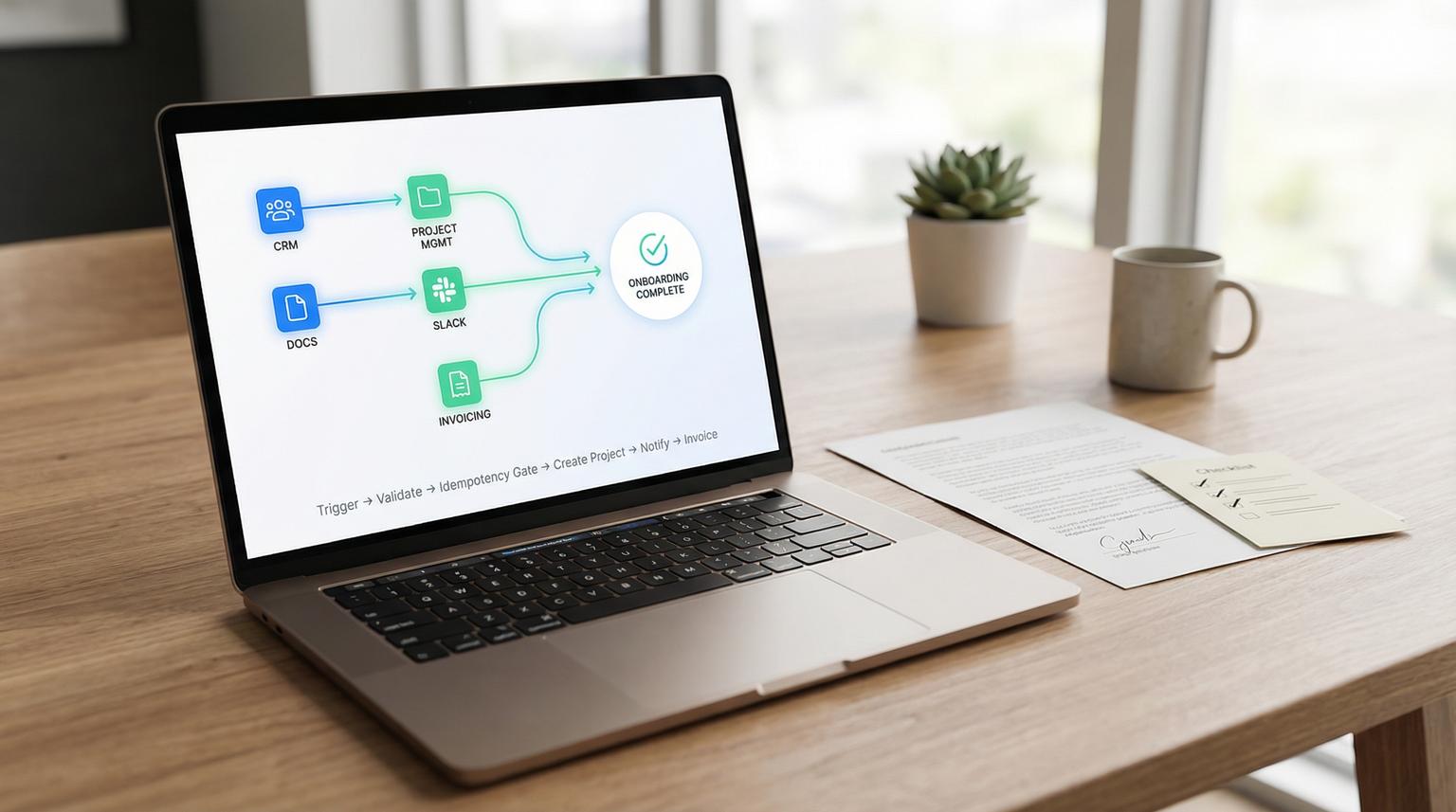
Sales says the deal is signed and delivery asks, "Where is the kickoff packet?" That gap is where onboarding breaks: missing details, duplicate projects, wrong billing info and delayed starts. In this implementation-focused article we will automate the exact handoff from signed agreement to live delivery using no-code automation tools across Docs, CRM, project management, Slack and invoicing.
You will get a schema-first onboarding payload, field mapping rules and an idempotent workflow design so retries and re-fired events cannot create duplicate projects or invoices.
At a glance:
- Define a required handoff schema so sales cannot accidentally send delivery incomplete or inconsistent client details.
- Build an idempotent workflow with a dedupe key, locking and safe retries so side effects only happen once.
- Automate the full chain: contract signed or deal won to CRM update, PM project, folder structure, Slack notifications and invoice draft.
- Add validation, dead-letter handling and monitoring so failures do not silently stall kickoffs.
Quick start
- Pick your single trigger: contract status becomes Signed or deal stage becomes Closed Won and ensure it fires once per client onboarding.
- Normalize data into one onboarding payload (deal + company + primary contact + billing) and validate required fields.
- Generate an idempotency key and check an idempotency store before creating anything in PM, Slack or invoicing.
- Create or find the client company and contact then create the PM project and standardized folders.
- Post one Slack kickoff message with links and assign internal owners then create an invoice draft and write back IDs to CRM.
To automate post-signature onboarding reliably, you need two things: a strict handoff payload that includes client identity, delivery scope and billing fields and an idempotent workflow that checks a dedupe key before creating any project, Slack message or invoice. With that foundation you can safely connect your signature or CRM event to PM setup, folder generation, team notifications and invoicing without duplicates or stalled kickoffs.
Why onboarding breaks at the sales-to-delivery boundary
Most teams already know the happy path steps. The real breakage is operational:
- Incomplete handoff data: the deal record rarely contains billing identity, legal entity name, tax/VAT details, kickoff date and the right contact. You must fetch associated company and contacts before you create delivery artifacts. A common pattern is trigger then filter then enrichment where you pull the associated company/contact data before creation steps as shown in typical CRM integration builds.
- At-least-once delivery and retries: webhook providers and automation platforms retry on timeouts. Without idempotency you get two projects, two Slack pings and sometimes two invoices.
- Parallel runs and race conditions: some platforms can process instant webhooks in parallel which can create the same folder structure twice or claim the same project code.
- Write-back loops: if your workflow writes to the same field that triggers the workflow you can accidentally re-trigger onboarding.
The fix is not adding more steps. The fix is making the handoff deterministic, validated and safe to run multiple times.
What data must be in the handoff payload?
Before you automate anything downstream, decide what delivery and finance need to start work without asking sales follow-up questions. Treat this as a contract between systems. Your workflow should refuse to create a project if required fields are missing or inconsistent.

Required onboarding schema (minimum viable handoff)
| Field | Type | Required | Source of truth | Validation rule |
|---|---|---|---|---|
| handoff_id | string | Yes | Signature event ID or CRM deal ID | Must be stable and unique for this onboarding |
| client_company_name | string | Yes | CRM Company | Trim whitespace and reject placeholder values like "Test" |
| client_company_id | string | Yes | CRM Company | Must exist and be associated to deal |
| primary_contact_email | string | Yes | CRM Contact | Must be valid email format |
| primary_contact_name | string | Yes | CRM Contact | Non-empty |
| deal_id | string | Yes | CRM Deal | Non-empty |
| deal_name | string | Yes | CRM Deal | Non-empty |
| service_package | string | Yes | Signed doc or CRM Deal | Must match an allowed list (your delivery SKUs) |
| scope_summary | string | Yes | Signed doc | Minimum length, avoid empty templates |
| kickoff_target_date | date | Yes | CRM Deal | Must be within an acceptable range (example: next 90 days) |
| internal_owner | string | Yes | CRM Deal owner | Must map to a Slack user or email |
| billing_contact_email | string | Yes | CRM Company or Deal | Must be valid email format |
| billing_entity_name | string | Yes | CRM Company | Non-empty and matches invoice profile if you store one |
| billing_address | string | Yes | CRM Company | Non-empty |
| currency | string | Yes | CRM Deal | ISO currency code like USD, GBP, EUR |
| payment_terms | string | Yes | Signed doc | Must be one of your supported terms (Net 7, Net 15, Net 30) |
| invoice_trigger | string | Yes | Signed doc or Deal | Example values: "on_kickoff" or "on_signature" |
Field mapping rules that prevent wrong client details
- Company beats deal for legal identity: billing entity name, address and tax fields should come from the CRM Company record, not from a deal free-text field that sales can typo.
- Signed document beats CRM for scope: use the executed agreement or proposal for scope summary, deliverables and payment terms. Then write back a sanitized summary to the deal for visibility.
- One primary contact: choose a deterministic rule such as "contact with role = Decision Maker" else "most recently engaged" else "deal primary contact". Avoid picking the first associated contact.
Implementation detail we see in the real world: deals often have the right commercial fields but the wrong billing email. If you create an invoice from the deal only, finance will chase the client for weeks. Pull the associated company and billing contact every time before you create invoices or accounting profiles.
Workflow architecture that will not create duplicates
Production onboarding automations need to assume duplicate events, partial failures and retries. The simplest reliable design is:
- Receive trigger and acknowledge quickly so upstream systems do not retry due to long processing time.
- Normalize and validate payload and persist it for audit.
- Idempotency gate before any side effect.
- Perform side effects using create-or-find and write-back IDs.
- Retries for transient failures and dead-letter capture for non-recoverable issues.
Idempotency key design
Create a deterministic idempotency key based on stable identifiers and the action type. A practical pattern is:
idempotency_key = hash(source_system + ":" + handoff_id + ":" + action_type)
For onboarding, you usually want one master key for the overall onboarding plus optional per-side-effect keys. Example:
ONBOARDING: hash("crm" + ":" + deal_id + ":" + "onboarding_v1")
INVOICE: hash("crm" + ":" + deal_id + ":" + "invoice_v1")
SLACK: hash("crm" + ":" + deal_id + ":" + "slack_kickoff_v1")
Idempotency store and locking
- Store: a small database table, Redis or a lightweight data store that can do fast get-or-set.
- Lock: when an event arrives, attempt to create the key with status = processing. If it already exists in processing, exit. If it exists as completed, exit.
- TTL: set a TTL long enough to cover delayed retries. For onboarding, 7 to 30 days is often safer than 24 hours because clients can re-sign or CRMs can replay events.
If you build this in n8n you can use an idempotency gate pattern near the trigger. A reference workflow pattern is described here: idempotency gate pattern.
Decision rule: sequential vs parallel execution
If your workflow generates shared resources like a folder tree, project codes or invoice numbers, favor sequential processing or implement a lock per company. If all operations are isolated per client and you have strong idempotency, parallel processing is fine and improves throughput.
Step-by-step build from Docs to CRM to PM to Slack to invoicing
The tooling can vary (n8n, Zapier, Make or a mix) but the steps stay the same. Below is the build order we use when we implement onboarding pipelines for clients. If you are still deciding tooling, compare tradeoffs like branching logic, error handling, and total cost of ownership in our no-code automation tools comparison (n8n vs Zapier vs Make).

1) Trigger: signed contract or closed-won gate
- Preferred trigger: contract or proposal status becomes Signed, not just viewed.
- Acceptable trigger: deal stage becomes Closed Won but add a filter gate so it only runs once when the deal truly becomes won. Many CRM event triggers can be broad so always gate before you create anything downstream.
Borrow the "filter then enrich" flow: trigger on the stage change then filter for closed-won then fetch associations for company and contacts before creation steps. This structure is common in CRM to delivery integrations such as the practical walkthrough described at this integration example.
2) Enrichment: pull the associated company and primary contact
Do not assume the deal object contains billing identity. Fetch:
- Associated company record for legal name, billing address, tax fields and domain
- Associated contacts then select the primary contact based on your rule
- Internal owner mapping to a Slack user ID and a PM assignee
3) Normalize into one onboarding payload
Convert all upstream fields into your schema and set defaults. Then validate required fields. If validation fails, stop before side effects and route to a dead-letter queue with a human-readable error such as "Missing billing_contact_email".
Payload example (what you persist and pass downstream)
{
"handoff_id": "deal_84721",
"deal_id": "84721",
"deal_name": "Acme Automation Retainer",
"client_company_id": "comp_1933",
"client_company_name": "Acme Manufacturing Ltd",
"primary_contact_name": "Jordan Lee",
"primary_contact_email": "[email protected]",
"billing_entity_name": "Acme Manufacturing Ltd",
"billing_contact_email": "[email protected]",
"billing_address": "100 Industrial Way, Manchester, UK",
"service_package": "CRM-OPS-INTEGRATION",
"scope_summary": "Implement CRM workflow, inbound lead routing and reporting dashboards.",
"kickoff_target_date": "2026-04-10",
"internal_owner": "sdr_owner_12",
"currency": "GBP",
"payment_terms": "Net 15",
"invoice_trigger": "on_kickoff"
}
4) Idempotency gate before side effects
Generate your onboarding key and attempt to acquire the lock in your idempotency store. Only if you acquire it do you proceed. This is where most teams skip a step and later discover duplicate PM projects and duplicate invoices after a timeout or a manual replay.
5) Create or find the client in delivery systems
- PM tool: find or create the client organization. Store the PM organization ID back to CRM.
- Folder structure: create a standardized set of folders using a deterministic path that includes client_company_id and deal_id. If the folder already exists, do not error. Confirm required subfolders exist.
A reliable folder naming rule is: {client_company_name} ({client_company_id})/{deal_name} ({deal_id}). This reduces collisions when companies have similar names.
6) Create the project and tasks from a template
- Create the project with a unique external reference field set to deal_id.
- Apply a project template based on service_package.
- Assign internal_owner and any default roles.
- Write the PM project ID and project URL back to the CRM deal.
Tradeoff: writing back the PM project ID to CRM is essential for traceability but it can create trigger loops if your workflow triggers on any deal property change. Avoid this by triggering only on a specific stage change or by setting a dedicated "Onboarding completed" flag that is not part of the trigger.
7) Slack notification with dedupe protection
Post one kickoff message to the right channel including links and next actions. Protect it with a per-action idempotency key if your flow can partially fail after posting.
- Message includes: client name, kickoff target date, PM project link, folder link, owner and billing trigger.
- If you use threads, post follow-ups in the same thread to avoid clutter.
8) Create invoice draft and connect it to the deal
Create an invoice draft only when your rule says to. Many teams prefer invoicing on kickoff not on signature. Either way, treat invoicing as a separate idempotent side effect:
- Use a find-or-create pattern if supported. Otherwise search by deal_id stored in an invoice reference field.
- Populate billing fields from the company record and payment terms from the signed document.
- Write back invoice ID and status to CRM so sales and ops have visibility.
Pre-flight QA checklist before you turn it on
Use this checklist to avoid the most common production issues: wrong mappings, broad triggers and duplicate runs.
- Trigger scope: confirm the trigger is a single event (Signed or Closed Won transition) not a general update trigger.
- Filter gate: ensure your filter checks the final state not a text contains match. For example stage equals Closed Won and contract status equals Signed if you use both.
- No static test values: review every action mapping for leftover static text used during testing (client name, email, project code).
- Association pull: confirm the workflow fetches the associated company and contact before creating the project or invoice.
- Idempotency store works: simulate the same event twice and verify no second project, Slack message or invoice is created.
- Write-back loop prevention: confirm that updating CRM with PM IDs does not retrigger onboarding.
- Permissions: ensure the automation account can create projects, folders and invoices without manual approval steps.
- Audit trail: persist the onboarding payload and resulting IDs in one place for later troubleshooting.
Failure handling, retries and dead-letter operations
Even with strong mapping, APIs fail. Your goal is to avoid silent stalls and avoid unsafe replays. Use a simple operations model:
Retries for transient failures
- Retry on rate limits, timeouts and 5xx errors with exponential backoff.
- Limit retries to a sane number (example: 3 to 5) then dead-letter.
- If you acknowledge webhooks early, you must rely on this retry and alerting layer because the source system will assume success.
Dead-letter for non-recoverable failures
If validation fails or an API returns a 4xx that indicates bad data, capture the payload and error in a dead-letter table and alert the right owner. Include a correlation ID (deal_id) and the exact missing field so a human can fix the CRM record then replay safely.
Common failure patterns and mitigations
| Failure mode | What it looks like | Mitigation |
|---|---|---|
| Duplicate execution | Two PM projects or two invoices for the same deal | Idempotency key + store check before side effects. Per-action keys for Slack and invoices. |
| Partial failure after project creation | Project exists but no Slack message or invoice | Store created IDs immediately then continue. On replay, detect existing project by external reference and resume missing steps. |
| Wrong billing email | Invoice sent to sales contact not accounts payable | Billing fields sourced from company record. Validation requires billing_contact_email. |
| Trigger loop | Workflow fires again after writing PM ID back to CRM | Trigger only on stage transition. Use a dedicated onboarding flag not used as a trigger input. |
| Concurrency collision | Two runs create two folder trees or conflicting project codes | Sequential processing for shared resources or lock by company_id. Deterministic folder paths. |
Rollout, ownership and when this is not the best fit
To move from proof-of-concept to something your team trusts, assign ownership and define how you will operate the workflow. For a broader, end-to-end framework to map, standardize, and roll out reliable automations across back-office teams, use our pillar guide: business process automation playbook.
- Owner: ops or revops owns the schema and validation rules. Delivery owns the project template. Finance owns invoice rules.
- Change control: version your schema. If you add a required field, roll it out with a warning period and a fallback.
- Monitoring: track counts for onboardings started, completed and dead-lettered. Review dead-letter items daily until stable then weekly.
- Rollback: if a mapping change causes errors, disable side effects first (project creation and invoicing) but keep capturing payloads so no handoffs are lost.
This approach is not the best fit when your onboarding is highly bespoke for every client and the required data cannot be standardized. In that scenario, start by automating only the data capture and internal notification then keep project setup manual until your delivery process is more repeatable.
If you want this implemented in your stack with production-grade idempotency, validation and recovery paths, ThinkBot Agency can build and harden the workflow in tools like n8n or your preferred automation platform. Book a consultation and we will map your fields, define your schema and ship a reliable onboarding flow.
For examples of the kinds of integrations we deliver across CRM, PM, messaging and billing, you can also review our portfolio.
FAQ
Common questions we get when teams operationalize sales-to-delivery onboarding automations. If you are also building other revenue workflows beyond onboarding, the patterns in our no-code workflow automation blueprint (lead-to-invoice) can help you reuse the same validation, retries, and audit approach.
Should the trigger be contract signed or deal closed-won?
Use contract signed when possible because it reflects the executed agreement. If you must trigger on closed-won, add a strict filter gate and confirm the signed document is present before creating a project or invoice.
How do we prevent duplicate project and invoice creation when webhooks retry?
Generate a deterministic idempotency key from the source system and deal or contract ID then check a persistent idempotency store before any side effect. If the key already exists as processing or completed, exit without creating anything.
What is the minimum onboarding data we should require?
At minimum require a unique handoff ID, client company identity, a primary contact, service package, scope summary, kickoff target date, internal owner and billing details including billing email, billing entity name, address, currency and payment terms.
What should we do when validation fails or an API call errors mid-flow?
Stop before side effects when validation fails and write the payload plus error into a dead-letter queue with a clear message. For mid-flow API errors, retry transient failures automatically and dead-letter after a few attempts so a human can fix the underlying issue then replay safely.
