
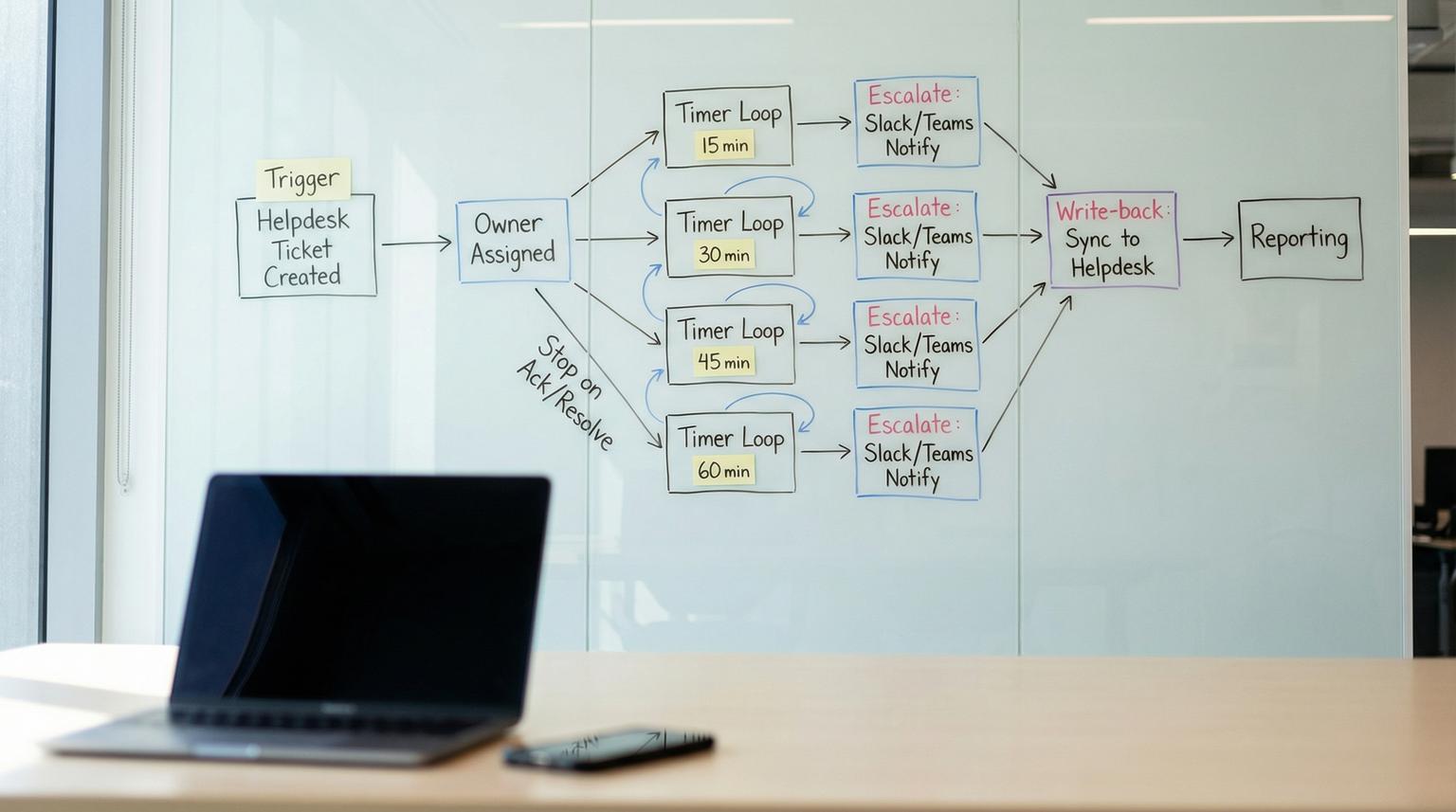
When your support SLA is 60 minutes, the gap is rarely effort. It is usually missing timers, unclear ownership and one-way alerts that do not update the helpdesk. This playbook shows how to build a no-code workflow integration that starts the clock on every new Zendesk or Intercom ticket, assigns a single accountable owner, escalates at 15/30/45/60 minute checkpoints into Slack or Teams and syncs every status change back into the helpdesk so reporting is trustworthy.
At a glance:
- Run a timer-driven escalation loop at 15/30/45/60 minutes with explicit stop conditions (acked or resolved).
- Assign one owner early then broaden visibility later to avoid the "everyone thought someone else had it" problem.
- Keep Zendesk or Intercom as the source of truth via bi-directional status sync and timeline logging.
- Design for idempotency so duplicate webhooks and retries never cause duplicate escalations.
Quick start
- Pick your orchestrator (n8n, Zapier or Make) and create one workflow triggered by Zendesk events or Intercom webhooks. If you need a deeper tool choice framework, use our n8n vs Zapier vs Make comparison for workflow integration.
- Create helpdesk fields or tags for owner, ack time, escalation level and workflow run id.
- Implement a 15/30/45/60 minute checkpoint loop that re-reads ticket state each time before posting.
- Post the right message to Slack or Teams at each checkpoint then write the new state back to the ticket.
- On ack or resolve, cancel remaining checkpoints, post a final update and log the full timeline for reporting.
To enforce a 60-minute escalation SLA without custom code, capture ticket create or reopen events, store an owner and acknowledgement timestamp in the helpdesk, then run a timer loop that checks the ticket at 15/30/45/60 minutes and escalates to Slack or Teams only if the ticket is still unacked and unresolved. Each action writes back tags, fields and internal notes so the helpdesk remains the source of truth and the full timeline is measurable.
Why teams miss 60-minute SLAs even with notifications
Most escalation setups fail at the boundary between the helpdesk and internal comms:
- No precise timers. Native helpdesk automations are often coarse. For example, Zendesk automations run on an hourly cadence which is useful as a safety net but not precise enough for 15/30/45/60 minute checkpoints. Zendesk even shows near-breach alert patterns while noting automation cadence limitations in its own workflow examples (SLA breach alert workflow).
- Unclear accountability. Broadcasting alerts to a channel does not mean anyone owns the ticket. Reliable escalation models stop on acknowledgement, not just on resolution.
- One-way messaging. Slack or Teams pings happen but the helpdesk does not reflect who acknowledged or when so your SLA reporting becomes guesswork. If you are also converting chat requests into tracked work, see how to stop losing Slack/Teams requests by routing them into approved, tracked tickets.
A practical rule we use in production: treat ticket escalation as a small state machine with explicit fields and stop conditions. Notifications are side effects. The state lives in the helpdesk and the workflow engine.
The operating model and state machine you will implement
Before building steps, define the workflow states and what moves a ticket between them. This is what makes the system reliable in production and not just a demo.

Core fields to store (minimum viable)
- owner_id: the assigned responder (a helpdesk agent id or an internal directory id).
- ack_at: timestamp of acknowledgement (empty until acked).
- escalation_level: 0, 15, 30, 45, 60 (or similar).
- run_id: a unique id for the workflow run for idempotency and auditing.
- last_checkpoint_at: timestamp of the last checkpoint action taken.
Stop conditions
- Acknowledged: ack_at is set. Escalation stops and future reminders should not fire.
- Resolved: ticket is solved/closed or conversation is closed. Escalation stops.
- Not eligible: ticket is merged, spam or moved to a non-SLA queue.
This mirrors how mature incident tools treat escalation policies where acknowledgement stops the chain. You can apply that same logic even when you are only using Zendesk or Intercom plus internal comms.
Build the workflow in your no-code orchestrator
The following design works in n8n, Zapier or Make. We will describe it in a tool-agnostic way so you can map steps to your stack. The key is minute-level timers and re-checking state at each step. For a broader, end-to-end methodology on mapping, standardizing, and automating workflows (including exceptions, audit trails, and phased rollout), use our business process automation playbook.
1) Trigger: capture ticket events
Use one trigger per helpdesk:
- Zendesk: trigger on ticket created, ticket updated (status change) and optionally comment added. Zendesk event to action patterns are commonly implemented with a webhook-like HTTP call to Slack (Zendesk to Slack message example) and you can replicate the same idea in your orchestrator with HTTP and templating.
- Intercom: subscribe to webhook topics that matter operationally: conversation.admin.assigned (ownership) and conversation.admin.closed (stop). Intercom explicitly documents these topics and also notes that some setups may emit multiple related events so dedupe is required (Intercom webhook topics).
Implementation detail that saves pain: store the inbound event id and ticket id then reject duplicates. Retries happen. If you do not dedupe you will schedule multiple 60-minute loops for the same ticket.
2) Normalize: load the current ticket state
Right after the trigger, fetch the current ticket or conversation from the helpdesk API. Do not rely on the webhook payload alone. This prevents stale messages like "15 minutes left" when the ticket was solved 10 minutes ago.
3) Ownership assignment: one owner, then backups
Ownership should be decided once at the start of the clock and stored so the ticket does not bounce when routing rules change mid-stream. This is a key tradeoff:
- Decision rule: if you have stable on-call schedules, assign owner from the schedule. If you do not, assign the queue lead as owner and include a backup in the escalation path.
- Tradeoff: assigning by schedule reduces manager load but requires schedule hygiene. Assigning by team lead is simpler but increases escalation volume to leads.
Write the selected owner into the helpdesk (custom field or assignee) and post an internal note like: "Escalation clock started. Owner: Alex. Backup: Sam. Manager: Priya. Run: 8f3c..."
4) The timed checkpoint loop (15/30/45/60)
Model this as a loop with delays. At each checkpoint you:
- Wait until the checkpoint time (15 minutes from start, then 30, 45, 60).
- Re-fetch ticket state from the helpdesk.
- If acked or resolved, stop the loop and post a final update.
- If still unacked and open, send the next escalation message and write back the new level.

Common failure pattern: teams send reminders on a fixed schedule without re-checking state. That creates noisy pings and erodes trust in the system. The re-check step is what makes reminders feel smart and accurate.
5) Messages: Slack and Teams delivery options
Slack posting can be done via incoming webhooks (simple and reliable). Teams posting has multiple modes. Microsoft documents the "Post a message in a chat or channel" action and it can post as a Flow bot or as a user depending on your governance needs (Teams message options).
In practice:
- 15 minutes: direct message to the owner. Goal is acknowledgement.
- 30 minutes: post to the team channel with the owner mentioned. Goal is visibility and backup help.
- 45 minutes: post to channel again with clearer urgency and include the backup responder.
- 60 minutes: message the manager directly and post to the escalation channel. Goal is intervention.
Mini template for checkpoint messages (copy and adapt)
Use a consistent schema so people recognize the call to action. Keep it short and include how to stop the pings.
[Checkpoint: 30m] SLA risk for Ticket #{{id}} ({{priority}})
Owner: {{owner_name}} | Account: {{account_tier}} | Product: {{product}}
Link: {{ticket_url}}
Required: acknowledge in helpdesk or set Acked=Yes. Escalation stops on ack or resolve.
Current status: {{status}} | Next checkpoint: {{next_checkpoint}}
For Slack, the HTTP payload is often as simple as:
POST https://hooks.slack.com/services/...
{
"text": "[Checkpoint: 30m] SLA risk for Ticket #1234 ..."
}
Routing rules by product, account tier and priority
Routing is where most "one size fits all" escalations become either noisy or ineffective. Build a routing table that selects the owner, backup, manager and comms destination based on ticket attributes.
| Condition | Owner assignment | Primary comms | 60-minute escalation |
|---|---|---|---|
| Priority P1 OR VIP tier | On-call engineer (schedule) | Slack: #p1-support or Teams: Incident channel | Manager DM + exec visibility channel |
| Billing product AND tier is Standard | Billing queue lead | Billing channel | Support manager DM |
| Bug report AND product is Mobile | Mobile triage owner | Mobile triage channel | Engineering manager DM |
| All other | Rotating generalist | General support channel | Support manager DM |
Keep the routing table in a place non-developers can update safely: a Google Sheet, Airtable or a simple JSON document in your automation tool. Store the selected route on the ticket at start so mid-stream edits do not change who gets paged for an already-running escalation.
Bi-directional sync back to Zendesk or Intercom (keep the helpdesk truthful)
The helpdesk must remain the source of truth or you will never trust your SLA reporting. The workflow should both read and write:
Write-back actions at each checkpoint
- Set escalation_level to the current checkpoint.
- Add an internal note: "Checkpoint 30m posted to #billing-support by FlowBot at 10:30"
- Add an idempotency tag like sla_escalation_30_sent (prevents repeats if the workflow restarts).
Acknowledgement capture (how escalation stops)
Pick one acknowledgement mechanism and make it easy:
- Helpdesk field: "Acked" boolean or "Ack timestamp" field set by the owner.
- Status-based ack: moving from New to Open counts as acknowledgement (works in some teams but can be gamed).
- Slack or Teams button: if your tool supports interactive actions, record the click then write ack_at into the helpdesk. If you cannot do buttons reliably, stick to a helpdesk field for simplicity.
Close the loop with customer notifications
Once the ticket is resolved, have the helpdesk send the customer-facing update as normal so you do not create parallel communication threads. Your workflow should only add internal notes and internal comms messages then exit. If you do send a customer update from the workflow, do it by updating the ticket in the helpdesk so the customer history is complete.
Reliability guardrails, monitoring and rollback
A timer-driven system is production software even when it is no-code. Treat it like one.
Failure modes and mitigations
- Duplicate webhooks trigger duplicate loops. Mitigation: dedupe by event id and store run_id on the ticket. If run_id exists and ticket is still open, do not start a new loop.
- Escalations keep posting after resolution. Mitigation: re-fetch ticket state at every checkpoint and stop on resolved or closed.
- Owner changes mid-incident create confusion. Mitigation: store assigned owner at start. Allow reassignment but require updating owner_id in the ticket and have the workflow always read the latest owner_id before posting.
- Teams or Slack rate limits or webhook failures. Mitigation: retry with backoff, log the error as an internal note and continue the loop so the 60-minute manager escalation still happens via an alternate channel if needed.
- Zendesk-only automations used for precise timing. Mitigation: use Zendesk automations as a safety net only since hourly cadence cannot reliably hit 15/30/45/60.
Go-live checklist (use this before you flip it on)
- Helpdesk fields and tags created and visible to the right roles (owner, ack_at, escalation_level, run_id).
- One test ticket per route path verifies correct owner and correct channel destination.
- Checkpoint timers verified with short intervals in staging (for example 1/2/3/4 minutes) then switched to 15/30/45/60.
- Stop conditions validated: ack stops future messages and resolution stops future messages.
- Logging validated: every checkpoint writes an internal note with timestamp and destination.
- Alerting in the automation tool enabled for workflow errors or paused runs.
- Rollback plan: disable the trigger and keep a manual escalation SOP for 24 hours.
Real-world ops insight: the best early warning for broken escalations is a daily report of tickets with escalation_level greater than 0 and ack_at empty. If that number grows, your loop is running but ownership is failing.
When this approach is not the best fit
If your SLA is tied to true 24/7 incident response and the impact is high (outages, security or regulated environments), you may need a dedicated incident response platform with built-in on-call scheduling, acknowledgement semantics and multi-channel paging. A no-code escalation loop can still be a great bridge for many support orgs but it should not become your single point of failure for life-or-death operations.
Implementation help from ThinkBot Agency
If you want this built quickly with clean logging, idempotency and reporting-ready fields, ThinkBot Agency can implement the workflow in n8n or your preferred automation stack and tailor routing to your product lines and tiers. Book a consultation and we will map your escalation policy to a reliable timed loop.
If you want to see examples of the kinds of integrations we ship, you can also review our automation portfolio.
FAQ
Common questions we hear when teams move from basic notifications to a reliable escalation loop.
Can Zendesk automations enforce 15/30/45/60 minute checkpoints by themselves?
Not reliably. Zendesk automations run on an hourly cadence so you can use them for coarse warnings or as a safety net but minute-level checkpoints should run in an external automation platform that can delay precisely and re-check ticket state before posting.
How do we define acknowledgement so escalation stops consistently?
Use a single acknowledgement signal that is written into the helpdesk, typically an ack timestamp field or an "Acked" boolean. The workflow should read that field at every checkpoint and stop scheduling further messages as soon as it is set.
How do we avoid duplicate escalations when webhooks fire more than once?
Make the workflow idempotent. Store the inbound event id and a workflow run id on the ticket then dedupe triggers and add one-time tags per checkpoint (for example sla_escalation_30_sent) so retries do not post twice.
Should we escalate to a channel or directly to a person?
Do both, in sequence. Start with a direct message to the assigned owner at 15 minutes to drive accountability. Escalate to a channel at 30 and 45 for shared visibility and backup help. At 60 minutes notify the manager directly and optionally post to an escalation channel for intervention.
