
Cross-functional work breaks down in predictable places: unclear triggers, inconsistent inputs, ambiguous handoffs, approval chasing, and exceptions that live in inboxes. A solid process automation blueprint fixes those issues before you ever touch a tool. This guide is for ops leaders, founders, and team leads who want automations that scale across departments without creating brittle workflows or losing accountability.
You will learn a repeatable method to identify high-leverage processes, map what is really happening, standardize intake and outputs, design future-state flows with clear owners, and run those automations with proper controls, audit trails, and measurable outcomes.
At a glance:
- Start with a process inventory so you prioritize the right work, not the loudest request.
- Map current state with explicit exceptions, queues, and approvals, then simplify before automating.
- Standardize intake fields, definitions, and handoff contracts so automation is stable.
- Design future-state workflows as state machines with owners, SLAs, and exception paths.
- Operate automations like production systems: monitoring, access control, change control, and rollback.
Quick start
- Create a process inventory across Finance, HR, Ops, Sales, and Support and tag each process with owner, frequency, and systems touched.
- Pick 1-3 candidates with high volume, clear triggers, stable rules, and painful rework loops.
- Run a walkthrough workshop to capture the real current-state steps, exceptions, queues, and decision evidence.
- Define an intake contract: required fields, sources of truth, validation rules, and done criteria.
- Draft a future-state swimlane map and RACI that names one accountable owner per outcome.
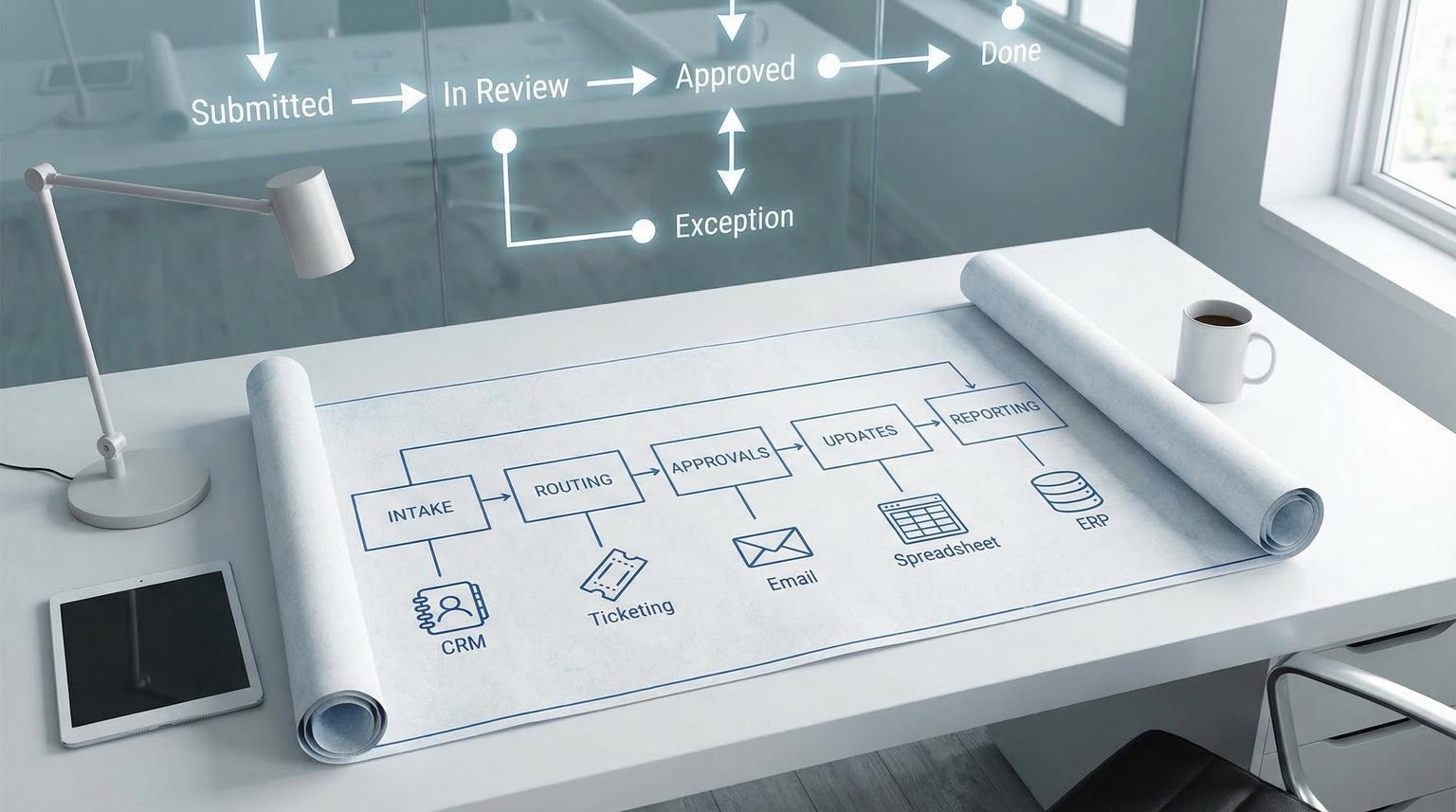
- Implement automation in increments: intake -> routing -> approvals -> updates -> reporting, with manual fallback.
- Add reliability and governance: retries, idempotency, audit log, least privilege, and alerts.
- Ship with a runbook, documentation, and a quarterly review cadence to prevent workflow drift.
A business process automation blueprint is a tool-agnostic method for turning messy cross-team work into reliable, measurable workflows. You inventory and prioritize processes, validate the true current state, standardize inputs and handoffs, and then automate the future state with clear ownership, exception handling, and controls. The result is less rework and fewer escalations, with automations that remain stable as teams and systems change.
Table of contents
- Why cross-functional automation fails (and how to avoid brittle workflows)
- Step 1: Build a process inventory and pick high-leverage candidates
- Step 2: Map the current state with walkthroughs (happy path plus exceptions)
- Step 3: Standardize with handoff contracts, data definitions, and RACI
- Process walkthrough notes template (copy/paste)
- Step 4: Design the future state as a state machine, not an email chain
- Automation patterns for common process families
- How to integrate CRM, ticketing, email, spreadsheets, and internal tools without creating a mess
- Reliability and observability: retries, idempotency, and run tracking
- Governance operating model: access, audit trails, change control, and continuous improvement
- When to DIY vs partner with ThinkBot Agency
Why cross-functional automation fails (and how to avoid brittle workflows)
Most automation failures are not technical, they are operational. A workflow breaks when:
- Triggers are ambiguous, so work starts differently depending on who asks.
- Inputs are inconsistent, so the same request arrives as a Slack message, an email, and a spreadsheet row with different fields.
- Ownership is unclear, so exceptions bounce between teams and escalation becomes the process.
- Approvals are informal, so there is no deterministic state and no audit evidence.
- Exceptions are not modeled, so the automation only works on the happy path.
The fix is a blueprint that treats automation as a product: clear contracts, explicit states, measurable outcomes, and an operating model. If you are also looking at broader operational improvement, start with process optimization so you simplify before you automate.
Step 1: Build a process inventory and pick high-leverage candidates
Cross-functional automation starts with visibility. Build a process inventory that uses a consistent taxonomy so you do not accidentally automate the same thing twice under different names. A process framework like APQC PCF is commonly used to standardize naming across departments and create a complete inventory (APQC).
Keep the inventory lightweight at first, then score candidates for value and feasibility. Favor processes that are procedural and have a long shelf life, because frequent change erodes ROI (Microsoft).
Selection criteria that actually predicts success
- Volume and frequency: repetitive work amplifies savings.
- Stability: rules do not change weekly.
- Data readiness: inputs can be standardized.
- Exception profile: exceptions exist but can be categorized.
- Control needs: approvals and evidence requirements are clear.
- System access: you can integrate safely with least privilege.
For tool considerations (n8n vs Zapier vs Make) treat it as an implementation detail after you have a spec. If you need that comparison, use tool selection as a separate decision.
Step 2: Map the current state with walkthroughs (happy path plus exceptions)
Before you automate, validate what truly happens. A structured walkthrough workshop keeps the group focused on reality, captures variants, identifies decision points and evidence requirements, and exposes where queues form (Blue Prism). This is where you learn what should be fixed before you automate.
What to collect before the workshop
- Existing SOPs, forms, screenshots, email templates, spreadsheet trackers
- Volumes, SLAs, peak periods, known rework drivers
- Exceptions and how they are currently handled
- Application landscape and workarounds (macros, copy/paste routines)
How to map for automation readiness
- Capture the happy path and each major exception path.
- Mark handoffs and waiting states as first-class steps.
- Record decision rules and what evidence is required to decide.
- List systems touched and where data is re-entered.

If you want an example of how we approach end-to-end workflow mapping for revenue processes, see our lead-to-invoice blueprint and borrow the same intake and validation mindset for back-office workflows.
Step 3: Standardize with handoff contracts, data definitions, and RACI
Standardization is the difference between stable automation and constant firefighting. Your goal is to turn tribal knowledge into a shared contract: inputs, outputs, definitions, owners, and acceptance criteria.
Use swimlanes to expose ambiguous handoffs
Swimlanes make responsibility distribution visible across roles and teams, especially at shared responsibility zones where handoffs blur (swimlanes). In automation terms, each handoff needs a payload (fields), an SLA, acceptance criteria, and an escalation path.
Turn maps into a written spec (PDD mindset)
A Process Design Document (PDD) forces clarity on triggers, prerequisites, step narratives, exceptions, and signoffs. It is a practical handoff contract between business owners and builders, and it sets governance gates: if it is not in the PDD, it is not a requirement (PDD).
This is also where you define: system of record, data retention needs, approval authority limits, and what counts as done.
Process walkthrough notes template (copy/paste)
Use this template during discovery so you capture the details that make or break automation. It is intentionally automation-oriented: data, exceptions, controls, and handoffs.
Process name:
Business owner (Accountable):
SMEs interviewed:
Trigger(s):
Volume (per day/week/month):
Systems touched:
Inputs (fields + source of truth):
Outputs (records/docs + destination):
Steps (numbered):
Decision points (rule + evidence required):
Exceptions (type, frequency, current handling):
Handoffs/queues (from, to, typical wait):
Controls (approvals, segregation of duties, audit evidence):
Candidate automation score (value, feasibility, risk):
When you standardize inputs and outputs consistently, you also unlock better AI augmentation later, for example classification of inbound requests or summarizing ticket context. For more on where AI is heading in ops workflows, see future trends.
Step 4: Design the future state as a state machine, not an email chain
Cross-functional processes become reliable when you model them as explicit states with deterministic transitions. Approvals, in particular, should behave like a state machine: at step entry, rules are evaluated, actions occur, and the item routes forward or becomes an exception. This reduces email chasing and makes routing testable (SAP).
Future-state design rules that prevent rework
- One intake: one place to submit, one schema, one required field set.
- One owner per outcome: multiple contributors, single accountability.
- Explicit queues: pending approvals, missing info, blocked by access, vendor follow-up.
- Reason codes: every rejection, send-back, or exception gets a category.
- Done criteria: completion is a verifiable state, not a feeling.
Event-driven vs scheduled workflow progression
Use business events when possible (record created, status changed) to reduce polling and decouple systems, then use schedules for consolidation and SLA evaluation when event sources are not available. Event-driven architectures formalize producers, consumers, and event contracts and they encourage explicit handling for poison messages and observability (Temporal).
Automation patterns for common process families
Below are repeatable patterns for cross-functional process families. The point is not the tool, it is the structure: triggers, standardized data, queues, approvals, and outcomes.
Employee onboarding (HR, IT, Finance, Hiring Manager)
Onboarding fails mainly due to inconsistency and manager-dependent variability. Standard checklists and defined stages (pre-start, day 1, week 1, month 1) reduce missed access and unclear expectations (HRCloud).
- Trigger: offer accepted -> start date confirmed
- Intake fields: role, location, manager, hardware needs, system access profile
- Queues: access provisioning, equipment shipping, payroll setup
- Controls: readiness verification before day 1, Day 5 pulse survey, 30-day check-in and satisfaction survey
- Outputs: created accounts, assigned tasks, status dashboard, audit trail of completion
Approvals (budget, discounts, access, policy exceptions)
Approvals work best when they are rule-driven and measurable. Encode thresholds and routing rules so the workflow selects the right approver and generates an exception when the item needs higher scrutiny. Keep the rules readable and testable, and evaluate rules at the beginning of a step so users see a clear required action (SAP).
- Trigger: request submitted via form or ticket
- Standardized fields: requester, amount, cost center, justification, attachments
- Controls: authority limits, segregation of duties, required rationale
- Outcomes: approved, rejected with reason code, sent back for info, escalated
Procurement-to-pay (vendor onboarding, PO, invoice, payment)
This family spans multiple systems and teams, which makes it a perfect candidate for a blueprint approach. Standardize vendor data, require evidence at each decision, and build an exception queue for missing PO, mismatched totals, or incomplete tax forms.
- Trigger: purchase request or invoice received
- Queues: vendor validation, PO creation, invoice match, payment approval
- Controls: approvals, audit evidence, retention for finance records
- Outputs: updated accounting record, status notification, payment confirmation
For measurement targets in accounts payable, pair speed and quality. Benchmark categories often include cycle time from invoice receipt to payment plus first-time error-free disbursements and cost per invoice (APQC).
Invoicing and collections (quote-to-cash adjacency)
Even if your invoicing system is separate, the pattern stays the same: standardized invoice creation inputs, deterministic approval routing when needed, status sync back to CRM, and exception handling for bounced payments or missing purchase order data. If you want a practical cross-app revenue example, compare it to our lead handling workflow where reliability patterns prevent silent drop-offs.
Recurring reporting (weekly KPIs, month-end packs, exec rollups)
Recurring reporting looks simple but often hides manual copy/paste and inconsistent definitions. The automation should focus on:
- Standard metric definitions and calculation rules
- Stable data extraction and validation checks
- Scheduled production with an exception queue for missing data
- Distribution with access controls and audit logs (who received what and when)
How to integrate CRM, ticketing, email, spreadsheets, and internal tools without creating a mess
Cross-functional operations usually span a CRM, a ticketing system, email, spreadsheets, and finance or HR platforms. The mistake is letting any single tool become the centerpiece. Instead, design around a process contract and use systems as supporting components with clear responsibilities:
- System of record: where the authoritative status lives (often ticketing for ops workflows, CRM for customer lifecycle, ERP/accounting for financial truth).
- Event sources: what emits triggers (web form, CRM stage change, ticket created).
- Work execution: where humans do the work (ticket queues, approval tasks).
- Evidence and audit: where approvals and outcomes are captured.
Ticketing is especially useful as an evidence generator. When approvals and changes are embedded into ticket workflows, you automatically capture who did what, when, and why. That makes governance less of a seasonal scramble and more of an operational logbook (ticketing).
If you are evaluating how much to build with low-code or no-code, our guides on low-code delivery and no-code ROI can help frame tradeoffs like maintainability, permissions, and total cost of ownership.
Reliability and observability: retries, idempotency, and run tracking
A workflow that fails silently is worse than manual work because it creates false confidence. Reliability is a set of guarantees you add: retries for transient failures, idempotency so reruns do not cause duplicates, and traces so operators can answer what happened and where (reliability).
Production reliability checklist
- Categorize errors (transient vs permanent) before retrying.
- Retry timeouts and 5xx with backoff and max attempts, avoid retrying 4xx-type bad requests (guide).
- Define an idempotency strategy for every side-effecting step (upserts, sent emails, created tickets).
- Use structured logs with correlation IDs (run_id and business_key like invoice_id).
- Track success rate, failure rate, latency, and SLA breaches.
- Alert on failure spikes and stuck queues.
- Document a manual fallback procedure for each exception class.
- Run post-incident reviews to harden rules and validation.

A minimal run table schema for debuggability
Even without full distributed tracing, you can implement a simple run table and step table so you can resume, replay, and audit cross-system workflows. A practical schema pattern includes run_id, business keys, per-step timing, error classification, and external request IDs (schema).
runs: run_id, workflow_name, business_key, started_at, finished_at, status
steps: run_id, step_name, started_at, finished_at, status, output_ref, error_ref
links: run_id, external_system, external_request_id
Time-based SLAs without fragile delayed jobs
Overdue checks and escalations are a common source of brittleness when you schedule one-off timeouts per item. A more resilient approach is combining a To-Do List of pending work with a periodic "passage of time" event that evaluates what is overdue and transitions items into an escalated state (pattern). This makes SLA evaluation auditable and retryable.
Governance operating model: access, audit trails, change control, and continuous improvement
Automation without governance becomes operational debt. Treat workflows like production systems with standards for access, logging, retention, and change control. Governance guidance for workflow automation commonly emphasizes least privilege, segregation of duties, encryption, retention policies, immutable audit logs, and risk-tiered workflow rules (controls).
Risk and guardrails for cross-functional automations
Use these failure modes and mitigations as a practical checklist during design reviews and before production rollout.
- Failure mode: Duplicate records or duplicate emails after a retry. Mitigation: Use idempotency keys and state checks before writes; prefer upserts over creates when possible (idempotency).
- Failure mode: Silent failures from swallowed errors or missing alerts. Mitigation: Centralize error handling, log with run_id, and alert on failure spikes and stuck items (traces).
- Failure mode: Approval bypass because the process lives in email threads. Mitigation: Embed approvals in a ticket or workflow state machine with required fields and timestamps (evidence).
- Failure mode: Workflow drift after a tool change or team re-org. Mitigation: Maintain an automation inventory with owners, quarterly reviews, and versioned change control (governance).
- Failure mode: Overdue escalation logic fails because delayed tasks never fire. Mitigation: Use periodic passage-of-time evaluation, not per-item scheduled timeouts (timeouts).
- Failure mode: Excessive connector permissions expose sensitive data. Mitigation: Apply least privilege scopes and separate build vs approve vs operate roles for higher-risk workflows (least privilege).
Measure outcomes, not activity
To prove impact and prioritize iteration, define process measures that reflect speed, congestion, and quality. Useful definitions include lead time (start to finish including waiting), cycle time (touch time), backlog, WIP, rework rate, and loopback counts (measures). In cross-functional processes, lead time is often the number executives care about, while WIP and loopbacks tell you where the system is breaking.
Establish baselines before you automate, then measure after each release. This avoids the trap of celebrating a new workflow that simply moved work from one team to another.
When to DIY vs partner with ThinkBot Agency
If your process is low-risk and mostly internal reminders, DIY can work. If the workflow touches revenue, customer communications, payments, payroll, or regulated data, you will want production-grade reliability, security, and governance from day one. That is where an automation partner helps you move faster without accumulating operational debt.
ThinkBot Agency designs and implements cross-functional automations with clear process contracts, robust exception handling, and integrations across CRM, ticketing, email, spreadsheets, and internal tools. We are highly active in the n8n community and build tool-agnostic solutions that can also leverage Zapier or Make where appropriate. If you want help turning your process maps into production workflows, book a consultation.
If you prefer to evaluate credentials and past delivery first, you can also review our Upwork profile.
FAQ
What is a process automation blueprint?
A process automation blueprint is a repeatable method for taking a business process from discovery to production: build an inventory, map current state, standardize inputs and handoffs, design a future-state workflow with owners and exception paths, then operate it with monitoring, access controls, audit trails, and change management.
Which processes should we automate first?
Start with high-volume, stable processes with clear triggers and measurable outcomes, especially where rework and escalations are common. Examples include onboarding task coordination, approvals with thresholds, procurement-to-pay exceptions, invoice status syncing, and recurring KPI reporting.
How do we prevent brittle workflows when systems change?
Use standardized intake schemas, explicit state machines, and integration patterns that separate the process contract from any single tool. Add governance: version control, peer review for higher-risk changes, runbooks, and quarterly workflow reviews to detect drift.
What governance controls matter most for cross-functional automation?
At minimum: least-privilege access, segregation of duties for high-risk workflows, immutable audit logs, retention policies, change control with approvals, and monitoring that alerts on failures and SLA breaches.
Can ThinkBot integrate our CRM, ticketing, email, and spreadsheets into one workflow?
Yes. We typically anchor workflows around a system of record (often ticketing for ops or CRM for customer lifecycle), then connect email, spreadsheets, and internal tools as supporting components with clear data contracts, error handling, and audit-friendly run tracking.
