
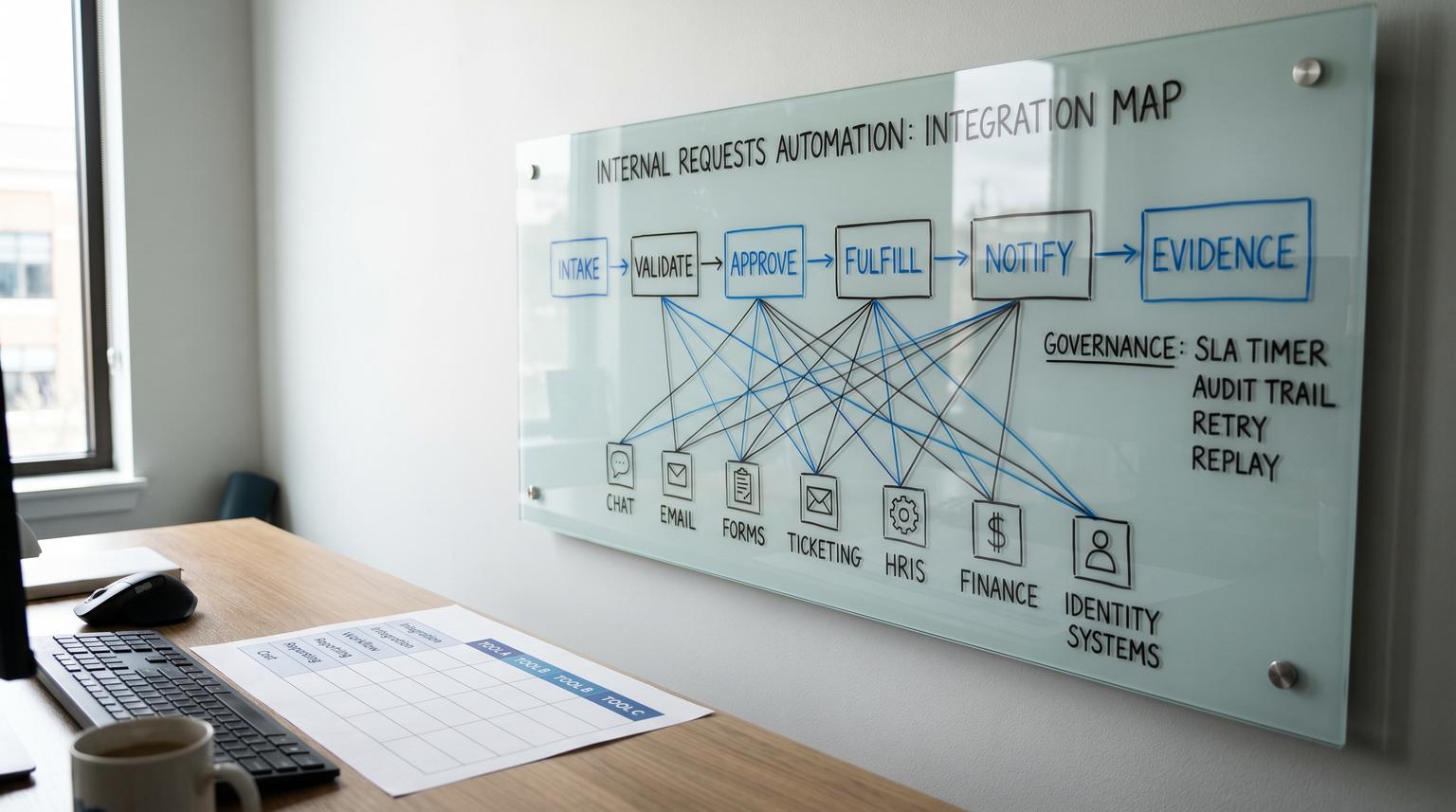
Internal requests sound simple until you run them in production: access requests, purchase approvals, HR changes and IT tickets coming from chat, email and forms then fanning out into ticketing, finance, HRIS and identity systems. This task automation tools comparison focuses on that high-friction workflow boundary where ownership, permissions, SLA timers and traceability matter more than flashy connectors. Below we compare n8n, Power Automate, Zapier and Make using requirements ops and IT teams actually get measured on.
Quick summary:
- If you need governed workflows with strong control over retries, reprocessing and domain ownership, n8n and Make tend to fit better than pure iPaaS style builds.
- If your org lives in Microsoft 365 and you need enterprise-grade environment governance, Power Automate is often the default but plan separately for admin audit evidence vs run execution evidence.
- If you need fast intake and lightweight approvals with minimal build time, Zapier is usually the quickest path but multi-stage approvals and SLA escalation can get complex.
- The best decision signal is whether you need workflow-engine control (state, replay, standardized error handling) or iPaaS simplicity (fast connectivity with lighter governance).
Quick start
- Write your current request flow in 6 steps: intake, validate, approve, fulfill, notify, log evidence.
- List your non-negotiables: who can edit workflows, who can view secrets, where audit evidence must live and your SLA and escalation rules.
- Decide what "reliability" means for you: retry rules, replay a single request, alerts to the right owner and run retention.
- Score each tool against the matrix below using your real volumes (requests per day) and your real approvers (single manager vs multi-team chain).
- Pilot one request type end to end (example: software access request) and include failure testing: API timeouts, approver no-response and downstream rejection.
For internal request workflows that require approvals, SLA timers and auditability, n8n and Power Automate generally win when governance and control are critical, Zapier wins when speed and simplicity are the priority and Make often lands in the middle with strong operational reprocessing. The right choice depends less on integrations and more on how each platform handles pause and resume approvals, retry and replay, role-based access, run evidence retention and escalation paths.
Why internal request automation breaks in the real world
Most teams already have “a process” for requests. The breakdown happens when you automate intake and routing but you do not automate the operational guardrails. The usual failure modes are predictable:
- Approvals live in chat with no persistent state. Someone reacts with a thumbs up and nothing updates the system of record. If this is your situation, see how to stop losing internal requests in chat with tracked, approved automation.
- Ownership is unclear. When a flow fails at 2am the request is stuck and nobody knows who should fix it.
- SLAs are informal. The requester follows up manually which hides true cycle time and creates rework.
- Audit evidence is incomplete. You can prove a workflow exists but not prove each request was handled on time with timestamps and outcomes.
A practical way to think about “internal requests” is a governed workflow with five requirements: intake, approval, timers, fulfillment and evidence. Once you use that model the tool choice becomes much clearer.
Map your workflow to tool primitives before you compare platforms
Before you evaluate vendors, translate your process into primitives you can test. Here is a simple mapping template you can copy into a doc and fill in with your real systems.
| Workflow stage | Your current reality | What the tool must support | Evidence you need |
|---|---|---|---|
| Intake | Teams message or email or form | Normalization, validation, dedupe, request ID | Request created timestamp, requester identity, payload snapshot |
| Approval | Manager says yes in chat | Pause and resume, approve or reject, comments, multi-stage if needed | Approver, decision, time-to-approve, change history |
| SLA timers | Follow up reminders | Timers, escalation paths, reroute on absence, reminders | Timer start and stop events, escalations fired |
| Fulfillment | Ticket plus manual steps | API calls, idempotency, retries, partial failure handling | Downstream ticket ID or transaction ID, success or failure reason |
| Audit and reporting | Spreadsheet updates | Run history retention, export, searchable logs, admin change tracking | Who changed the workflow and when plus request-level execution trail |

This last row is where teams often misjudge tools. Governance and compliance auditing is not the same thing as execution evidence. For example Power Automate can log admin and permission events via Microsoft Purview but that does not automatically replace run-by-run operational monitoring and retention. Microsoft documents this split in its overview of Power Automate activity logs in Purview.
How n8n, Power Automate, Zapier and Make model approvals and control
Zapier
Zapier is strong when you want fast intake and straightforward routing. For approvals, Zapier offers a true pause and resume concept with its Human in the Loop steps such as Request Approval and Collect Data. Zapier documents this pattern in Human in the Loop. This is excellent for single-step approvals inside a simple automation. The tradeoff is that complex multi-stage approvals, SLA escalations and replay mechanics can become scattered across multiple Zaps unless you design carefully.
Power Automate
Power Automate is often the default choice inside Microsoft 365 environments because it aligns with tenant governance and enterprise controls. It can support approvals and environment-level administration. The operational nuance to plan for is evidence: admin audit trails are available through Microsoft Purview when enabled while run-level execution monitoring and retention live elsewhere (run history, analytics, Dataverse, Application Insights depending on setup). If your compliance team needs both “who changed the flow” and “what happened for request 1234” you should design for both from day one.
Make
Make shines when you need visual scenarios with strong operations-friendly reprocessing. One of the most practical reliability features for request workflows is Make’s concept of incomplete executions that you can retry or resolve with metadata like attempts and scheduled retry time. Make describes this in Manage incomplete executions. In practice this becomes a queue you can drain to protect SLAs and avoid rebuilding runs manually.
n8n
n8n is a strong fit when you want workflow-engine control and you care about ownership boundaries and secrets. Two capabilities matter for internal requests:
- RBAC with project scoping so you can separate who can edit workflows from who can access credentials and segment automations by domain. n8n explains this model in its RBAC documentation.
- Standardized error workflows where any failed execution can trigger a dedicated error workflow for logging and alerting. n8n documents this in Error handling. This is valuable when you want consistent incident signals and evidence capture across many request types.
A real operations insight we see repeatedly: teams that succeed at internal request automation standardize one error workflow that writes a failure record to a log destination, notifies the owning channel and opens a ticket. Without that standard pattern, failures get “handled” by someone checking histories once a day which is how SLAs get missed.
Scored decision matrix for internal request workflows
The matrix below is intentionally opinionated for approvals, SLAs and audit trails. Scores are 1 to 5 where 5 is strongest for governed internal request routing. Use it as a starting point then adjust weights based on your environment and volume.
| Criteria | n8n | Power Automate | Zapier | Make |
|---|---|---|---|---|
| Approvals and governance | 4 (flexible control, self-managed governance patterns) | 5 (enterprise governance alignment, approvals supported) | 4 (explicit pause and resume approvals via Human in the Loop) | 3 (can build approvals but typically more custom orchestration) |
| Reliability (retries, alerts, replay) | 5 (error workflows for standardized alerts and logging) | 4 (strong platform, monitoring strategy required for evidence) | 3 (solid run history, complex failure handling at scale) | 4 (incomplete executions enable practical reprocessing) |
| Security (RBAC, secrets, separation of duties) | 5 (project-scoped RBAC around workflows and credentials) | 5 (enterprise controls, environment governance) | 3 (good for many teams, less granular separation for regulated workloads) | 4 (good workspace controls, still validate least-privilege needs) |
| Integrations breadth and speed to connect | 4 (strong connectors and APIs, best when you can use webhooks) | 4 (excellent in Microsoft ecosystem, broader connectors exist) | 5 (fastest time to connect across many SaaS tools) | 4 (broad integrations, good for cross-app scenarios) |
| Total cost at low volume (tens per day) | 4 (efficient if you already host and want control) | 4 (good if you already license Microsoft stack) | 5 (lowest time-to-value for small workloads) | 4 (good value, watch operations overhead) |
| Total cost at high volume (hundreds to thousands per day) | 5 (control and reusability reduce human ops cost) | 4 (scales well, costs depend on licensing model and monitoring) | 2 (can get expensive and complex to govern across many Zaps) | 4 (reprocessing helps reduce SLA firefighting time) |

Decision rule: If your primary pain is dropped requests, missed approvals and proving outcomes for compliance then bias toward workflow-engine capabilities like replay, centralized error handling and access control boundaries. If your primary pain is simply connecting intake to downstream tools quickly and your approval chain is simple then bias toward iPaaS simplicity. For a broader cross-scenario view, compare patterns in our no-code automation tools comparison.
Which tool fits your request workflow and your org constraints?
Use this checklist to land on a confident choice without over-engineering.
- Your approval chain is single-step and low risk: Zapier is often enough, especially when you want the approver experience to be simple and you can keep the workflow shallow.
- Your approvals are multi-stage or cross-team: n8n or Power Automate usually provide better structure for ownership and evidence plus clearer separation of duties.
- You need an ops-friendly replay queue: Make is a strong option because incomplete executions become an operational control surface.
- You must prove who changed workflows: Power Automate is typically strongest for administrative audit events when configured via Purview while n8n can be strong in self-managed environments with disciplined change control.
- You need strict credential scoping: n8n’s project-based RBAC model is a practical way to isolate domains like HRIS and IdP credentials from general automation builders.
- You will operate this like a service with on-call expectations and SLAs: prioritize standardized error handling, alert routing and run retention over connector counts.
Operational design that makes approvals, SLAs and audit trails actually work
Regardless of tool, the most resilient internal request implementations share the same design choices. If you want the full end-to-end framework for mapping, standardizing, and rolling out governed workflows, use our business process automation playbook for back-office workflows.
1) Create a request record early and treat it as the source of truth
As soon as a request arrives from Teams, Slack, email or a form create a record in a system you control (ticketing, database or a simple requests table). Assign a request ID immediately then log every state transition. This avoids the classic mistake of letting the only “state” live in a chat thread.
2) Approvals should write decisions to the request record
Even if the approver interacts in chat, your automation should capture: approver identity, decision, timestamp and optional comment. If you need auditability, do not rely on chat reactions as the sole evidence.
3) Model SLAs as timers plus escalation paths, not reminders
Define explicit rules like: “If no approval within 4 business hours then escalate to backup approver. If no fulfillment within 24 hours then open an incident ticket.” Implement these as timers tied to the request record, not ad hoc pings. This is where workflow control matters because pause and resume must interact with timers cleanly. For a concrete escalation example, see how to implement a 60-minute ticket escalation workflow.
4) Standardize failure handling
For n8n, error workflows let you route all failures into a single consistent handler for logging and alerting based on workflow settings, not per-node hacks. For Make, incomplete executions provide an operator loop for retry vs resolve. For Power Automate and Zapier, plan a consistent pattern for capturing failure context and notifying the owning team with the request ID.
5) Separate administrative auditing from execution evidence
Compliance teams often ask for both: change history and run history. Power Automate highlights this split: Purview auditing tracks lifecycle and permission events but run monitoring is handled through other services and logs. Build your evidence plan intentionally so you can answer “who changed the workflow” and “what happened to request 8921” without scrambling.
If you want a second set of eyes on your specific process and constraints, book a consultation with ThinkBot Agency here: schedule a workflow selection call.
Failure patterns we see most often and how to prevent them
- Silent failures that nobody owns: Prevent this by routing failures to a named channel and creating a ticket automatically with request ID, step name and payload snapshot. Do not depend on someone checking run history manually.
- Duplicate fulfillment due to retries: Add idempotency keys and downstream checks (for example check if user already has the group, check if bill already exists) before performing irreversible actions.
- Approval dead ends: Include a backup approver rule and an escalation path. Also log who was asked and when so you can diagnose bottlenecks.
- Audit trail gaps: Store decisions and state changes in a durable record then retain run logs long enough to meet your policy. A chat transcript is not a reliable audit store.
- Overbuilding too early: If you only run five requests a week, a simple iPaaS flow might be the right first step. Add workflow-engine complexity when you actually need multi-stage approvals, reprocessing and strict RBAC.
When these tools are not the best fit
If your internal requests require heavy process mining, complex case management or highly regulated change management with strict segregation and formal workflow modeling, you may need a dedicated service management or BPM platform rather than a general automation tool. Also, if downstream systems lack APIs and require brittle UI automation, the core risk shifts from orchestration to RPA stability and you should evaluate that separately.
FAQ
What should we automate first in an internal request process?
Start with request intake normalization and a single request record that tracks status. Then automate one approval step and one fulfillment action end to end. This delivers immediate reduction in dropped requests and creates the foundation for SLAs and reporting.
Is an approval in chat enough for compliance?
Usually not by itself. Chat can be the user interface but the decision and timestamp should be written to a durable system of record. For many teams, compliance requires both request-level execution evidence and administrative change history.
How do we choose between iPaaS simplicity and workflow-engine control?
Choose iPaaS simplicity when your flow is short, approvals are single-step and your risk is low. Choose workflow-engine control when you need multi-stage approvals, SLA timers, standardized error handling and replay or reprocessing for stuck requests.
Which platform is best for retry and replay when an API fails?
Look for first-class reprocessing features and standardized failure handling. n8n supports centralized error workflows for consistent alerts and logging while Make provides incomplete executions that operators can retry or resolve with metadata like attempts and scheduled retry time.
What is the most common mistake teams make with internal request automations?
They automate the happy path and ignore operations. Without clear ownership, alerts, run retention and an escalation plan, approvals stall and failures go silent which creates more manual work than the original process.
