
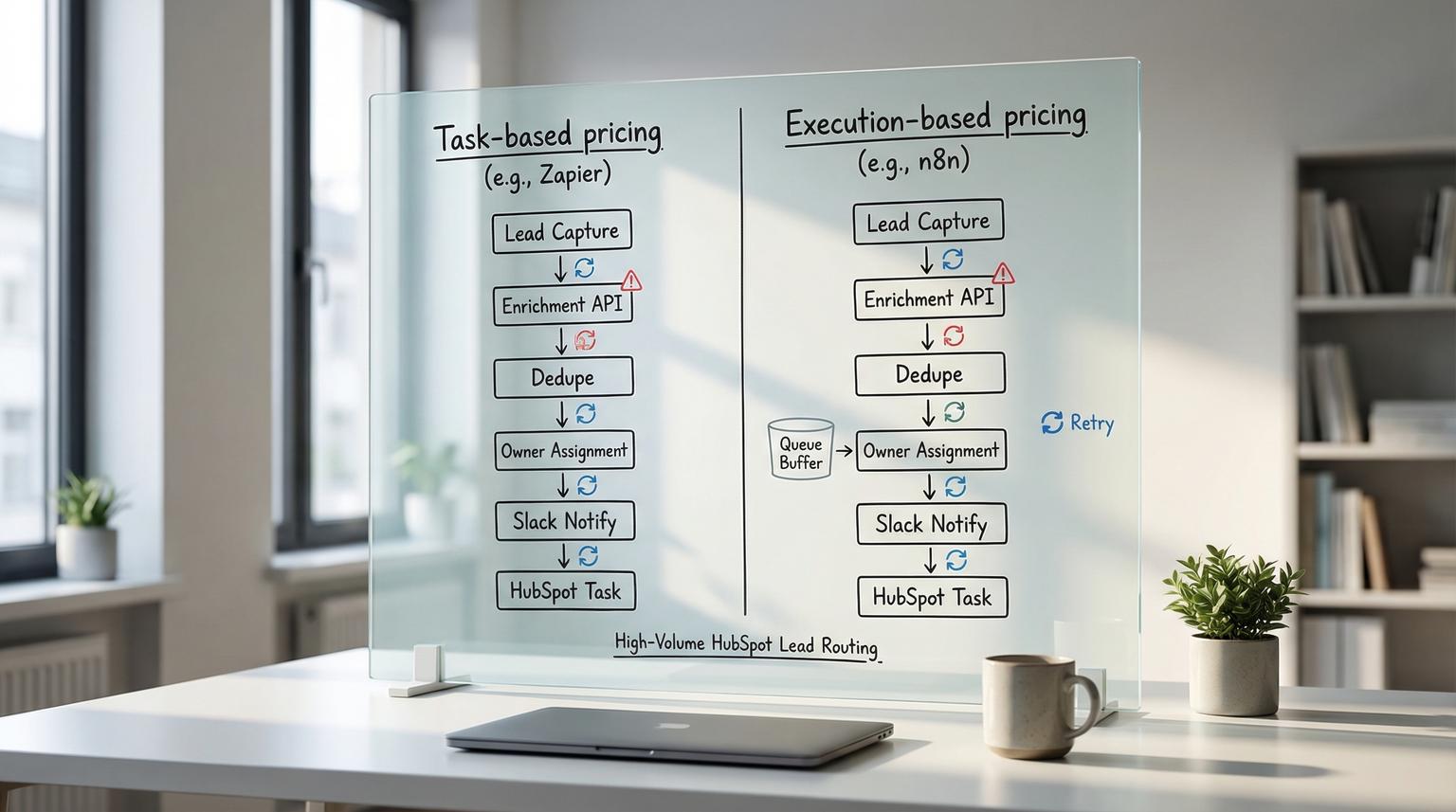
High-volume lead routing is one of those workflows that looks simple in a diagram but gets expensive and fragile the moment volume spikes, rate limits hit and a single silent failure drops a hot lead. This Zapier vs n8n comparison is written for RevOps and ops teams running HubSpot lead capture then enrichment, deduplication, owner assignment, Slack notifications and task creation where reliability, cost per lead and governance matter more than quick demos.
Quick summary:
- Zapier is usually fastest to ship for a straightforward HubSpot router but per-lead variable cost scales with each successful step.
- n8n tends to win once you need controlled retries, advanced branching, centralized error handling and lower cost per run at high volume.
- The biggest reliability cliff is burst traffic: delayed webhook processing, HubSpot 429 rate limits and partial writes that create duplicates or unassigned leads.
- Governance becomes the second cliff: auditability, permissions, retention and data residency requirements can force a move to self-hosted or enterprise setups.
Quick start
- Write your exact lead-routing steps as a list (capture, enrich, dedupe, assign, Slack, task) and note which steps call external apps.
- Estimate volume and burstiness (leads per hour, peak 5 minutes) then identify where HubSpot writes can trigger 429 responses.
- Model the economics: count Zapier tasks per successful action step and count n8n executions per lead then add expected retry rate.
- Decide your reliability baseline: do you need automatic retries with backoff and a centralized incident workflow or is manual replay acceptable?
- Decide your governance baseline: do you need RBAC, longer retention, audit trails and data residency or is a managed SaaS acceptable?
If you need to route lots of HubSpot leads with enrichment and dedupe while meeting speed-to-lead SLAs, Zapier is often best for getting the first reliable version live quickly, especially when the logic is linear and volumes are moderate. As volume grows, n8n becomes the better fit when you need deeper branching, consistent retries, better observability and stronger governance controls including self-hosting and data residency. The tipping point is usually a mix of cost per lead, failure rate and compliance needs.
The workflow we are actually comparing
To keep the decision practical, we will compare the same workflow end to end and map the real failure modes to platform capabilities. For a broader platform-level perspective, see our Zapier vs. n8n comparison for business automation.
- Capture: Form submission, webhook or list import creates a lead in HubSpot or sends a payload to the router.
- Enrich: Look up company domain, firmographics, email verification or intent signals via a data provider API.
- Dedupe: Search HubSpot for existing contacts or companies and decide update vs create.
- Assign owner: Use territory rules, round-robin logic or account matching to set contact owner and lifecycle stage.
- Notify Slack: Post to the right channel with context and the next action.
- Create tasks: Create a HubSpot task for the owner with SLA due date and notes.
Why this specific workflow? Because it contains the two hard parts that separate hobby automation from operational automation: (1) rate-limited writes to HubSpot and (2) data correctness under retries so you do not create duplicates or assign the wrong owner.
Reliability at scale comes down to a few predictable failure modes
Most lead-routing incidents look like one of these patterns:
- 429 rate limits from HubSpot: When bursts hit, HubSpot will return 429 for subsequent calls after limits are exceeded. That means search, create and update steps can fail and repeated retries can amplify the problem. HubSpot documents this behavior in its API usage guidelines.
- Webhook intake delays: Zapier can return HTTP 200 for a webhook call but still process it minutes later during high activity, which can break speed-to-lead and create out-of-order routing. Zapier notes this behavior in its webhook rate limits documentation.
- Silent drops or partial writes: A contact gets created but owner assignment fails or Slack notification is never sent. The CRM looks fine at a glance but the rep never follows up.
- Duplicate creation during retries: A transient error happens after a create call succeeded but before the automation recorded success. A retry creates a second contact or second task unless you enforce idempotency.
A real-world operations insight we see often: teams measure success by how fast the first version ships then months later they discover that their router has been quietly creating unassigned leads during peak campaigns because error alerts were never operationalized. The fix is rarely a single setting. It is the combination of retries, backoff, idempotency keys and a clear on-call style alert path.
Economics at volume task pricing vs execution pricing
The main cost difference is the billing unit:
- Zapier: You pay per successful action step. Triggers do not count. Filters and Paths do not count. Errors and halted steps do not count. Zapier explains how tasks are measured here: task usage measured in Zapier.
- n8n: You typically pay or allocate capacity per workflow execution (or you self-host and pay infra). One lead equals one execution in the simplest model, even if it runs many nodes, although retries and sub-workflows can change the effective compute load.
This difference matters because your lead router has multiple action steps. Each enrichment API call, each HubSpot write, each Slack post and each task creation is a successful action step in Zapier. In n8n, those steps are nodes inside a single execution so cost scales more with total executions and infrastructure than with the number of nodes.
Common mistake that drives surprise bills
Teams often prototype enrichment and dedupe with multiple lookups and multiple writes then only later realize that each successful action multiplies task usage. This is not a reason to avoid Zapier. It is a reason to model the per-lead task count before scaling campaigns.

Decision matrix for the HubSpot lead router tasks vs executions, retries and governance
The matrix below maps each workflow step to (a) billable unit, (b) failure mode plus retry pattern and (c) governance implications. Use it to find your scale boundary and your governance boundary.
| Workflow step | Zapier billable unit and scale notes | n8n billable unit and scale notes | Failure mode and recommended retry pattern | Governance and data control considerations |
|---|---|---|---|---|
| Capture lead (webhook or HubSpot trigger) | Trigger is not a task. Webhook intake can be rate limited and can be delayed during high activity even when 200 is returned. | One execution per captured lead. In queue mode you can separate intake from workers for spikes. | Protect speed-to-lead: apply buffering, validate payload and dedupe early. For webhooks, retry with exponential backoff on non-200 responses. | Zapier is managed SaaS. n8n can be self-hosted for data residency and isolation. Both should log payload IDs. |
| Enrich (external API call) | Each successful enrichment action is a task. Multiple enrichment providers multiply tasks. | Runs as nodes inside the execution. More nodes add compute time but not a new billing unit in most n8n pricing models. | Handle provider timeouts: add retry with backoff and a retry budget. Fail closed for missing critical fields so a lead does not route to the wrong owner. | Data sent to third parties. For regulated teams, prefer minimizing fields and consider self-hosting n8n so only enrichment calls leave your network. |
| Dedupe (search HubSpot) | HubSpot search action is a task if it runs successfully. Configure search behavior carefully so you do not create extra steps or unexpected paths. | Search node in the same execution. Easier to implement idempotency logic and store keys. | HubSpot Search APIs may not expose the same rate limit headers so monitor at your app level. Use backoff on 429 and cache recent lookups when possible. | Auditability: you need a trail of why you updated vs created. n8n can log structured decision data to a datastore or SIEM more flexibly. |
| Assign owner (rules, round robin, territory) | Filters and Paths do not cost tasks which helps for branching. The final HubSpot update is a task. | Branching is flexible with IF, Switch and code nodes. HubSpot update is a node in the same execution. | Failure mode is partial write: created contact without owner. Prefer fail fast then retry the owner update or send to a review queue. | Permissions: ensure only approved users can modify routing logic. n8n offers stronger RBAC options in enterprise setups. Zapier permissions depend on workspace plan. |
| Notify Slack | Slack message action is a task. If you notify multiple channels based on rules, tasks can climb. | Slack node in the same execution. Can also route notifications through a centralized error workflow. | Do not let Slack failures block CRM writes. Treat Slack as best-effort and log notification failures for later replay. | Data leakage risk: sanitize fields. Self-hosting does not change Slack data exposure but can improve internal logging of what was sent. |
| Create HubSpot task | Task creation action is a task. If you create multiple tasks per lead, tasks climb quickly. | Task creation node in the same execution. Easier to build idempotent task creation based on a unique key like contactId plus campaignId. | On 429 from HubSpot, retry with backoff. Ensure idempotency so you do not create duplicate tasks on retry. | Retention and audit: keep a record of task IDs created. n8n self-host can align retention with internal policies. |
| Global error handling and replay | Zap history supports replay of runs. Operationally you need a discipline for monitoring failed runs and replaying with context. | n8n supports a dedicated error workflow that triggers on failures and can alert, create tickets and requeue retries. See n8n error handling. | Retry pattern: exponential backoff, cap retries, send to dead-letter queue for manual review. Force a failure when business rules are not met so you do not silently proceed. | Governance: audit depth, retention and RBAC are critical. n8n self-host improves data residency control. Zapier is simpler but less customizable for internal logging pipelines. |
| Scaling under burst traffic | Use Delay After Queue to smooth bursts and reduce flood conditions. Webhook limits apply per user and per Zap in some cases. | Queue mode decouples intake from execution workers using Redis and can scale workers and webhook processors. See n8n queue mode. | Protect HubSpot and enrichment APIs with throttling and backpressure. Treat spikes as normal and design for it. | Infrastructure responsibility shifts to you with self-hosted n8n. That is a feature for governance-focused teams and a burden for teams that want no ops. |
Decision rules that hold up in real RevOps environments
Use these as practical selection rules rather than abstract feature comparisons.
- If your routing is mostly linear and your main constraint is time to ship, start with Zapier. Filters and Paths are efficient and non-billable and the ecosystem gets you to a working workflow quickly.
- If you expect high bursts, frequent 429s or strict speed-to-lead SLAs, bias toward n8n. The ability to separate webhook intake from workers and add centralized error workflows makes reliability easier to engineer.
- If governance is a hard requirement such as data residency, deeper retention, tighter RBAC or internal audit trails, n8n becomes more attractive, especially self-hosted or enterprise.
- If your team cannot own infrastructure, Zapier remains compelling. You can still improve reliability with queuing, monitoring and replay discipline.
A simple tradeoff rule: when the cost of one dropped or misrouted lead exceeds the monthly difference between platforms, pay for reliability first then optimize for cost.
Reliability patterns for both platforms that prevent duplicates and silent drops
Regardless of tool choice, your lead router should behave deterministically. That means the same input should not create different outcomes on a retry. If you want production-grade patterns (logging, retries, dead-letters, versioning) you can adapt across teams, use this pillar on building a governed operating system: n8n workflow framework for production automations.

Idempotency pattern for HubSpot writes
- Generate a stable routing key such as source + formId + email or hubspotContactId + campaignId.
- Store the routing key and the outcome (contactId, ownerId, taskId, timestamp).
- Before creating a contact or task, check if the routing key was already processed.
Backoff pattern for 429 handling
- On 429, wait then retry with exponential backoff.
- Cap retries so you do not turn one burst into a prolonged hammering loop.
- When retries exceed the cap, move the lead to a review queue and alert ops with the context needed to replay safely.
Fail loudly on business-rule ambiguity
One of the most useful operational techniques in n8n is intentionally stopping a workflow when critical business rules are not met then sending the failure to an error workflow for triage. This prevents a lead from being routed incorrectly just because a field was blank. In Zapier, you can approximate this with filters and careful step ordering but the centralized incident pattern is harder to standardize across many Zaps.
Governance checklist for lead routing in HubSpot
Use this checklist to align the automation with your internal controls before you scale campaigns.
- Access control: Who can edit routing rules and who can publish changes?
- Change management: Do you have a staging version or at least a rollback plan when routing rules change?
- Audit trail: Can you answer why a given lead was assigned to a specific owner and what enrichment data influenced that decision?
- Retention: How long do you retain run history, failures and payloads and does that match policy?
- Data handling: Are you minimizing what you send to enrichment providers and Slack?
- Observability: Do you have alerts for failure spikes, 429 spikes and delayed processing?
- Replay safety: When you replay a failed run, can it create duplicates or does it detect prior success?
Migration triggers that signal your current setup has outgrown itself
Most teams do not decide to migrate because of one feature. They migrate because of operational symptoms that keep repeating.
- You are spending meaningful time each week replaying failed runs and manually fixing partial HubSpot updates.
- You have speed-to-lead complaints that correlate with webhook bursts, queued delays or campaign launches.
- Task usage becomes hard to predict because every new enrichment step or notification adds variable cost.
- You need a single place to manage error handling, incident alerts and retry logic across multiple routing workflows.
- Security or compliance asks for stronger RBAC, longer retention, audit exports or data residency guarantees.
When you see two or more of these at once, it is usually time to validate whether n8n with queue mode and an error workflow will reduce operational load.
Validation steps before moving from Zapier to n8n
If you decide to migrate, validate these items first so the new workflow is not just different but actually more reliable. For enterprise-grade implementation patterns (error handling, scaling, security), also review n8n best practices for enterprise workflow automation.
- Define the source of truth: choose whether HubSpot or the router owns dedupe decisions and lifecycle stage transitions.
- Design idempotency: decide what keys you will store and where, including task creation keys.
- Prove backoff behavior: run load tests that intentionally trigger 429s then confirm retry budgets and dead-letter handling.
- Decide operating model: who owns Redis, workers, upgrades and incident response if you self-host n8n?
- Map governance requirements: retention period, audit exports, RBAC roles and where logs must live.
Primary CTA: If you want help modeling task vs execution economics, hardening retries and building a governed HubSpot lead router in n8n or Zapier, book a consultation with ThinkBot Agency here: book a consultation.
For examples of automation systems we ship for ops teams, you can also review our work: ThinkBot Agency portfolio.
FAQ
How do I estimate Zapier tasks for this HubSpot lead-routing workflow?
Count one task for each successful action step that runs. For this router that is typically enrichment call(s), HubSpot search, HubSpot create or update, Slack message and HubSpot task creation. Triggers do not count and Filters and Paths do not count. Then multiply by expected successful leads per month and add a buffer for retries that succeed.
What is the most common reliability failure in high-volume HubSpot routing?
The most common pattern is rate limiting and partial writes: HubSpot returns 429 during a burst, the workflow retries without backoff and you end up with duplicates or unassigned contacts. The second common issue is delayed processing on webhook intake which breaks speed-to-lead even when requests return 200.
When does n8n become the better fit than Zapier for lead routing?
n8n is usually the better fit when you need centralized error handling, controlled retries with backoff, complex branching logic and better governance controls including the option to self-host for data residency. It is also a strong choice when volume makes per-action task pricing hard to justify.
Can I run n8n reliably for bursty inbound leads?
Yes, if you run it with an architecture designed for spikes. n8n queue mode decouples trigger intake from workflow execution using Redis and lets you add workers and webhook processors as load grows. You should also implement a global error workflow that alerts and requeues failed executions safely.
When is neither Zapier nor n8n the best choice?
If your routing requires very low latency, strict transactional guarantees or extremely high throughput with complex state management, you may need a more custom integration approach using a message queue and a dedicated service. In those cases, Zapier and n8n can still support edge automations but the core router may belong in application code.
